
Usage-based billing
Recurly's usage-based billing model lets you charge customers at the end of each billing cycle based on actual consumption, with flexible add-on pricing strategies, measured units, and full API support for logging and managing usage.
Bill customers for exactly what they use — no more, no less. Usage-based billing lets you define consumption-driven add-ons, track measured units across plans, and charge at the end of every billing cycle with full transparency for customers and finance teams alike.
Definition
Recurly's usage-based billing model lets you charge customers at the end of each billing cycle based on their actual consumption — not a fixed fee. Customers pay only for what they use, which reduces overcharging, increases satisfaction, and aligns your pricing directly with the value you deliver. This model is ideal for any business where consumption varies between customers or billing periods.
Key benefits
Key details
Pricing strategies
Recurly supports two pricing strategies for usage-based add-ons:
Cumulative aggregates every usage record logged throughout the billing period, then multiplies the total by the unit price. For example, logging 1 GB per day for 30 days results in a charge for 30 GB.
Last recorded charges based only on the most recent usage record in the billing period. For example, if you log 3 GB daily for 29 days and 2 GB on the 30th, the customer is charged for 2 GB.
You can switch a usage-based add-on's pricing strategy at any time, but the change only applies to subscriptions created after the switch. To modify the strategy on an existing subscription's add-on, remove the add-on from that subscription, update the plan, and re-add it.
Usage accumulation and billing
Usage can be accumulated and billed per billing cycle, or across the entire subscription term — depending on how the add-on is configured.
Measured units
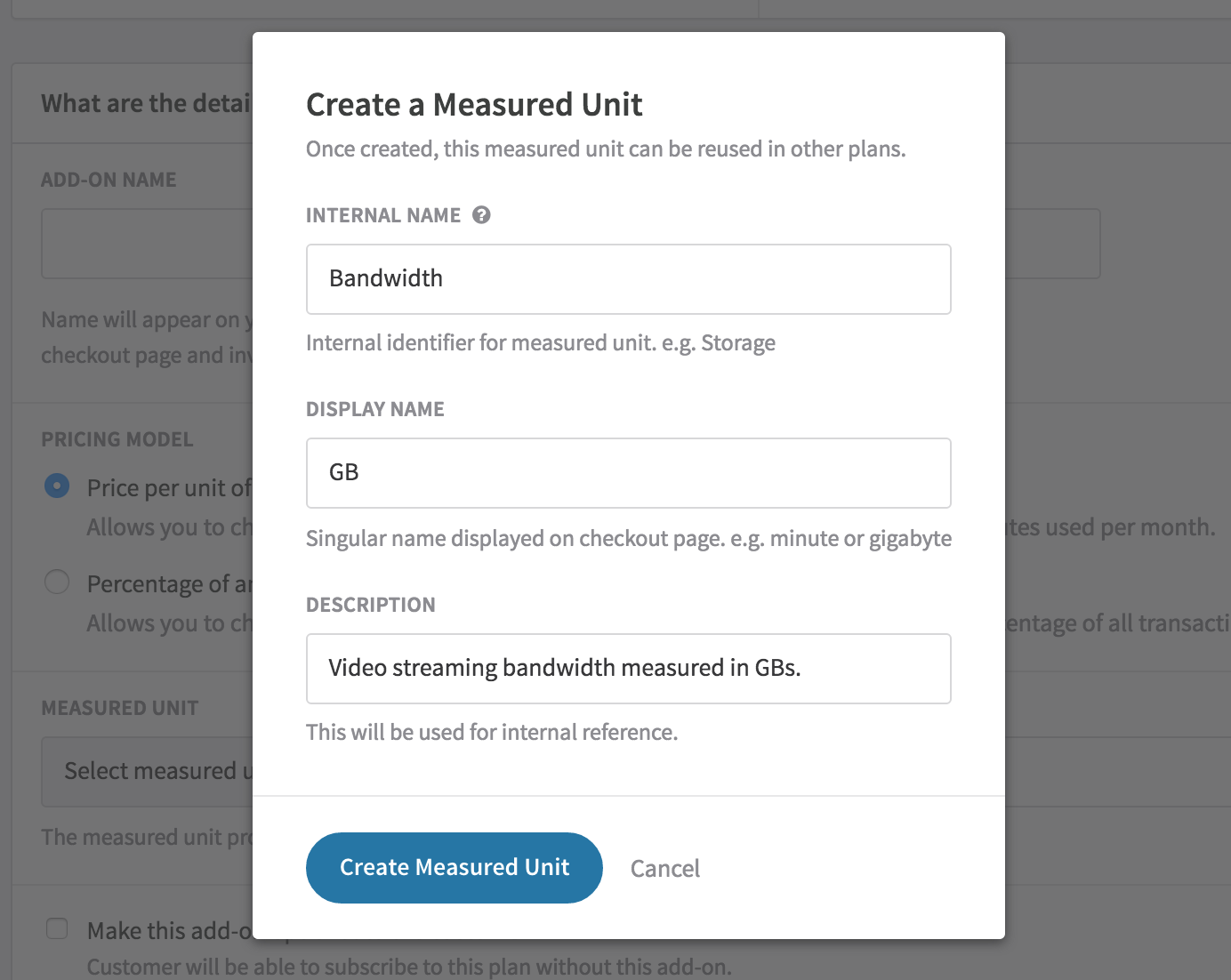
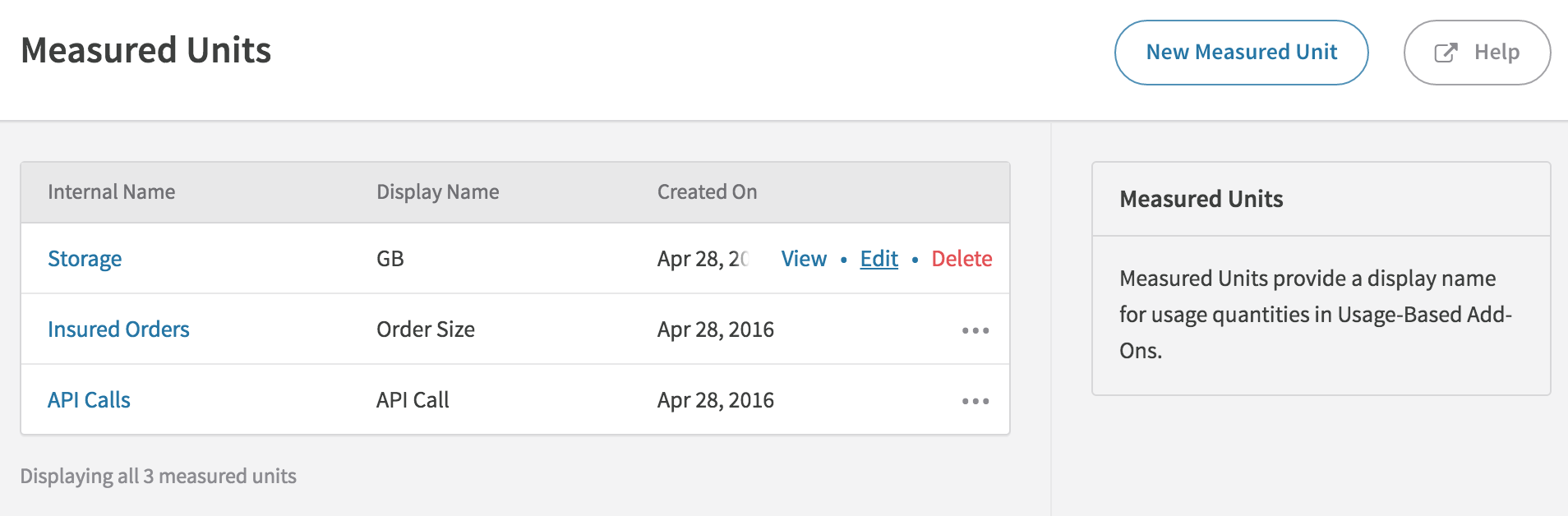
Measured units describe the usage tracked by a usage-based add-on and enable consistent reporting across multiple add-ons and plans.
- Create measured units while building a usage-based add-on in a plan, or from the Measured Units page under Configuration in your Admin Console. They can also be managed via API.
- Editing a measured unit updates your plan and all active subscriptions immediately.
- A measured unit can only be deleted if it isn't used in any plan. Remove it from all plans first.
- Measured units are required for all usage add-ons, but only display to subscribers for price-per-unit add-ons. Percentage add-ons always charge based on the monetary amount of usage logged.
Industry example
| Industry | Usage-based billing example |
| Digital media | ACME, a movie streaming platform, charges $20/month plus additional fees for their "Currently In Theaters" service, billed based on how many in-theater videos a subscriber streams each month. |
Subscriptions at checkout and hosted pages
Usage-based add-ons appear automatically on Checkout and Hosted Payment Pages, but their cost is excluded from the Order Total — all usage fees are charged at the end of the billing cycle.
Fixed-price usage add-ons display the price and measured unit name next to the add-on. Tiered, volume, and stairstep add-ons don't display prices at checkout because the total depends on usage logged.
First invoice behavior
The first invoice a subscriber receives depends on how their subscription starts:
Active subscription (no trial): The first invoice does not include usage-based add-ons. Because usage is billed in arrears, it's inaccurate to show add-ons for a period before any usage was logged. Usage add-ons appear on all subsequent invoices — even when usage is zero.
Trial subscription: Trial invoices include usage-based add-on line items showing the trial period dates, so customers can see what they're trialing. However, usage logged during the trial is never billed — the first payment invoice after the trial behaves the same as an active subscription's first invoice.
Future subscription: No invoice is generated until the subscription start date. If you need to include usage from before the start date (e.g., migrating from another system), log usage between the creation date and the start date — it will appear on the first invoice with the correct date range.
Proration on usage-based subscriptions
Usage-based add-ons never prorate. Proration only applies to line items charged up front. Since usage is billed at the end of the cycle, there's no prorated amount to calculate.
When changing a subscription with usage-based add-ons:
- Adding a usage-based add-on: The new add-on doesn't appear on the change invoice. It shows up on the next bill date.
- Removing a usage-based add-on: The add-on appears on the change invoice with any unbilled usage.
- Changing price or percentage: Unbilled usage is charged at the old rate on the change invoice. New usage from that point forward uses the new rate.
- Changing between plans that both have usage-based add-ons: The old plan's add-ons bill any unbilled usage on the change invoice. The new plan's add-ons don't appear until the next bill date.
Free trials with usage-based billing
Usage incurred during a free trial is not billed to the customer. It's logged and visible (useful for product analytics), but it won't appear on the first payment invoice.
Coupons and discounts
Coupons apply to usage-based add-ons the same way they apply to other add-ons, with two exceptions:
- Usage correction line items are not eligible for discounts — they represent a past billing period that may or may not have had an active coupon.
- Limited-duration coupons don't discount the usage add-on fees from the final period of the coupon's duration, because those fees are billed in arrears after the coupon has expired.
To offer a set number of free units, use a tiered pricing model with the first tier set to $0 per unit for the first X units, then add a charged tier for additional usage.
Cancellations and terminations
When a subscription with usage-based add-ons expires, Recurly always generates a final invoice that includes the usage add-ons — even if usage is zero.
If there is positive usage at termination, you have the option to zero it out (useful for waiving a churning customer's final bill). Recurly creates a negative usage record to zero out the line item and sends a new_usage_notification webhook.
If usage corrections exist at the time of termination, they will be charged on the final invoice. Recurly only zeros out current-cycle usage when you explicitly choose that option.
Email template support
These email templates fully support usage-based add-ons:
- New Subscription
- New Invoice
- Invoice Past Due
- Subscription Change
- Subscription Canceled
- Payment Confirmation
- Payment Declined
Invoices include a quantity (Qty) column and subscription pricing reflects usage-based add-on fees. If you've customized any of these templates, you can reset them to see the changes, or update your customized version to include the add-on email parameters. For quantity-based pricing models, do not display add_on_price — display the total price for the line item on the New Invoice instead.
{#subscription_add_ons}}
  {{#add_on_usage_based?}}
    add_on_name: {{{add_on_name}}}<br />
    add_on_price: {{{add_on_price}}}<br />
    add_on_measured_unit_display_name: {{{add_on_measured_unit_display_name}}}<br />
 {{/add_on_usage_based?}}
{{/subscription_add_ons}}
Notifications
Recurly sends a new_usage_notification webhook in these scenarios:
- You zero out usage for the current cycle
- You refund a usage-based add-on (a new negative usage record is created)
- Recurly creates usage on your behalf during a refund
Integration partner support for decimal usage quantities
| Partner | Decimal handling |
| Xero | Rounds to the nearest 4th decimal place. The original quantity in Recurly is unaltered. |
| QuickBooks Online | Rounds to the nearest 7th decimal place. The original quantity in Recurly is unaltered. |
| Salesforce | Rounds to the 2nd decimal place. Can be altered in Salesforce during order submission, up to two decimal places. |
| NetSuite | Rounds to the nearest 8th decimal place. The original quantity in Recurly is unaltered. |
| Avalara | Rounds to the nearest 9th decimal place — matching the precision Recurly supports. |
| Vertex | Does not receive quantity data, only price. No impact on decimal quantities. |
| Kount | Receives line-item quantity as an integer for fraud scoring. Decimal quantities logged in Recurly are unaffected. |
Create a usage-based plan
To create a usage-based plan, create a new plan or edit an existing one. When configuring add-ons, you'll see two categories: Add-ons (charged at the start of the billing cycle) and Usage-Based Add-ons (charged at the end, based on logged usage).
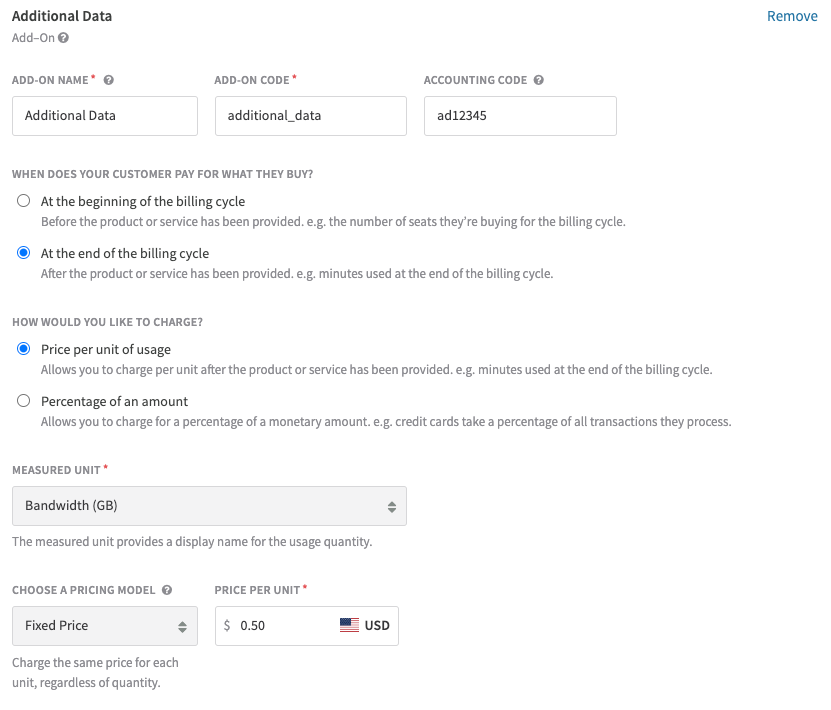
You can combine usage-based add-ons, item add-ons, and standard add-ons in any mix. Recurly requires a recurring plan fee, but you can set it to $0 for a strictly usage-based plan.
Usage-based add-on attributes
| Attribute | Example | Description |
| Add-on name | Video Streaming | Displayed on Checkout, Hosted Payment Page, and invoice line items. |
| Add-on code | video_streaming | Product code used in exports and API requests. |
| Accounting code | VS1000239 | Optional code for your finance team's ledger reconciliation. |
| Tax type / tax code | "Digital Product" or "D0000000" | Required for EU VAT or AvaTax integrations to apply appropriate taxation. |
| Charge model | "Price per unit" or "Percentage of an amount" | Determines whether you define a fixed price or a percentage. Cannot be changed after creation — remove and re-add the add-on to switch models. |
| Measured unit | Bandwidth (GB) | The unit of measure. Shown on Checkout and Hosted Payment Pages, and used for cross-plan reporting. |
| Pricing model (tier type) | Fixed, Tiered, Volume, Stairstep | The pricing structure for charges. Cannot be used when charge model is Percentage. See quantity-based pricing for details. |
| Price | $0.50 USD | Price per unit. Supports up to nine decimal places. |
| Tiers | Array of tier/price pairs | Used with Tiered, Volume, or Stairstep pricing models. |
| Percentage | 2.36% | Percentage of the monetary usage amount. Supports up to four decimal places. Percentage tiers and volume are supported. |
| Optional to customer | Boolean | Whether the add-on is optional on Checkout and Hosted Payment Pages. Usage-based add-ons default to required. |
Calculation methods
Select one of two calculation methods on the usage-based add-on:
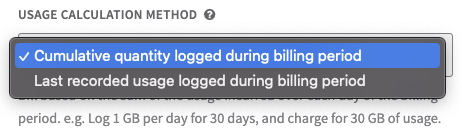
Cumulative — Adds up all usage logged during the billing period, then multiplies by the unit price.
- Log 1 GB/day for 30 days → charged for 30 GB
Last recorded — Applies only the most recent usage record in the billing period.
- Log 3 GB/day for 29 days, then 2 GB on day 30 → charged for 2 GB
- Log 5 GB/day for 15 days, then 7 GB/day for 5 days with no further usage → charged for 7 GB
Changing the calculation type on an add-on only affects subscriptions created after the change. To update an existing subscription, remove it from the account, modify the plan add-on, then re-assign the plan.
Usage accumulation periods
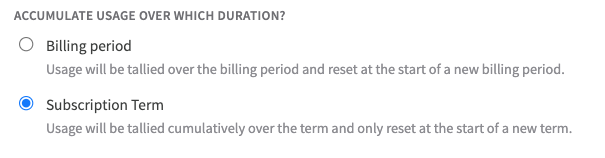
Choose whether usage accumulates and bills at each billing cycle, or across the entire subscription term.
Managed measured units
Creating a usage-based subscription via Admin Console
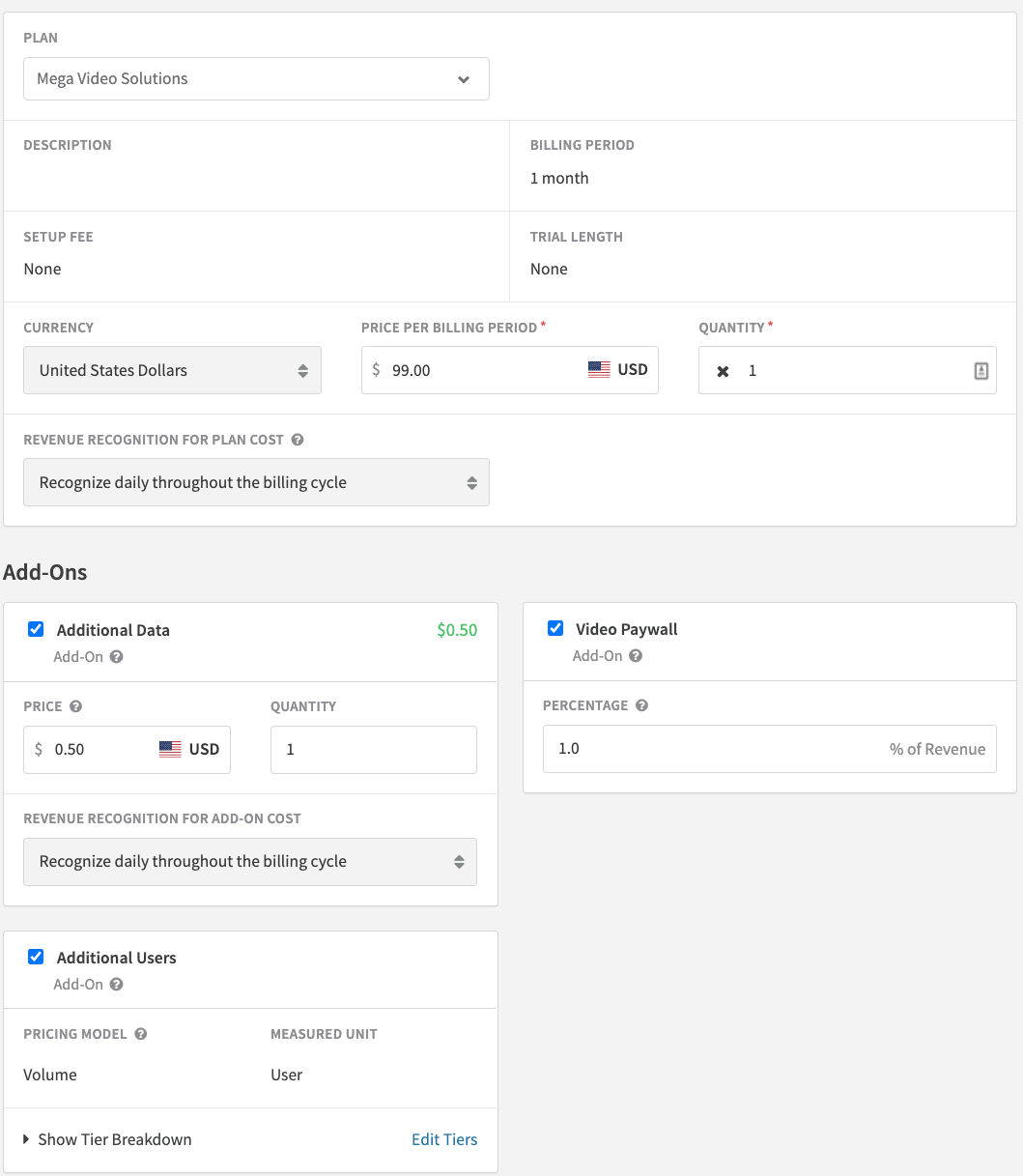
Select a usage-based plan on the New Subscription page to see its associated usage-based add-ons. Required add-ons are checked by default but can be unchecked. You can enter a custom price or percentage for any add-on. For quantity-based add-ons, you can customize tiers per subscription by clicking Edit Tiers — the pricing model itself cannot be changed.
Manage usage for subscriptions
Logging usage
All usage is logged through the Usage API. Usage cannot be logged from the Admin Console.
- For percentage-of-amount add-ons, log usage in cents. Recurly converts to the correct currency display (e.g., sending
500for a USD subscription displays as $5.00). - Usage amounts can be positive or negative.
- Each usage record has an optional
merchant_tagfield for storing your own event ID, enabling auditable usage statements via your own UI.
Decimal usage quantities
Decimal usage logging is available in API v2 and v3 but must be enabled by Recurly Support. Key limits:
- Supported up to nine digits before and after the decimal point (as long as the total doesn't round to one billion)
- Whole-number quantities support up to nine digits total (e.g., 999,999,999)
- Mixing decimal and whole-number logging across add-ons on the same site is not supported — enabling decimal logging applies to all usage-based add-ons
- Invoice line item charges reflect the total quantity multiplied by the unit price (e.g., 10.57874 GB at $10.00/GB = $105.79)
- Charge amounts round to the standard hundredths place ($10.505 rounds to $10.51)
When to log usage
Log usage in real-time or as hourly or daily aggregates — whichever aligns best with your systems. The closer to real-time, the cleaner your invoices. The Usage API endpoints are not rate-limited to support real-time logging.
The Subscription Prerenewal webhook fires one day before renewal — use it as a trigger to finalize any pending usage records before billing runs.
If you log usage later in the day for a past date that was already billed that morning, the new usage won't appear on that invoice. Recurly picks it up on the next invoice instead.
Editing and deleting usage
- Edit: You can edit unbilled usage records. Once billed, only the
merchant_tagfield can be edited. - Delete: You can delete unbilled usage records. Once billed, issue a refund or usage correction instead.
Usage corrections
Usage corrections are new usage records for a usage date in an already-billed billing cycle. They appear on the next invoice, grouped by the billing cycle they correct.
- If the net sum of corrections from the same past cycle is positive, it's a charge. If negative, it's a credit.
- Usage corrections are not eligible for coupon discounts.
- Corrections are accepted for Fixed and Tiered pricing models. They're charged at the tiers already billed for that period.
- Corrections are not accepted for Volume or Stairstep pricing models — use line item refunds or a new charge instead.
- Usage records cannot be corrected for term-based billing add-ons.
Refunding usage-based invoices
Use line item refunds rather than open-amount refunds for usage-based add-ons:
- A line item refund creates a negative usage record for the quantity being refunded, marked as billed immediately. A
new_usage_notificationwebhook is sent. - Fixed price-per-unit add-ons support full or partial quantity refunds.
- Quantity-based add-ons can only use line item refunds.
- Percentage add-ons can only be fully refunded via line item refund. For partial refunds, use a usage correction or an open-amount refund and track the usage record change manually.
- Decimal quantity refunds work the same as whole-integer refunds — both full and partial are supported.
API integrations
All usage and quantity-based pricing functionality is available on API v2019-10-10 and above. Minimum client library versions:
We recommend always using the latest API version.
Usage-based add-ons in plans
Use the Plan Add-On API resource to create usage-based add-ons. See the Plan Add-Ons API reference.
Usage-based add-ons in subscriptions
Use the Subscription Add-On API resource to add usage-based add-ons to a subscription. See the Subscription Add-Ons API reference.
- Set custom prices using the
amountattribute for price-per-unit add-ons, orusage_percentagefor percentage-of-amount add-ons. - Usage-based add-ons can only have a
quantityof 1. The customer is billed by measured units, not quantity.
Recurly.js
Recurly.js v4.0.5 and above supports usage-based billing pricing. Use it to display the add-on price or percentage. Usage-based fees are excluded from _now and _next pricing totals since they can't be estimated up front.
Webhooks
Usage-based add-on attributes are included in these webhook notifications:
new_subscription_notificationrenewed_subscription_notificationupdated_subscription_notificationcanceled_subscription_notificationreactivated_accountexpired_subscription_notification
Adding usage-based add-on attributes to existing webhook payloads may break existing integrations. Review your webhook handler before enabling usage-based billing.
Reports and exports
Reports
- The transactions report includes usage-based add-on revenue.
- The MRR report does not include usage-based add-on revenue — variable fees are not counted in MRR by convention.
- No additional reports specific to usage-based add-ons are available at this time.
Exports
Two key exports cover usage-based billing data:
The Subscriptions Usage Records export contains individual usage records for each customer's usage-based add-ons — useful for pre-bill revenue recognition and product/marketing analysis.
Pricing in the usage export reflects the customer's base price and does not include invoice-level discounts. Review the Invoices — Line Items export for discount data.
For quantity-based pricing, exports include tier_type but not detailed tier pricing. Use the API to retrieve specific tier data for a plan, subscription, or usage record.

Usage-based billing was developed with support from Louisiana Economic Development's Office of Entertainment Industry Development.
Updated 4 months ago