
Renewal reminder and trial ending notifications
Learn how to configure renewal reminder emails, trial ending notifications, and pre-renewal webhook notifications in Recurly to keep subscribers informed and reduce churn.
Definition
Key benefits
Renewal reminder emails
Renewal reminders can be enabled across all plans, with the option to disable them for specific plans as needed. You can schedule these emails anywhere from one to 180 days before a subscription renews.
Renewal reminder types
Term Renewal Reminder
Notifies customers of an upcoming subscription renewal. Lead time is configurable from one to 180 days. Sending this reminder may be required by regional law or card brand agreements.
Bill Date Reminder
Reminds customers of their next billing date. Like the Term Renewal Reminder, this can be scheduled one to 180 days in advance and may be legally required in certain jurisdictions.
Annual Reminder
Sent once per year from the start of the customer's subscription. Particularly relevant for subscriptions with term lengths under one year, and required in regions with annual notification mandates.
Mastercard Reminder
Applies exclusively to customers paying with Mastercard, and must comply with Mastercard's specific content and timing guidelines. When configuring this template:
- You can schedule the email to send a set number of days before the customer's bill date.
- The email must include clear instructions for how the customer can cancel their subscription.
If multiple renewal reminders are scheduled for the same day, the Mastercard template takes precedence over other renewal reminder templates.
Ramp Price Change Renewal Notification
Notifies customers of an upcoming price change at the start of a new ramp interval. This template can be customized to include the start date and price of the next ramp interval. If scheduled on the same day as other reminders, it is prioritized.
Payment method-specific reminders
SEPA Payment Method
Sent ahead of the bill date for customers using SEPA as their payment method. Content and timing adhere to SEPA's specific requirements.
BACS Payment Method
Sent ahead of the bill date for customers using BACS as their payment method. Content and timing adhere to BACS requirements.
Expired Credit Card
Alerts customers when their credit card on file has expired or will expire before the next billing cycle, prompting them to update their payment information.
Trial ending emails
Trial ending emails notify customers when their free trial is approaching its end, giving them time to decide whether to continue with a paid plan. This feature is activated per subscription plan, so reminders only go out where they're relevant.
Activation and configuration
- To enable trial ending emails, select the Send Trial Ending Emails? option when creating or editing a subscription plan.
- Recurly automatically sends the trial ending email three days before the trial ends. For custom trial periods, the trial must be at least four days long to trigger the email.
- The Trial Ending email template is fully customizable in the Email Templates section of the Admin Console, allowing you to align messaging with your brand voice.
Pre-renewal webhook notifications
Pre-renewal webhook notifications extend renewal reminders beyond email, allowing each notification type to also trigger a webhook. Use these to initiate actions in your broader system — such as sending emails through an external provider or triggering other events tied to an upcoming renewal.
Each webhook notification type can be configured with a default lead time, specified in days before a subscription's renewal, and those defaults apply across all endpoints using pre-renewal notification events.
Configure pre-renewal webhook notifications
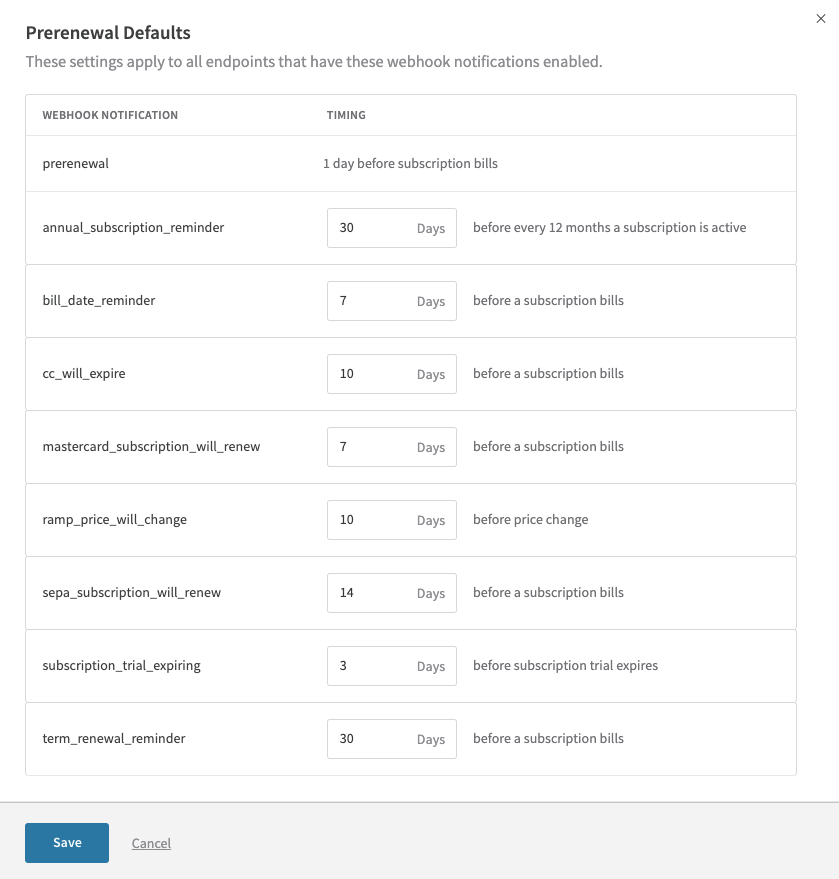
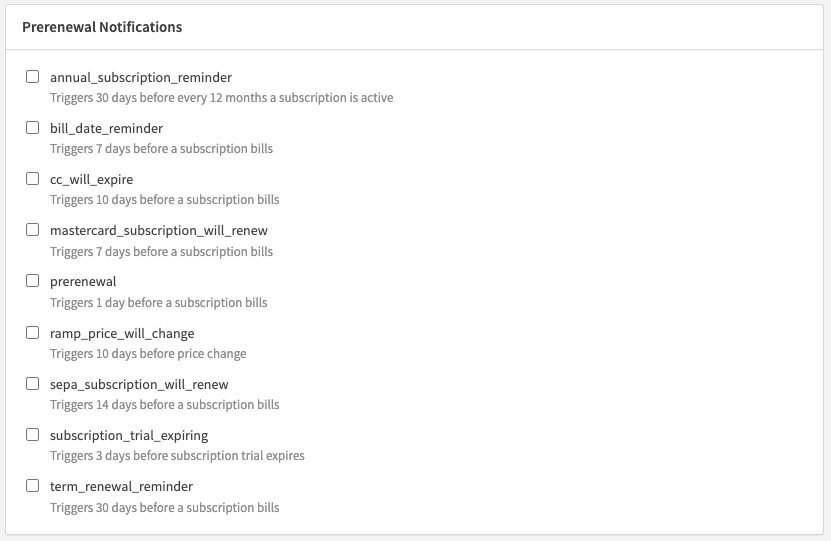
For full details on implementing pre-renewal webhook notifications, see the webhook developer documentation.
FAQs
What happens when the trial_ends_at date is extended via API?
If you update trial_ends_at through the API to extend the trial period and the new end date is more than three days away, the trial ending email won't send until the subscription is within the three-day reminder window. This ensures reminders stay timely and relevant to the updated trial end date.
Will renewal reminders be sent for subscriptions with a future start date?
Yes. Renewal reminders will be sent for subscriptions with a future start date, as long as that date is set at least two days in advance. This gives customers adequate notice about upcoming renewals even for subscriptions not yet active.
What happens if there is no email address on file for a customer?
If no email address is on file, Recurly falls back to the site's default email settings. As a best practice, always collect and pass the customer's email address to Recurly. You can configure both the "email to" and "CC email to" addresses in the Email Templates section to ensure communications reach the right recipients.
Can renewal reminders and trial ending emails be configured via API?
Not currently. Renewal reminders and trial ending emails can only be configured via the Admin Console. API-based management of these settings is under consideration for a future release.
Will disabling an email template stop those emails from going out?
Yes. Disabling an email template in the Email Templates section stops Recurly from sending that notification entirely.
Updated 4 months ago