
Subscriber churn analysis
Learn how to use Recurly's Subscriber Churn Analysis dashboard to understand why subscribers leave and reduce churn.
Prerequisites
- Users must have Analytics user role permission.
Definition
Throughout our analytics, churn and acquisition are calculated by comparing active subscribers at the beginning of a time period with active subscribers at the end of that period. A subscriber is considered churned if they aren't expired at the beginning of the period but are expired by the end of it. For example, using a weekly timeframe, a subscriber who is active at the start of the week and expired by the end of it counts as churn.
Key benefits
Key details
Filters (top left corner)
- Date range: Use the dropdown menus to select a specific timeframe and date range for the data shown on the dashboard.
- Timeframe: Adjust this to view data over different periods for a more detailed or broader overview.
- Subscriber type: Categorize the data by subscriber type — paying, non-paying, or trial.
Churn rates
The Subscriber Churn Analysis dashboard is a powerful tool for evaluating the success of your customer retention strategies. By presenting your churn rates clearly, it helps you identify both the strengths and weaknesses of your current approach — understanding these metrics is essential for refining your tactics and improving retention.
Churn rate is calculated by dividing the number of subscribers you lost during a period by the total number of subscribers you had at the start of that period. There are three key churn rates to consider:
- Overall churn: Combines involuntary and voluntary churn for a complete picture of total subscriber loss.
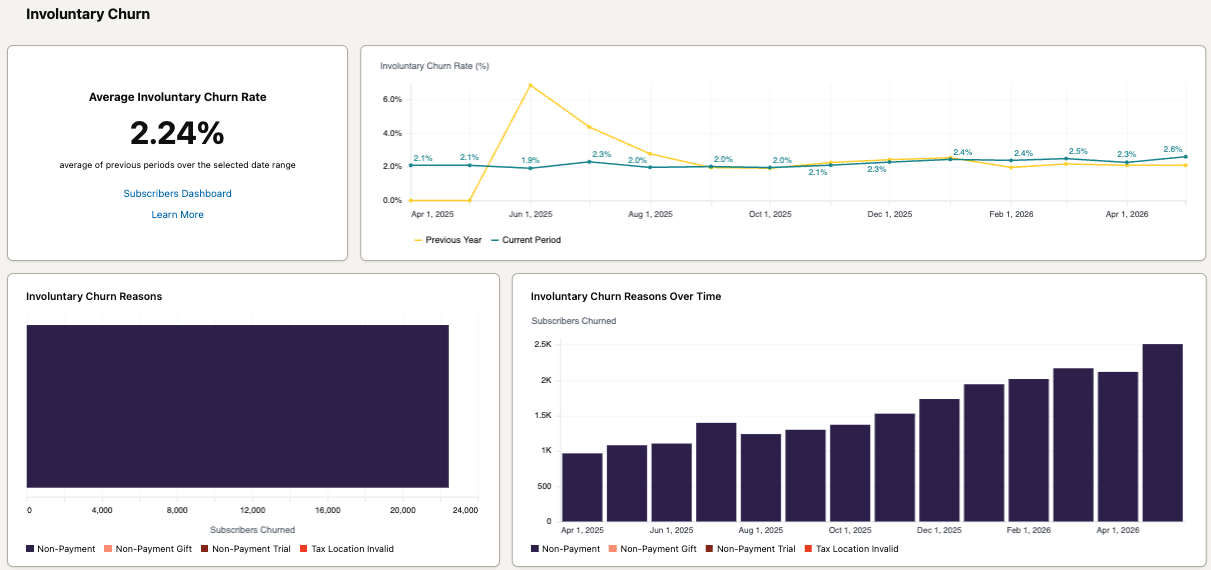
- Involuntary churn: Subscribers lost due to payment issues, showing how effective your payment recovery efforts are.
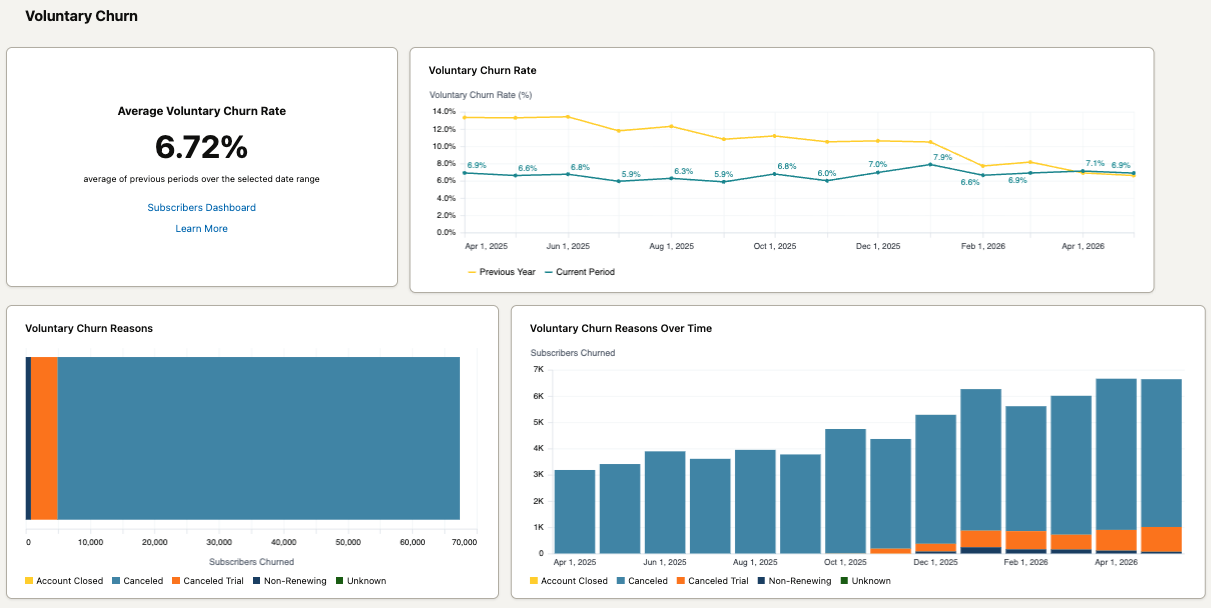
- Voluntary churn: The rate at which subscribers choose to leave on their own, reflecting subscriber satisfaction and perceived value.
Involuntary churn reasons
- Non-payment: The subscription churned due to a failed transaction and an unrecovered invoice.
- Invalid tax location: The subscription churned because it failed a tax validation check.
- Non-payment (gift): The subscription churned because a gift subscription ended without converting to a paid subscription.
- Non-payment (trial): The subscription churned because a trial ended without converting to a paid subscription.
Voluntary churn reasons
- Non-renewing: The subscription expired after a fixed number of billing cycles and wasn't renewed.
- Account closed: The subscription churned because its linked account was manually closed.
- Canceled: The customer initiated the cancellation.
- Trial ended: A cardless free trial ended without billing information added.
- Gift ended: The gift card amount was exhausted without billing info added before the next renewal.
Churn trends
See your performance across all churn rates — overall, involuntary, and voluntary — at a glance, and how that breakdown changes over time. This helps you spot important shifts in how well your retention tactics are working. You can also compare your overall churn rate to the previous year.
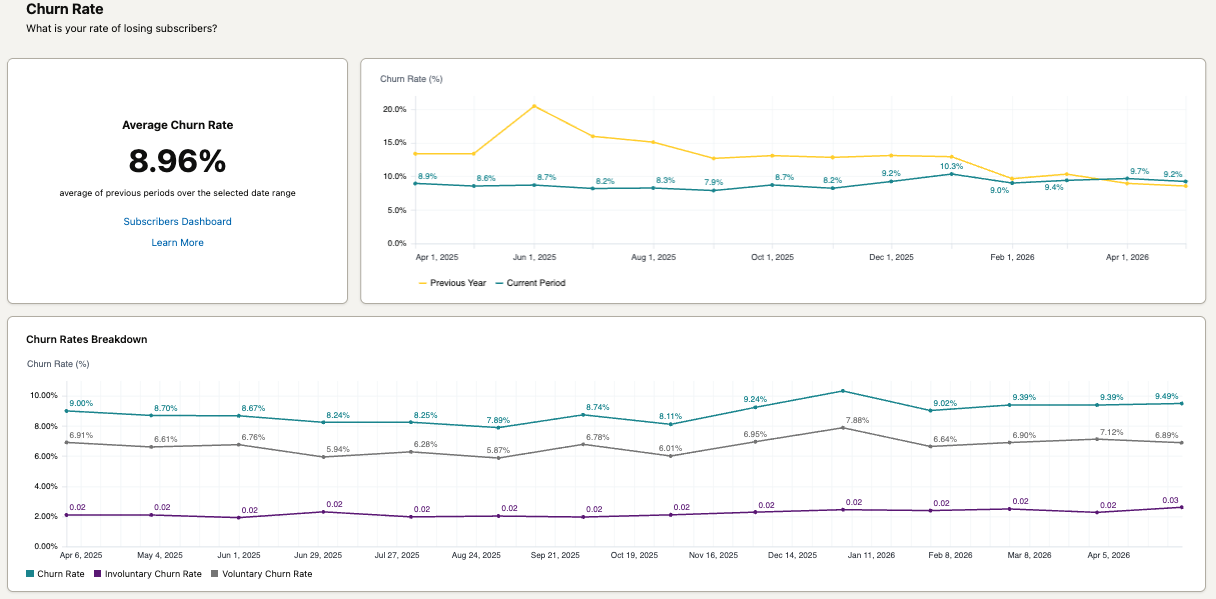
Involuntary churn trend
See the rate of involuntary churn from non-payment, compare specific involuntary churn reasons, and track the year-over-year trend.
Voluntary churn trend
See the rate of voluntary churn, compare specific voluntary churn reasons, and track the year-over-year trend.
Churn reasons breakdown
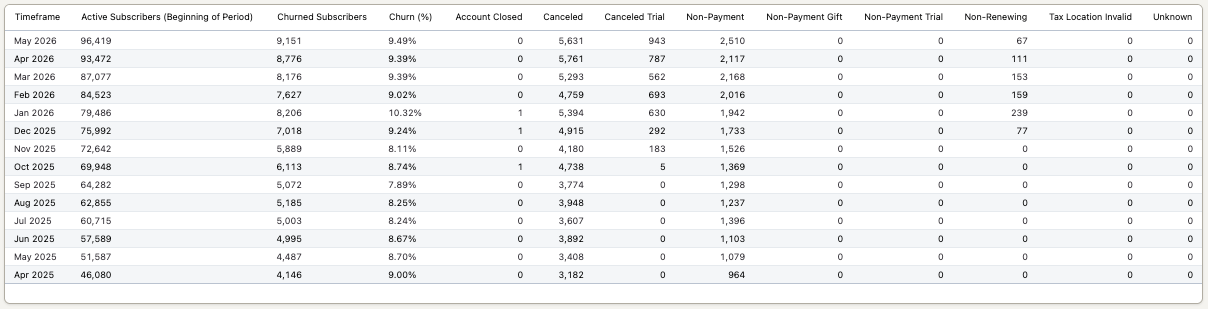
Dig into the data to see the specifics across all churn reasons.
Updated 2 months ago