
Chargebacks and late failures for direct debit
Manage SEPA direct debit chargebacks and late failures in Recurly — with automated or manual processing options, configurable invoice handling, and webhook notifications via GoCardless.
Definition
Key benefits
Key details
Chargeback processing modes
Recurly offers two approaches to handling SEPA direct debit chargebacks. Choose based on how much control you want over the process.
Automated chargeback handling
Recurly manages the full chargeback lifecycle — updating invoices, logging transactions, and adjusting subscription states — with minimal intervention required.
- Invoice updates: The original invoice is automatically updated with chargeback details for accurate reporting.
- Refund transaction: Recurly creates a new refund transaction equal to the chargeback amount. This records that funds were reversed by the customer's bank — it doesn't trigger an actual refund request to your gateway.
- Subscription management: Subscription status is adjusted based on your predefined settings.
Best for merchants who want Recurly to handle chargeback events end-to-end.
Manual chargeback processing
Recurly sends a webhook notification when a chargeback is received, and you handle the rest in your own systems.
- Webhook notification: Recurly alerts you when a chargeback is initiated — no automatic action is taken on the invoice or transaction.
- Invoice adjustments: You decide how to handle the original invoice — by creating a refund invoice, writing it off, or another method that fits your business practices.
- No chargeback filter: Since no chargeback refund transactions are created, the Chargeback status filter on the Transactions page won't return results.
Best for merchants who need customized handling per case, or who manage chargebacks through external financial or CRM systems.
Chargeback settings
Configure your chargeback handling mode at Configuration → Invoice Templates → Invoice Settings, then scroll to the Chargebacks section.
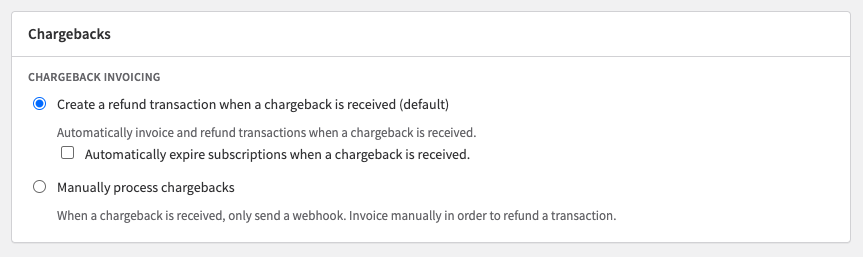
Option 1: Create a refund transaction when a chargeback is received (default)
When enabled, Recurly automates the full invoicing and status process on receipt of a late failure or chargeback webhook from GoCardless:
- The original transaction status remains unchanged in most cases. For merchants using automatic SEPA retries, transactions that fail due to insufficient funds are marked as Past Due.
- A new refund transaction is created for the chargeback amount. This reflects that funds were reversed by the bank — no refund request is sent to your gateway.
- The original invoice is updated with detailed chargeback information.
Chargeback refund transactions are visible on the Transactions page — filter by Chargeback status to view them.
Option 2: Manually process chargebacks
When selected, Recurly sends a webhook notification for each chargeback but takes no automatic action:
- No refund transaction is created.
- The original invoice remains unchanged.
- You handle all invoice adjustments and downstream actions in your own systems.
Integration notes
Webhooks
Recurly sends a webhook notification for every chargeback event, regardless of your processing mode. For manual processing, these webhooks are the primary trigger for action — make sure your systems are set up to receive and respond to them. For API integrations, update your webhook handling logic to take appropriate action based on chargeback events.
Refund transactions
For automated handling, the chargeback refund transaction Recurly creates is separate from the original transaction and tied specifically to the chargeback. No additional action is required in your gateway — Recurly records the event to reflect the bank reversal accurately.
Multi-currency
Chargebacks are processed in the currency of the original transaction. If your site handles multiple currencies, confirm your chargeback handling settings are compatible with each currency your customers use.
Updated 3 months ago