
Expire/cancel subscription
Learn how to cancel, terminate, reactivate, and expire subscriptions in Recurly using the Admin Console, Hosted Account Management, or API.
Definition
Key benefits
Cancel a subscription
When a subscription is canceled, it enters a pre-expiry state and remains active until the selected end date. The customer retains access to the service and can reactivate the subscription at any time before it expires.
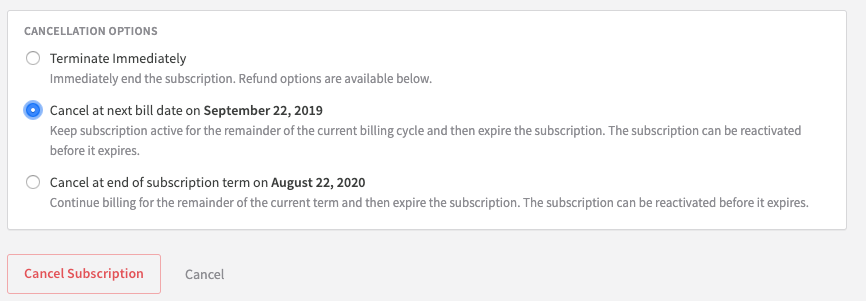
Admin Console
Hosted Account Management
Auto-cancellation
Recurly can automatically cancel a subscription when it receives a webhook signal from a payment gateway indicating that a payment method or mandate is no longer valid. The cancellation applies to any subscription using the affected token or mandate.
Supported gateways:
- PayPal Complete
- Ebanx when using UPI AutoPay, Mercado Pago, or Pix Automatico.
- Stripe when using e-mandates with Indian Credit Cards.
Read more about mandate settings to configure auto-cancellation or auto-expiry in Payment Settings.
Reactivate a subscription
A canceled subscription can be reactivated at any time before it expires — useful when a customer changes their mind. Once a subscription has expired, reactivation isn't possible and a new subscription must be created.
Admin Console
Hosted Account Management
If the cancellation option was provided to the customer, they'll see a reactivation option in their Hosted Account until the subscription expires.
Terminate a subscription
Termination ends a subscription immediately, mid-cycle. Unlike cancellation, there's no pre-expiry window — the subscription moves directly to expired. Use termination when you need to end a subscription right away rather than at a future date.
If you are using Ebanx or Stripe with a supported payment method, you may use auto-termination. See our documentation in Payment Settings for additional details. This setting relates to e-mandates on India Credit Cards (Stripe) and APMs on Ebanx (UPI AutoPay, Mercado Pago, Pix Automatico).
Admin Console
API
Termination can also be triggered via API. See the API reference for the required parameters and endpoints.
Dunning
Within Dunning Management, you can configure Recurly to automatically expire a subscription when its invoice reaches the end of the dunning cycle without a successful payment.
Updated 26 days ago