
Static retries
Understand Recurly's static retry logic for failed subscription payments — including soft decline schedules, hard decline exceptions, gateway error handling, manual collection, and APM-specific retry rules.
Prerequisites
- An active Recurly account in production mode.
- Recurring credit card payments configured.
- Access to the Recurly dashboard and configuration settings.
Limitations
- Not applicable for hard declines (see exceptions below).
- Retries stop after 7 transaction declines, 20 total transaction attempts, or 60 days since invoice creation — whichever comes first, or earlier if dunning settings complete first.
Definition
Key benefits
Retry logic
Soft declines
Soft declines (insufficient funds, temporary holds, etc.) are not final. Recurly uses gateway signals to determine retry eligibility and schedules retries on a set cadence using the same payment method. Retries continue until the static retry count is exhausted or dunning ends — whichever comes first.
Hard declines
Hard declines are generally not retried for compliance and regulatory reasons. There are three exceptions:
- Exception A — Immediate retry if Account Updater or the customer updates billing information.
- Exception B — A hard decline may change to a soft decline during dunning after a billing info update.
- Exception C — A manual forced collection outside the typical recurring schedule.
Gateway payment error retry schedules
| Error type | Retry schedule |
|---|---|
| Try Again / Gateway Error | Every 2 days |
| Issuer or Processor Unavailable | Every 3 days |
| Communication / Configuration Error | Up to 2 retries, 4 hours apart → then 6 retries, 1 day apart → then retries through end of dunning cycle, 3 days apart |
Manual retry and forced collection
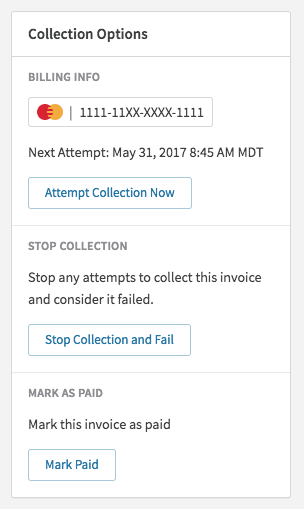
To manually trigger a collection attempt, click Attempt Collection Now on a pending or past-due invoice's details page. This is also available via the Recurly API.
Direct debit payments
Recurly supports automatic retries for most direct debit methods (ACH, SEPA, etc.) when the bank response indicates insufficient funds or an applicable return code. Manual retries are also available via the Admin Console or Recurly API for situations such as invoice corrections or updates.
See the Direct Debit Retries documentation for full details on automatic retry behavior.
Specialized retry strategies
Recurly supports automatic retries for UPI AutoPay, Pix Automatico, and Mercado Pago. No configuration is required — retries are available automatically for these payment methods.
UPI AutoPay
UPI AutoPay retries must be completed on the same day as the initial failure. Recurly reattempts up to 2 times in the hours following the initial failure. After 2 attempts, the invoice is marked failed and the subscription is handled per your dunning settings. Manual force collections are not supported.
Pix Automatico
Pix Automatico retries must complete within the same billing period as the initial failure, with up to 1–3 reattempts in the days following. For shorter billing periods (e.g., weekly), only one retry may occur. For billing periods longer than one week, the full retry schedule applies. Manual force collections are not supported.
Mercado Pago
Mercado Pago retries reattempt up to 3 times after the initial failure, with a 24-hour waiting period between each attempt (one attempt per day). Manual force collections are not supported.
Updated 4 months ago