
dLocal (Philippines)
Configure the dLocal payment gateway in Recurly to process one-time and recurring subscription payments with the GCash wallet in the Philippines.
Limitations
- GCash billing info updates not supported — If a customer needs to update their wallet funding source, they must do so in the app itself.
- No ad-hoc or one-time purchases using stored billing info — Customer-initiated one-time purchases using stored billing info and merchant-initiated force collections are not supported.
- Chargebacks not reflected — Chargebacks are not currently supported or reflected in Recurly.
- GCash one-time payments don't store billing info by design — Customers must reauthenticate via Recurly.js every time.
- Free trials — Free trials are not yet supported with this wallet.
- Log in to your dLocal account. Engage with dLocal to address any applicable contracts and fees before proceeding. Access your dLocal Production account for production keys, or Sandbox account for sandbox keys.
- Within your dLocal merchant dashboard, select Settings, then choose the Integration option.
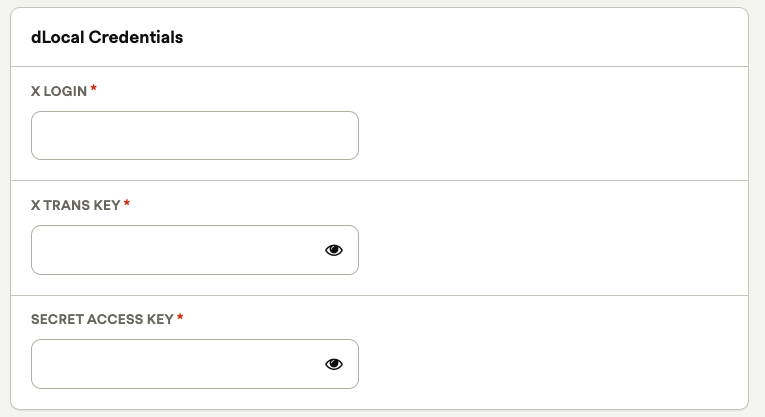
- Copy the X-Login, X-Trans-Key, and the Secret Key. You don't need the smartfields API key. Save these for the next step.
- In Recurly, navigate to Configuration → Payment Gateways, select Add a New Gateway, then choose dLocal.
- Paste your X-Login, X-Trans-Key, and Secret Key into the applicable fields, shown below.
- GCash integration guide
- One-time payments / ecommerce integration guide
- Customer first and last name
- Customer email address
- Customer billing address (street address, city, region/state, country, postal/PIN code)
- Street address — House/street name and number
- City — Locality and city
- State — Province
- Postal code — Postal / zip code (4 digit)
- Country — Country code (e.g., PH)
- Customer phone number
Definition
Key details
| Feature | Details |
| Services that work with Recurly | Payment processing, subscriptions, one-time / ecommerce payments with GCash |
| Supported operations | Subscription signups, recurring transactions, refunds, one-time purchases |
| Supported payment types | GCash |
| Supported card brands | N/A |
| Gateway-specific 3DS2 supported | No |
| Card on file supported | No |
| Regions | GCash: Philippines |
| Currencies | PHP only |
| Gateway features | None |
Setup
Integration guides
Refer to the individual payment method guides for implementation details:
Payment method specifics
GCash Wallet
dLocal and the GCash method require specific fields to authorize a payment successfully.
FAQs
I am using the billing info ID for one-time purchases, and it's failing. What can I do?
Recurly's integration with dLocal includes GCash only, which doesn't allow CIT one-time purchases using on-file tokens. You must offer the customer the option of using GCash and use Recurly.js to allow them to authenticate their account for one-time / line item purchases. If there is a stored payment method, its specific use is for active subscriptions only.
I'm setting the store_billing_info API field to 'true' on a line item purchase, but I'm getting an error. What gives?
One-time, or more specifically, ecommerce transactions using GCash do not produce a storable token for future purchases. Customers must re-authenticate with their app for every purchase. You'll need to set the store_billing_info API parameter to false and set up your checkout flow to always prompt the user to select the payment method during checkout, rather than using a stored method.
Updated 20 days ago