Plan Performance Subscription Trials gives you an in-depth look at how trial subscriptions progress — whether they convert into full subscriptions or run into trouble along the way. Swimlane charts, a status chart, and a conversion rate line chart give you a complete view of the trial journey for each plan.
Available on all Recurly plans
- Users must have Analytics user role permission.
Plan Performance Subscription Trials gives you an in-depth look at the journey of trial subscriptions. Swimlane charts, a status chart, and a line chart together give you a complete view of how trial subscriptions progress — whether they convert into full subscriptions or run into trouble along the way.
NoteIt's important to understand the difference between a subscriber and a subscription. A single subscriber might hold multiple active subscriptions, but this dashboard counts each individual subscriber — not the number of subscriptions they hold. Data only includes plans that have had at least one subscriber.
Visual clarity on trial journeys
See the trajectory of trial subscriptions at a glance, from start to conversion or termination, with the swimlane and status charts.
Insightful conversion metrics
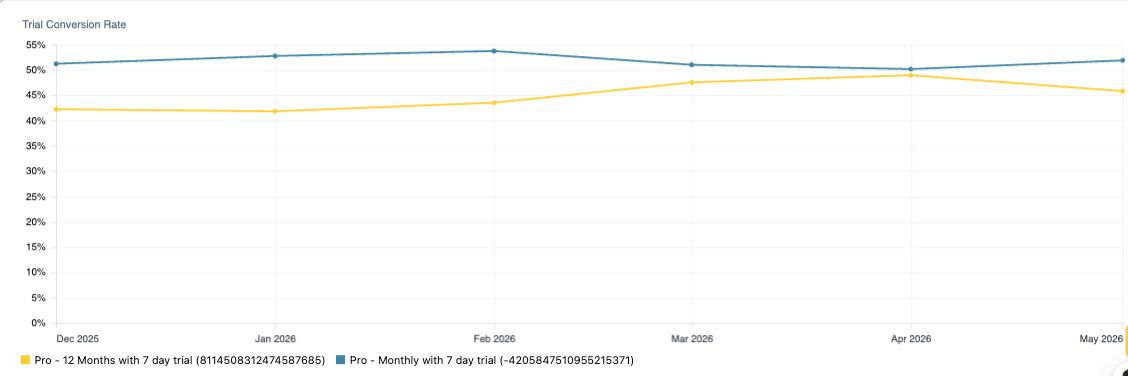
The Trial Conversion Rate line chart gives you a precise read on how well your trials are converting across plans.
Data-driven trial strategies
Use these insights to refine your trial offerings and increase the chances of a successful conversion.
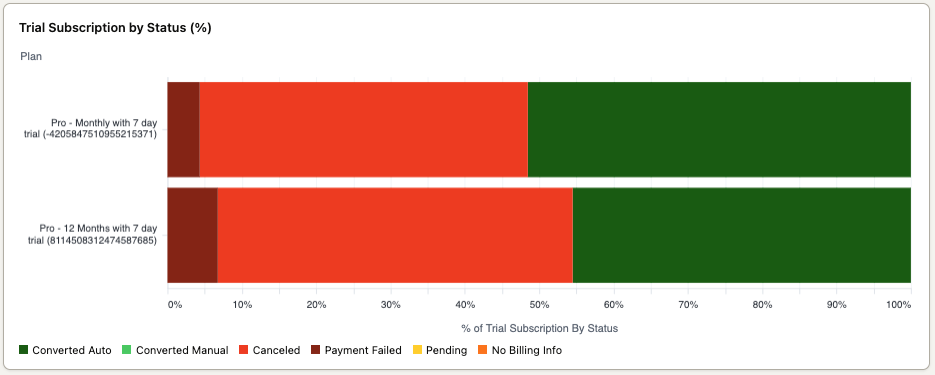
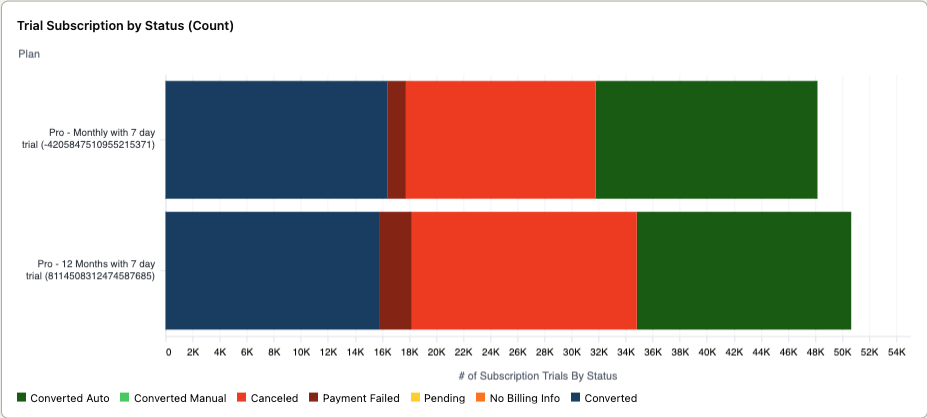
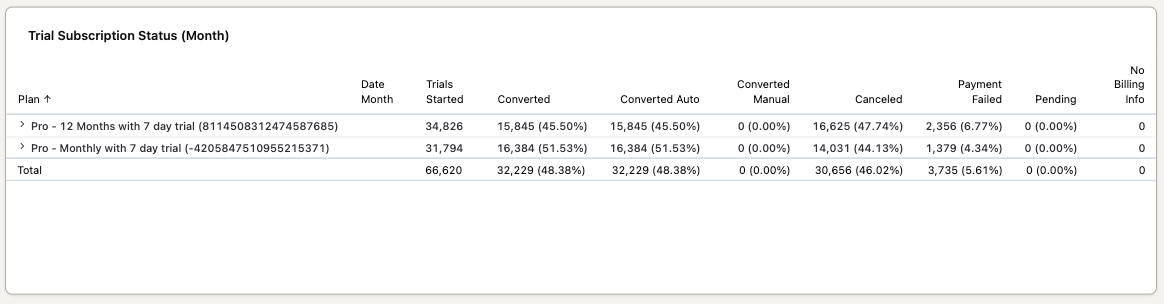
The Trials view includes two swimlane charts and a status chart in the Subscription Trials section, plus a line chart in the Trial Conversion Rate section.
The swimlane charts show the status of trial subscriptions, including conversions to paid subscriptions and non-conversions due to failed payment or cancellation.
The status chart tracks the current state of subscriptions that began as trials, giving you insight into how many convert to full subscriptions and, when they don't, why.
This line chart shows the trial conversion rate for each plan, helping you assess how effective your trials are at turning users into paid subscribers.
1
Navigate to the Trials view within the dashboard.
2
Check the two swimlane charts and the status chart in the Subscription Trials section to see which trials convert to full subscriptions, and why others don't.
3
Review the Trial Conversion Rate line chart to see how effective your trial plans are at converting users to paid subscribers.
4
Review conversion rates periodically and use what you find to improve your trial plans.