
Ebanx (APAC and LATAM)
Connect Ebanx to Recurly to process Credit Cards in LATAM, UPI AutoPay, Pix Automatico, and Mercado Pago subscription payments across India, Brazil, and Latin America.
Limitations
- Credit cards outside of LATAM not supported — card payments for customers outside of supported countries is not supported and will result in declines. If you require processing support for cards outside of supported countries, please reach out to your Recurly contacts.
- If you are processing cards in Argentina -- You must have your own account with Avalara or Vertex to handle Argintinian tax management.
- UPI mandate migration not supported — Customer mandates on another platform cannot be migrated to Recurly. Customers must cancel existing mandates and resubscribe. Enrollments are tightly coupled with the acquiring partner, merchant, and consumer — when the acquiring partner changes during a migration, re-enrollment is required per RBI and NPCI rules.
- UPI transaction limit — RBI mandates limit individual transactions to 15,000 INR without a consumer two-factor flow. This 2FA is handled by the customer's bank UPI app and is not customizable. Plans, or the combined amount of plans sent in the same purchase signup request, should be at or below 15,000 INR to avoid renewal rejections. See UPI AutoPay documentation for details.
- UPI billing info updates not supported — If a customer needs to update their VPA or bank account, they must cancel their existing mandate/subscription and re-subscribe.
- No ad-hoc or one-time purchases — Customer-initiated one-time purchases and merchant-initiated force collections are not supported.
- Recurly.js not supported for certain APMs — UPI AutoPay and Pix Automatico require direct API integration. Recurly.js is not supported for these payment methods.
- Refunds must be full amount — Partial refunds are not supported through Ebanx.
- Chargebacks not reflected — Chargebacks are not currently supported or reflected in Recurly.
- See individual payment method pages for additional limitations.
Definition
Key details
| Feature | Details |
| Services that work with Recurly | Payment processing, subscriptions, automatic subscription cancellation |
| Supported operations | Subscription mandate enrollment, recurring transactions, refunds |
| Supported payment types | Credit Cards, UPI AutoPay, Pix Automatico, Mercado Pago |
| Supported card brands | Visa, MasterCard, Discover, American Express, and Ebanx-supported regional brands. |
| Gateway-specific 3DS2 supported | Yes |
| Card on file supported | Yes |
| Regions | UPI AutoPay: India. Pix Automatico and Mercado Pago: Brazil. Mercado Pago: Mexico, Chile, Uruguay, and Argentina. Credit Cards: Argentina, Brazil (credit only), Chile, Colombia, Costa Rica, Dominican Republic, Ecuador, Dominican Republic, Guatemala, Mexico, Panama, Paraguay, Peru, and Uruguay. |
| Currencies | INR (UPI only), BRL (Cards, Pix Automatico, and Mercado Pago), ARS, CLP, MXN, UYU (Cards and Mercado Pago only), EUR (cards only), PEN (cards only), and COP (cards only). |
| Additional feature support | Cross-border and local settlement, Card network routing (for regional card brands), and specialized tax handling. |
Integration guides
Refer to the individual payment method guides for implementation details:
- LATAM Card integration guide
- UPI AutoPay integration guide
- Pix Automatico integration guide
- Mercado Pago integration guide
Please Note: It is highly recommended to subscribe to Ebanx's status page for updates on scheduled maintenance alerts to avoid unexpected downtime for payment processing.
Required fields
Ebanx requires specific fields for proper subscription and transaction handling.
Credit Cards
- Credit Card number, Expiry date, CVV (when customer is in session)
- Customer Information: email address, first and last name, billing address, customer phone number
- Tax ID and Tax ID type (conditional)
- Customer date of birth (conditional) -- this is a new field in the Recurly V3 API that will need to be sent.
UPI AutoPay
- VPA (UPI AutoPay) via PGR array. For QR / App Intent flows, send Payment Type and Authentication Type and omit the VPA.
- Customer email address
- Customer first and last name
- Customer billing address (street address, city, region/state, country, postal/PIN code)
- Street address — House/street name and number (e.g., HOUSE NO. 32, MG ROAD)
- City — Locality and city (e.g., VILLAGE OF AMARPUR, NEW DELHI)
- State — State or union territory (e.g., MAHARASHTRA)
- Postal code — PIN code (e.g., 110019)
- Country — Country code (e.g., IN)
- Customer phone number
Pix Automatico and Mercado Pago
- Customer name
- Customer billing address
- Customer email address
- Customer phone number
- Tax ID and Tax ID type (required for Brazil)
APM Mandate preferences
Ebanx APMs (UPI, Mercado Pago, and Pix Automatico) use subscription-level mandate IDs assigned to a customer's subscription at signup. Customers can revoke or pause (UPI only) their mandate from their banking app, which affects the subscription in Recurly. This does not apply to credit card usage.
- Customers cancelling or pausing mandates in their banking app are handled automatically.
- Pausing and resuming subscriptions via a banking app is currently supported with UPI only.
Configuring Ebanx in Recurly
Step 1: Obtain Ebanx credentials
Step 2: Enter credentials in Recurly

Step 3: Set your payment methods
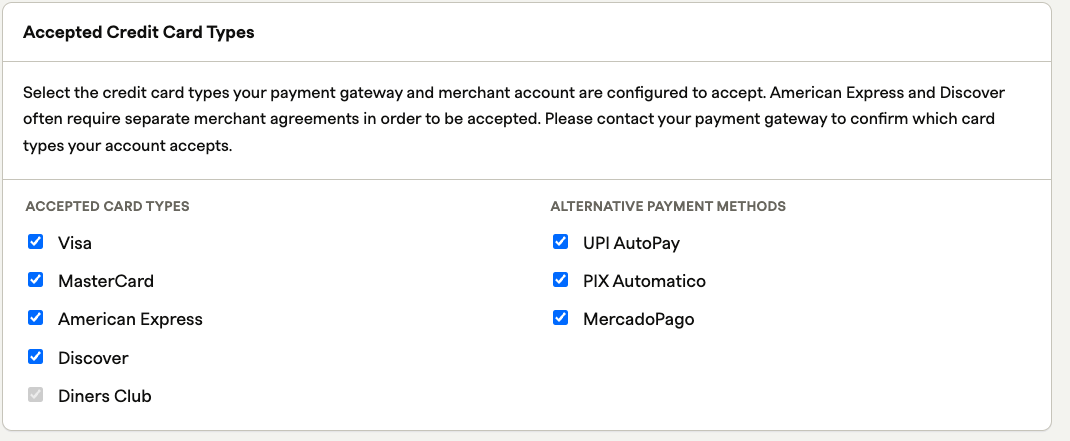
Under Alternative Payment Methods, enable UPI AutoPay, Pix Automatico, and/or Mercado Pago as applicable. For Card payments, choose your applicable brands you wish to support.
Step 4: Enable currencies
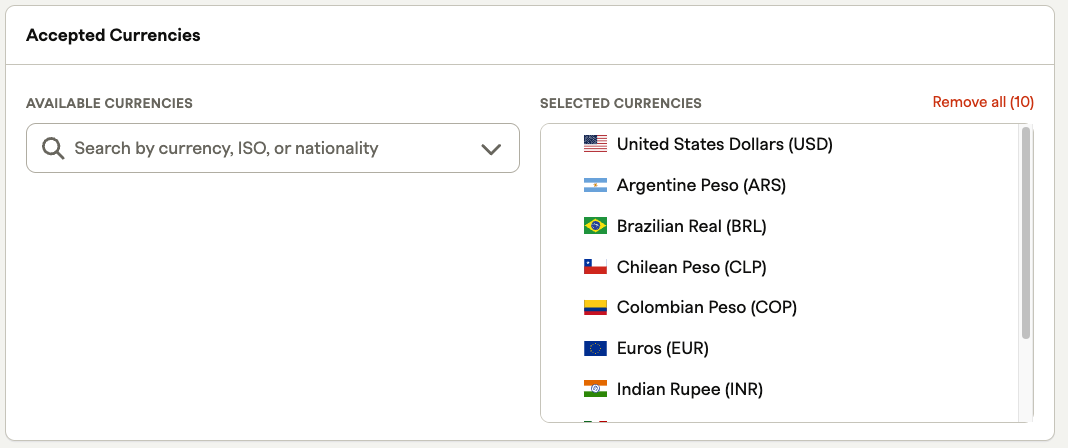
Enable the correct currencies for each payment method:
- UPI AutoPay — INR only
- Pix Automatico — BRL only
- Mercado Pago — BRL, ARS, CLP, MXN, or UYU
- Cards — USD, BRL, ARS, EUR, COP, CLP, MXN, or UYU
Step 5: Select your settlement model
Choose your operational settlement model. Confirm this setting with Ebanx before going live — an incorrect selection will disrupt processing and cause settlement delays.
- Cross-border (default, recommended for most merchants) — Ebanx handles the regulatory last mile on your behalf. You're funded in USD.
- Local settlement (advanced, uncommon) — You handle the regulatory last mile yourself. You're funded in local currency.
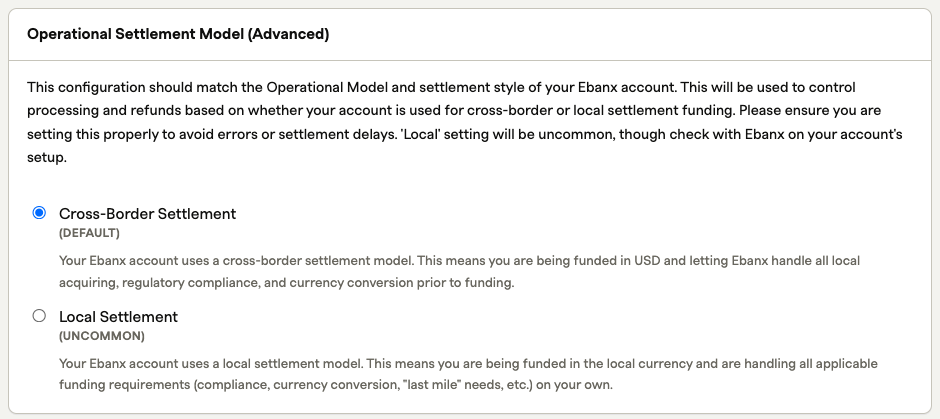
Selecting Local Settlement will display a warning. If you've confirmed with Ebanx that your account uses local settlement, proceed. Otherwise, revert to Cross-Border.

Step 6: Save and enable the gateway
Click Add Payment Gateway. Ebanx will appear in your Production Gateways list in Recurly with a status of Enabled.
Step 7: Test the configuration
Run a test transaction in development mode on your Recurly sandbox site before going live. If your settlement model is set incorrectly, you'll receive an Authentication error.
Step 8: Adjust dunning settings
Step 9: Go live
Enable production webhooks
Ensure Ebanx production webhooks are enabled before launch. See Configuring webhooks in Ebanx below.
Configuring webhooks in Ebanx
Set the Recurly callback endpoint
The state of your Ebanx dashboard (sandbox or production) determines which service URLs are updated. Sandbox Ebanx URLs must point to Recurly sandbox sites; production URLs must point to production Recurly sites.
https://callbacks.recurly.com/ebanx/YOUR_SUBDOMAIN
For EU-hosted Recurly sites, use:
https://callbacks.eu.recurly.com/YOUR_SUBDOMAIN
Subscription behavior
Retries and dunning
Retries are supported for UPI AutoPay, Pix Automatico, and Mercado Pago when your dunning settings are not configured to expire subscriptions immediately. See the Static Retries documentation and each individual payment method's page for method-specific retry behavior.
Card-based payment methods follow our normal retry behavior including Standard or Intelligent retries for merchants who use this enhanced feature.
Transaction, invoice, and subscription status
For UPI AutoPay and Pix Automatico, subscriptions become active immediately, but transactions and invoices remain in a scheduled/processing state until the pre-renewal notification is received and payment is triggered. If a customer doesn't authorize enrollment or payment via their banking app, the transaction will fail and the subscription will be expired upon rejection.
Supported subscription types
- Trial subscriptions with payment data on file
- Non-trial subscriptions
- Renewals
Features not supported with Ebanx
The following are not supported across Ebanx APMs payment methods. These limitations do not include credit card processing.
- Certain payment methods do not support separate Verification, Auth and Capture. This behavior is limited to card-based payments only.
- Subscription upgrades via APMs — mandate amounts and frequency are controlled by the customer's banking app; changes in Recurly can cause declines
- Excluding credit cards, trials without payment data on file is not supported
- Non-Net-0 terms — Ebanx APMs must be charged on the specific day noted in the mandate; terms above Net-0 can cause failures
- One-time transactions — Ebanx payment methods support renewals only
- Account hierarchy — mandates associated with a parent or child account won't apply to recurring subscriptions
- Aggregated or calendar invoicing — combining existing subscriptions is against mandate regulations in India and LATAM banking institutions
- Bundling subscriptions — same restriction as calendar aggregation
- Merchant admin-created subscriptions — MIT subscription enrollments are not permitted per NPCI regulations (India) and LATAM banking institutions, due to pre-debit notification and consumer authentication requirements
UPI / APAC specific:
- Billing info updates must be made by customers directly in the UPI app
FAQs
My UPI subscription is failing. How can I fix this?
Confirm the subscription price hasn't changed without re-engaging the customer. Also make sure the customer is responding to UPI app push notifications — this is especially important for charges above 15,000 INR, which require a two-factor authorization step in the customer's banking app.
I updated my customer's VPA, but the original account was charged. How do I fix this?
Billing info updates through Recurly APIs are not supported with UPI AutoPay. If a customer has a new VPA, they must re-enroll: cancel the current subscription and have the customer re-subscribe using their new VPA. If they only need to update their bank account details, they can do so directly in the UPI app.
A subscription renewal failed and I cannot attempt collection. Why?
Merchant-initiated one-time transactions — including one-time invoices and force collections — are not supported with UPI AutoPay. Contact your customer directly about alternative payment options.
I converted a Pix trial early and it declined. Why?
Pix Automatico transactions have a waiting period between consumer authentication and the date the first renewal charge can be triggered. This date is set in the original signup request and cannot be modified. Avoid forced or early trial conversions for Pix subscriptions.
I'm getting an Authentication Failure, but my API key is correct. Why?
Check two things. First, verify your settlement model is correct — cross-border and local settlement accounts are on different gateway-level environments, so a valid API key sent to the wrong environment will return an Authentication error. Second, confirm whether your key is a sandbox or production key. Production keys in Recurly's sandbox or development mode sites will also trigger this error. Use sandbox keys for development mode, and production keys for sandbox or production sites.
Updated 23 days ago