
Subscription dashboard
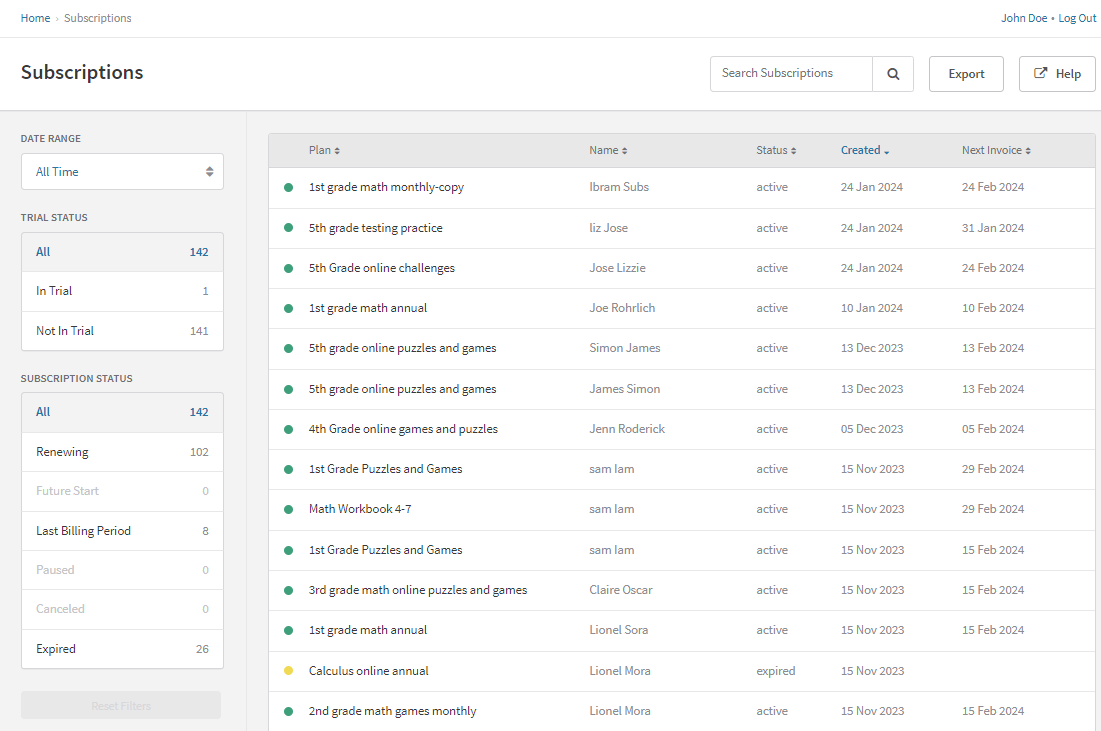
View, organize, and manage all customer subscriptions from Recurly's centralized subscription dashboard — with filters, sorting, and direct access to create, change, postpone, or expire subscriptions.
Prerequisites
- Active Recurly account with administrative permissions
- Basic understanding of Recurly's subscription models and billing cycles
Limitations
- Expired subscriptions cannot be reactivated
Definition
Key details
Subscription statuses
| Status | Description |
| Future | The subscription has a start date that hasn't arrived yet. Customers are not invoiced until the start date. Common in B2B contracts with a specified future commencement date. |
| Active | The subscription is live — either paying or in a trial period. |
| Canceled | The subscription is set to expire at the end of the current term. This occurs when a customer cancels their auto-renewing subscription or when the subscription is designed to end after the current term. A canceled subscription can be reactivated before its scheduled expiration date. |
| Expired | The subscription has churned and cannot be reactivated. Expiry can be involuntary (failed dunning cycle) or voluntary (cancellation). |
Dashboard filters
The dashboard lets you filter and sort by account, plan code, subscription status, creation date, or next invoice date. Filters can overlap and are not mutually exclusive — for example, the Live filter includes both Renewing and Canceled subscriptions.
| Filter | Description |
| All | Shows all subscriptions. |
| Renewing | Active subscriptions set to renew, including paused subscriptions. |
| Future start | Subscriptions scheduled to activate on a future date. |
| Last billing period | Subscriptions in their final billing cycle, set to expire at the end of the current term. |
| Paused | Active subscriptions that are currently paused and will not generate invoices. |
| Canceled | Subscriptions that will end at the close of their current term. |
| Expired | Subscriptions that are no longer active. |
| Trial | Active subscriptions currently in a trial phase. |
| Paying | Active subscriptions that have moved past the trial period. |
Subscription actions
Enroll a customer in a plan — a single customer can hold multiple subscriptions to the same or different plans.
Upgrade, downgrade, or modify invoicing method, effective immediately or at the next term renewal.
Shorten or lengthen a customer's current billing period, useful for putting a subscription on pause.
Cancel a subscription at the next billing date, or terminate it immediately mid-cycle — both result in the subscription expiring.
Updated 5 months ago