
Payments Hub: Payment processing dashboard
Analyze payment failure patterns and authorization rates with granular insights into gateway performance, card BIN success, and decline reasons. This guide helps you distinguish between hard and soft declines to optimize your recovery strategy and identify underperforming routing paths.
 Scale · Payments Hub
Payment processing dashboard
Payment processing is where you find out why payments are failing — broken down by gateway, payment method, card BIN, and decline reason.
Navigation Menu
 Navigate Home
 Payment processing dashboard
Payment processing
A deep-dive into your payment success rates and decline patterns. This is the most actionable dashboard in Payments Hub — it tells you not just what is happening, but where and why.
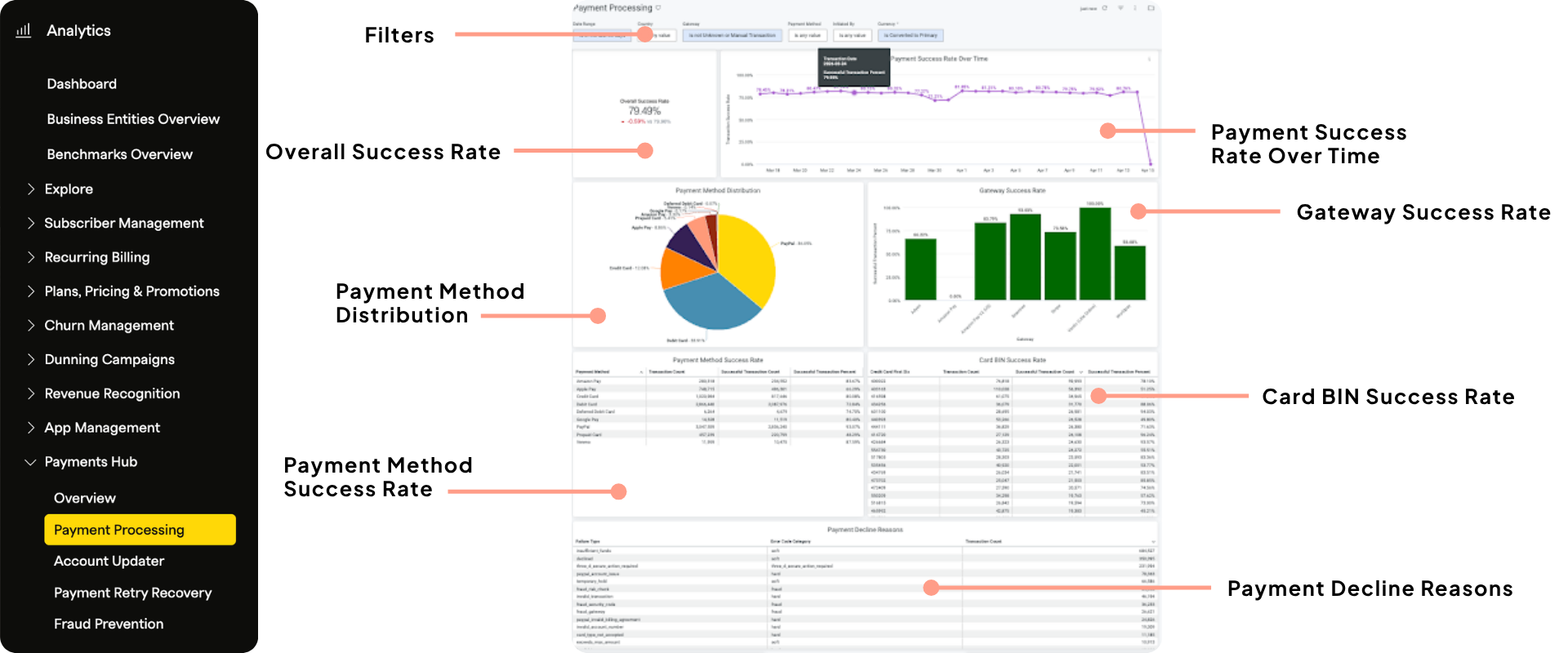
What's on this dashboard
Overall success rate + trend — Your blended success rate across all transaction types, with a time-series chart showing how it has moved over the period.
Payment method distribution — How transactions are split across your payment methods.
Gateway success rates — Side-by-side comparison of authorization rates per connected gateway. Useful for spotting underperforming routing paths.
Payment method success rates — Success rate per payment method, independent of gateway.
Card BIN success rates — Success rates broken down by card BIN (the first 6 digits of a card number). Identifies specific card issuers with high decline rates.
Payment decline reasons — A ranked table of your top decline reasons, categorized as hard or soft, with transaction count and volume.
Key concepts to know
What is a card BIN?
BIN stands for Bank Identification Number — the first 6 digits of a card. It identifies the issuing bank and card type. If a specific BIN has a very low success rate, it may indicate a problem with a particular bank's authorization behavior. You may be able to block that BIN via your gateway settings.
Hard vs. soft declines
A soft decline is potentially recoverable — the card may succeed if retried at a different time (e.g., insufficient funds). A hard decline requires intervention — the payment won't succeed without a change like a new card (e.g., invalid card number). Knowing which type you're dealing with determines your next step.
Payment processing shows data at the payment level — what's happening "on the wire." This is more granular than your standard Recurly billing dashboard, which includes dunning and subscriber re-entries. Some numbers may look slightly different between dashboards. Both are correct — they're measuring different things.
Not sure what a specific decline message means? This reference doc explains the most common codes and how Recurly responds to each. Read about decline codes →
Activity: explore payment processing
Payment processing activity
Questions about your decline data?
Bring your payment processing questions to Global Office Hours. Our CSMs can help you interpret your decline patterns and identify the best next steps for your specific setup.
Register for Office Hours →Resources
Updated 3 months ago