
REST API keys
Generate, regenerate, revoke, and secure REST API keys in Recurly to authenticate external applications and integrations with your account.
Prerequisites
- A Recurly account with a role that includes the Integration permission
- Familiarity with API integrations and HTTP Basic Authentication
Limitations
- API keys grant full access to your Recurly account — protect them the same way you would a password
- Exposing API keys publicly can compromise account security
Definition
Key details
How API keys work
An API (Application Programming Interface) acts as a communication channel between software applications. An API key is the credential Recurly uses to identify and authenticate the requesting application — similar to a password, but for programmatic access.
Base64 encoded API keys
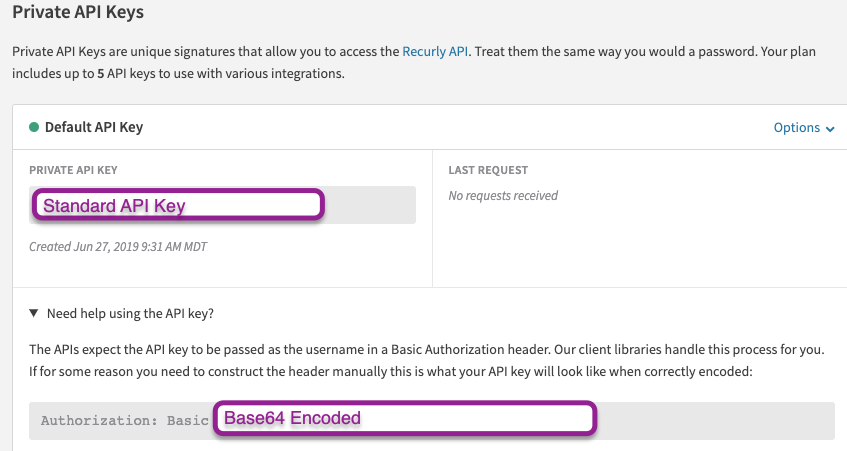
To find your Base64 encoded API key, go to Integrations → API Credentials and expand "Need help using the API Key?". The characters following Authorization: Basic are your encoded key.
API key security best practices
API keys grant full access to your Recurly account. Treat them with the same care as sensitive passwords.
- One key per integration — Assign each integration its own API key with a descriptive label. If a key is compromised, you can disable just that key without affecting other integrations.
- Never expose keys publicly — Don't include API keys in screenshots, videos, or documentation. Blurring isn't sufficient — use your graphics program's cut function to remove the data entirely.
- Share keys securely — If a key needs to be shared, generate a new labeled key so it can be disabled if needed. Never email an API key — a compromised email account would give an attacker access to your Recurly account.
- Don't embed keys in client-side code — Never store or expose API keys in JavaScript, mobile applications, or native executables. A bad actor can decompile your application and extract the key.
- Revoke access with users — If you revoke a user's access to Recurly, any API keys they created are automatically removed from your account.
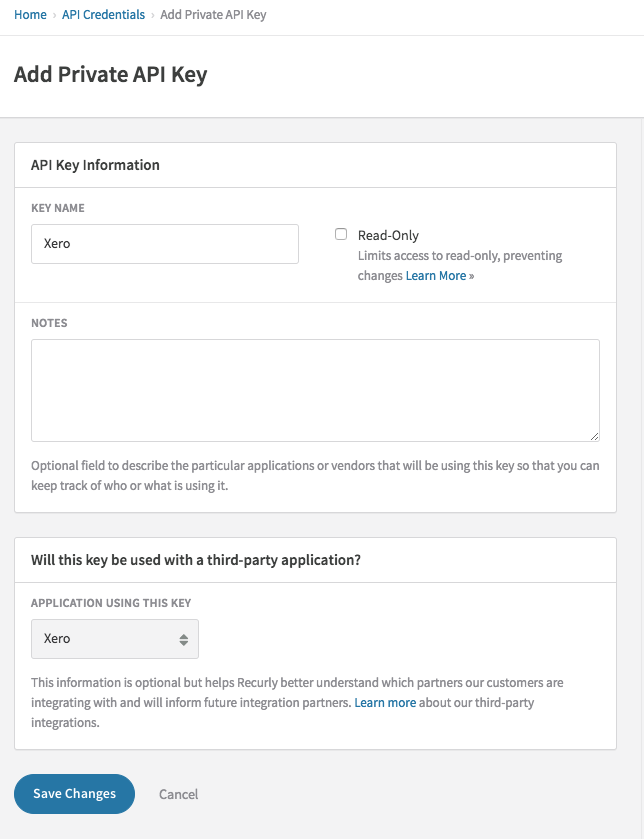
Generate an API key


Regenerate an API key
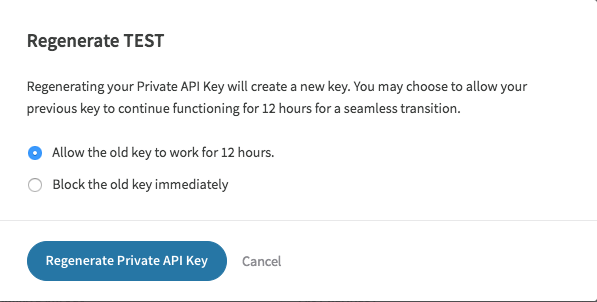
A key can be regenerated in two ways: the old key remains active for a 12-hour window, or it's disabled immediately.
Regenerate immediately — The old key stops working right away and Recurly issues a new key. Update all applications using the old key to avoid losing access.
Regenerate after 12 hours — The old key remains valid for 12 hours while Recurly generates a new key. This gives you time to update applications before the old key expires. During the 12-hour window, existing integrations continue working without interruption.
Revoke an API key
Revoke a key if you believe it may be compromised or if it's no longer needed.
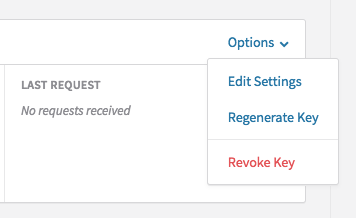
Immediately revoke — The key is deleted and stops working instantly. No new key is created. All applications using that key immediately lose access.
Regenerate immediately — The old key stops working and a new key is issued. Update applications with the new key to restore access.
Regenerate after 12 hours — The old key remains valid for 12 hours while a new key is generated. Use this window to update your applications.
FAQs
What is an API key in the context of Recurly?
An API key is a unique identifier that allows external applications to authenticate with and interact with the Recurly API. It works like a specialized password that Recurly uses to verify and authorize the requesting program.
How often should I update my API keys?
There's no required frequency, but it's good practice to rotate API keys periodically — and immediately if you believe a key may have been exposed or compromised.
Can I have multiple API keys for different integrations?
Yes, and it's recommended. Using separate keys per integration makes it easier to identify which key belongs to which application, and lets you revoke or rotate a single key without affecting others.
What happens when I revoke an API key?
The key stops working immediately. Any application or integration using that key loses access to Recurly until a valid key is provided.
Can I temporarily disable an API key without revoking it?
No. The available options are to revoke the key immediately or regenerate it. To temporarily restrict access, regenerate the key and hold back distributing the new key until you're ready to restore access.
How do I keep my API keys secure?
Treat API keys like sensitive passwords — never expose them publicly, don't embed them in client-side code, share them only through secure channels, and assign one key per integration so individual keys can be revoked without disrupting everything else.
Updated 3 months ago