
Overview dashboard
The Overview provides a high-level summary of payment performance, geographic distribution, payment method mix, and the health of payment recovery services.
Payments hub overview · MDX
Prerequisites
- You must have the Analytics user role permission.
Definition
Key benefits
Key details
General filters (top left corner)
- Date range — Adjust the time interval for your data to track and analyze long-term trends. The default view is typically 30 days.
- Country — See data specific to your country, offering relevant insights and comparisons.
- Gateway — Segment and analyze data by available payment processors — look at all gateways together or examine one at a time to understand where issues are happening.
- Payment method — See the breakdown of failed payments by the method your customers use, and select specific payment options to analyze.
- Initiated by — Filter to CIT (customer-initiated) or MIT (merchant-initiated) transactions. This classifies each transaction by who triggered the payment, not by whether it's a first charge or a renewal — see CIT vs. MIT transactions below. CIT payments are more likely to involve extra authentication, such as a 3DS challenge, because the customer is present.
- Currency — Filter by the currencies available for your site's geo-location.
Global payments volume distribution
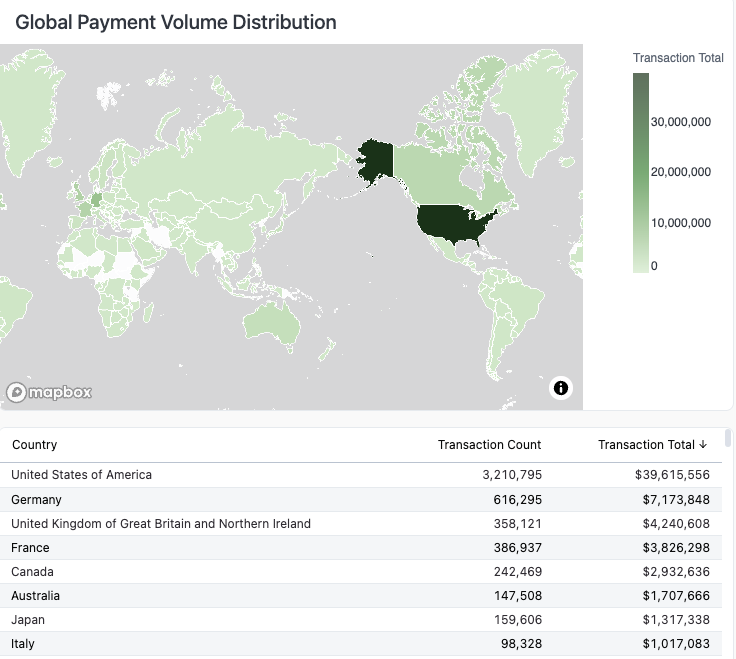
This map visualizes payment distribution by volume by region — darker shades indicate higher volume, making it easy to spot your strongest markets and revenue concentration at a glance, as well as where you need to focus your expansion efforts.
Payment method distribution
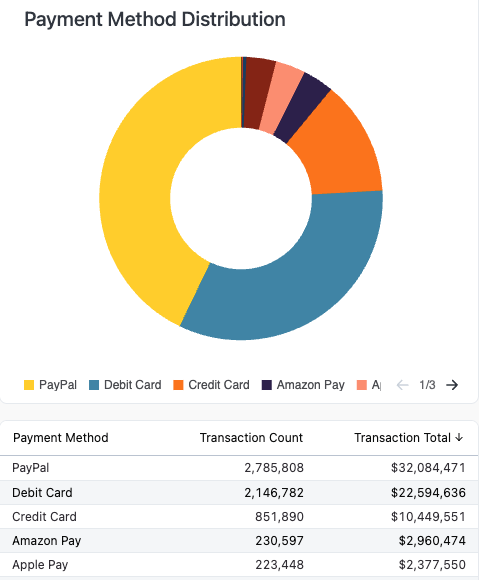
This pie chart breaks down your transactions by payment method, showing both the count and associated volume for each, giving you a clear picture of how revenue is distributed across payment types. Understanding your payment method mix helps you identify where customers prefer to pay, so you can prioritize optimization efforts and negotiate better rates where it matters most.
Overall success rate
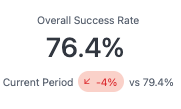
This card displays your total success rate as a single, at-a-glance percentage, paired with a comparison to the previous time period, so you can immediately see whether performance is improving or declining.
CIT vs. MIT transactions
The Initiated by filter and the CIT and MIT success rate cards below classify every transaction by who triggered it — not by whether it's a first charge or a renewal.
CIT (Customer-Initiated Transactions) happen while the customer is present and actively engaged: sign-ups, checkout, and dunning click-throughs where a customer updates or re-enters their card and the retry runs as a result of that action. Because the customer is in session, these transactions tend to see higher success rates and are more likely to trigger extra authentication, such as a 3DS challenge.
MIT (Merchant-Initiated Transactions) run automatically, without the customer in session: scheduled subscription renewals and recurring charges, along with the automatic retries Recurly runs against a failed invoice. This is where recovery tools like Account Updater and intelligent retries have the most impact, which is why the MIT success rate is a useful proxy for the health of your renewals.
So a card updated by the customer during dunning — where they re-enter their details and that submission triggers the charge — counts as CIT, while an automatic scheduled retry of the same invoice counts as MIT.
CIT success rate
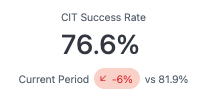
This card displays your Customer Initiated Transaction (CIT) success rate — covering payments where the customer is present, such as sign-ups, checkout, and customer-driven card updates during dunning — as a single, at-a-glance percentage, paired with a comparison to the previous time period, so you can immediately see whether performance is improving or declining.
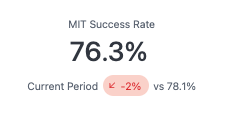
MIT success rate
This card displays your Merchant Initiated Transaction (MIT) success rate — typically reflecting the health of your subscription renewals — as a single, at-a-glance percentage, paired with a comparison to the previous time period, so you can immediately see whether performance is improving or declining.
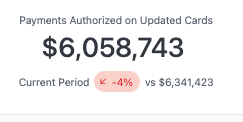
Payments authorized on updated cards
This card displays the total dollar amount of revenue retained through Account Updater — reflecting payments saved as a result of an automated card update — alongside a comparison to the previous time period, so you can immediately see whether performance is improving or declining.
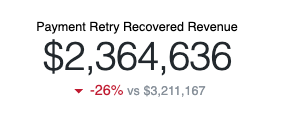
Payment retry recovered revenue
This card displays the total dollar amount recovered through Payment Retries, representing renewal revenue that would have otherwise been lost to failed transactions, paired with a comparison to the previous time period, so you can immediately see whether performance is improving or declining.
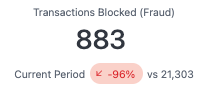
Transactions blocked (fraud)
This card displays the total count of blocked fraudulent transactions, paired with a comparison to the previous time period, so you can immediately see whether performance is improving or declining.
Updated about 2 months ago