Account updater

Tracks retained revenue through automated card updates. Monitor how the Account Updater service prevents payment failures by keeping payment methods current.

Overview

Required plan

This feature or setting is available to all customers on any Recurly subscription plan.

Prerequisites

  • Users must have analytics user role permission.
  • Site must have Account Updater enabled.

Definition

The Account Updater dashboard gives a real-time view of card update activity across your payment ecosystem, along with the lift provided through successful payments processed on updated cards.

Key benefits

  • Measure Revenue Protection - The "Payments Authorized on Updated Cards" metric directly quantifies how much revenue was saved by processing successfully on updated cards.
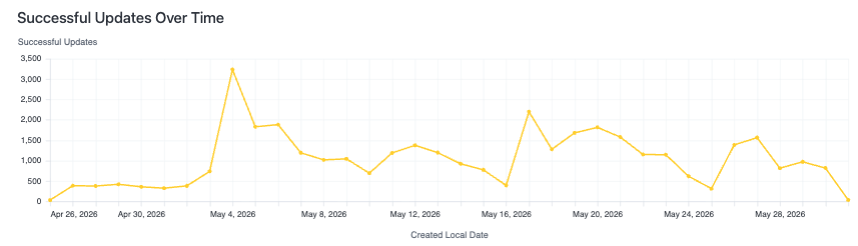
  • Catch Problems Early - The two time-series charts (Updates Over Time and Successful Payments Over Time) let you spot sudden drops in activity before they compound into significant revenue loss. A dip in updates that isn't addressed quickly can cascade into failed payments days, weeks, or even months later.
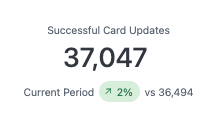
  • Benchmark Performance Period-Over-Period - The KPI tiles for both Successful Card Updates and Payments Authorized include comparison values and percentage changes against the prior period, making it easy to assess whether the service is trending in the right direction.
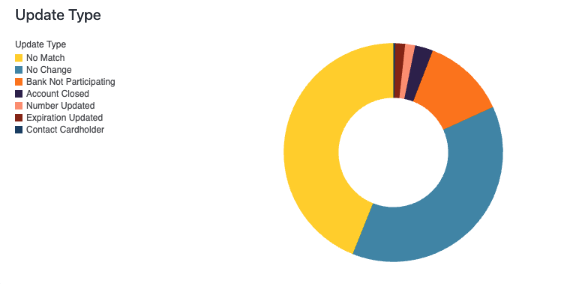
  • Prioritize Outreach and Card Management - The Update Type breakdown tells you whether customers are primarily getting new card numbers or just new expiration dates — useful for anticipating how disruptive card changes will be to your payment flows, since full number changes carry more risk of payment failure.
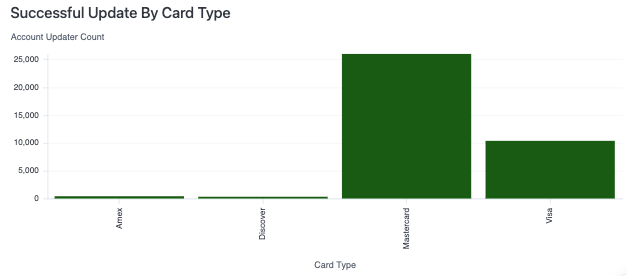
  • Optimize Network Relationships - The Updates by Card Type chart reveals which card networks are driving the most update activity. If a particular card scheme like Discover shows near-zero updates, it may signal a gap in your Account Updater enrollment or coverage worth investigating with your payment processor.

Key details

General Filters (Top Left Corner)

  • Date Range: Adjust the time interval for your data to track and analyze long-term trends. The default view is typically 30 days.

  • Card type: This filter allows filtering by credit card type.

Successful Card Updates

The total number of cards successfully updated in the selected period, along with a comparison to the previous time period.
Successful Card Updates Over Time

This line chart plots the daily count of successful card updates in the time period.
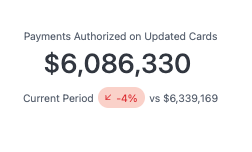
Payments Authorized on Updated Cards

The total value of payments successfully authorized on cards that were updated through Account Updater in the time period, with a comparison to the previous time period.
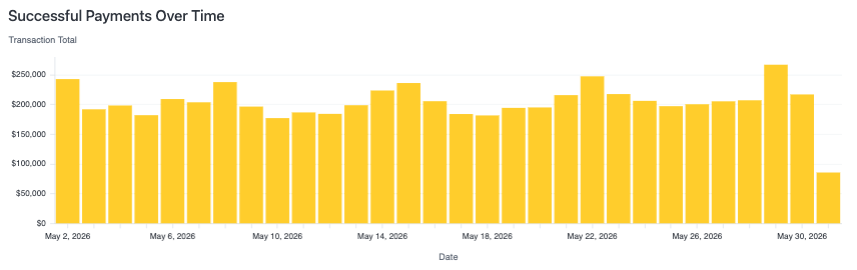
Successful Payments Over Time

This bar chart shows the transaction volume of successful payments made on updated cards in the time period.
Update Type

This pie chart breaks down the successful counts of card number vs card expiration date updates.

Updates by Card Type

This bar chart shows the distribution of successful card updates across card networks.