
Payments Hub: Overview dashboard
Get a high-level summary of your payment health with the Overview dashboard, featuring real-time data on success rates, global volume, and payment method distribution. Learn to use interactive filters and distinguish between Customer-Initiated (CIT) and Merchant-Initiated (MIT) transaction performance.
 Scale · Payments Hub
Overview dashboard
The Overview dashboard is your starting point — a high-level summary of your payment health, with filters to drill into exactly what you need.
Navigation Menu
 Navigate Home
 Overview
 Back to Path Start
Overview dashboard
Your top-level payment health summary. This is the first thing you see when you open Payments Hub — a single view of how your payments are performing across all gateways and methods.
Overview dashboard walkthrough
What's on this dashboard
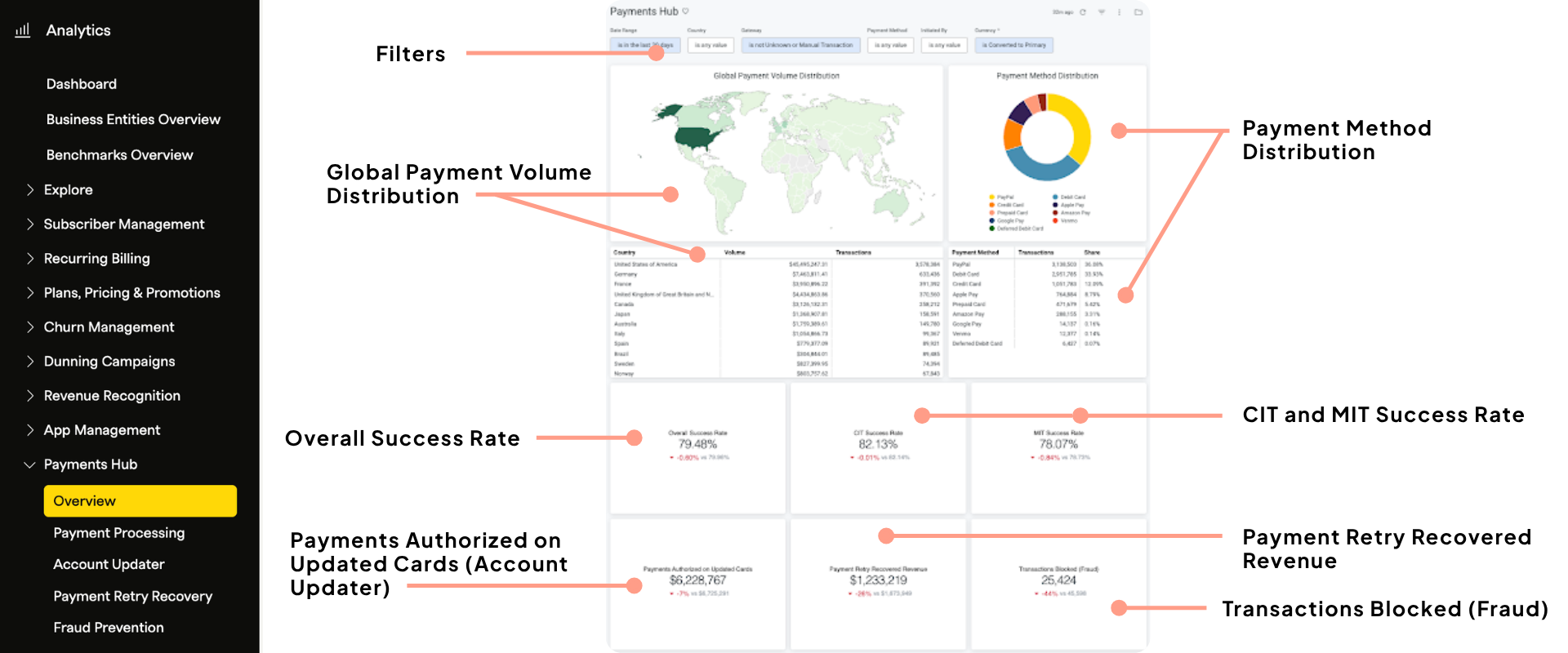
Global payment volume distribution — A heat map showing where your payments are coming from by billing country. Darker shades = higher volume.
Payment method distribution — A pie chart showing the share of transactions by payment method type (credit card, PayPal, Apple Pay, etc.).
Overall success rate — Your blended payment success rate across all methods and gateways, with a comparison to the previous time period.
CIT success rate — Customer Initiated Transactions: payments where the customer is actively in session (sign-ups, checkout clicks, dunning re-entries).
MIT success rate — Merchant Initiated Transactions: automatic recurring renewals and scheduled payments.
Account Updater tile — Revenue authorized on automatically updated cards in the period. Visible to Account Updater enabled merchants only.
Payment Retry Recovery tile — Revenue recovered on failed invoices in the time period. Includes all success reasons: retries, account updater, backup gateway, new payment method from dunning, etc.
Fraud blocking tile — Count of transactions blocked by Kount. Visible to Kount-enabled merchants only.
If you don't have Account Updater or Kount enabled, those tiles will display a "Learn More" prompt instead of data. This is expected — the dashboard is aware of which features you have active.
Learn more about Kount fraud prevention → or learn what Account Updater means and how to make it work for you via the Account Updater learning path →
CIT vs. MIT — what's the difference?
CIT — Customer Initiated
The customer is present. Includes sign-up transactions, checkout pages, and dunning click-throughs where a customer re-enters their card. These typically have higher success rates because the customer is actively engaged.
MIT — Merchant Initiated
Automatic payments. Includes all scheduled subscription renewals and recurring charges that happen without the customer in session — which is why tools like Account Updater and intelligent retries matter most here.
Using the filters
All filters sit at the top of the dashboard and apply to the entire page. Every chart, table, and metric updates when you apply one. You can also click directly on the map or pie chart to filter by that selection.
Date range — Defaults to the last 30 days. Adjust to any custom range.
Country — Filter by billing country on the transaction.
Gateway — Isolate data for one or more connected gateways.
Payment method — Focus on a specific payment type (e.g., Apple Pay, PayPal).
Initiated by — Filter to CIT only or MIT only.
Currency — Filter to a specific currency.
Activity: explore the Overview
Overview activity
Want to talk through your numbers?
Join Global Office Hours to walk through your Overview dashboard with a Recurly Customer Success Manager. We can help you understand what your metrics mean and what to prioritize.
Register for Office Hours →Updated 3 months ago