
3DS Processing
See how your payments perform through 3D Secure and the issuer's final decision, broken out by outcome, gateway, and country.
Limitations
- The dashboard shows 3DS outcomes on individual transactions. It doesn't yet show how 3DS processing on an initial signup affects the approval rate of future recurring charges — that comparison is planned for a future release.
- A frictionless-versus-full-challenge breakdown isn't available yet, since not all gateways report that distinction consistently.
Definition
Key benefits
Key details
Accessing the dashboard
The 3DS processing dashboard is a new option under Analytics > Payments Hub in Recurly Admin. It requires no setup — if your account processes 3DS transactions, the dashboard is available to you automatically.
Filters
All metrics, trends, and grids respond to the filters at the top of the dashboard:
- Date range — the period the dashboard reports on.
- Country — cardholder country.
- Gateway — the payment gateway processing the transaction.
- Currency — transaction currency.
- Initiated by — customer-initiated (CIT) or merchant-initiated (MIT) transactions. Defaults to Customer Initiated.
- Card brand — for example, Visa or American Express. Defaults to any value.
3DS challenges and completions
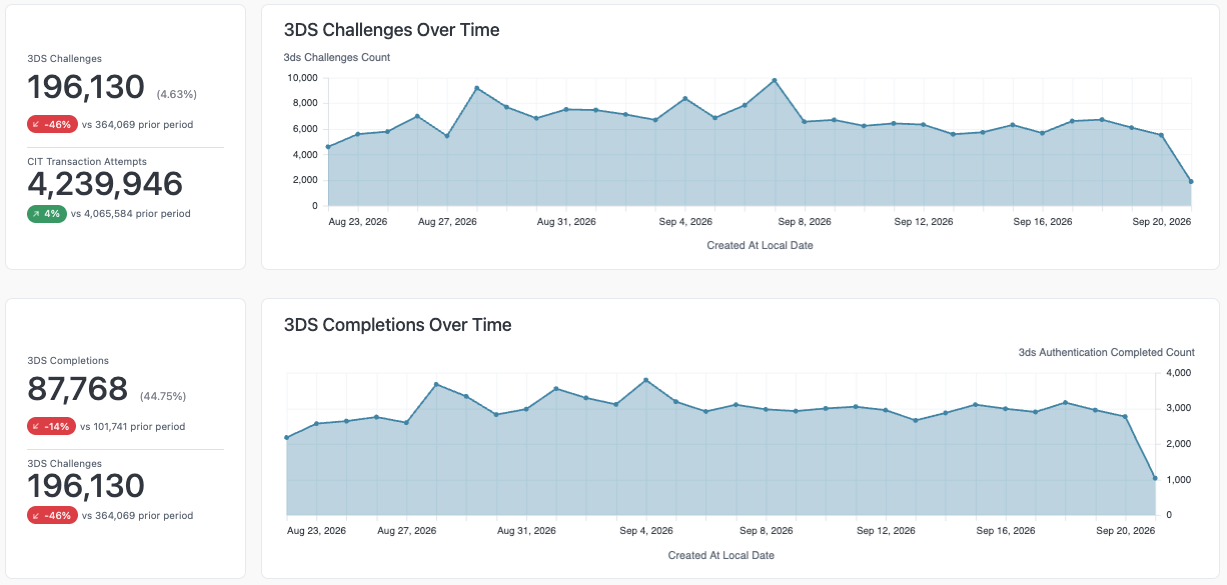
At the top of the dashboard, two metrics summarize your overall 3DS activity:
- 3DS challenges — how many of your transaction attempts were challenged for 3DS, and what share of total attempts that represents, with a daily trend. This count is inferred as the sum of the eight results categories described below, since there's no single direct counter for it.
- 3DS completions — how many of those challenges returned a 3DS result (rather than a technical issue), and the completion rate as a share of challenges, with a daily trend.
3DS outcome breakdown
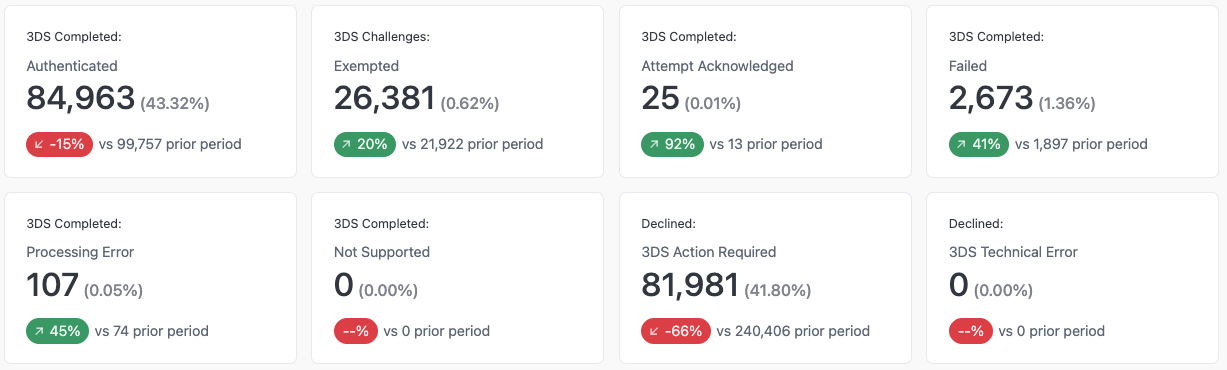
Every 3DS challenge resolves to exactly one of eight categories. Six are result states returned when a 3DS check completes; two are decline reasons used when there is a technical issue. Together, the eight always add up to 100% of your challenges.
| Category | Type | What it means |
| Authenticated | 3DS result | The 3DS check passed, and a result was returned. |
| Exempted | 3DS result | 3DS was exempted — for example, a granted exemption or a recurring/MOTO transaction — and a result was still recorded. |
| Attempt acknowledged | 3DS result | The issuer acknowledged the attempt without full authentication. |
| Failed | 3DS result | The 3DS check ran and customer was unable to authenticate their identity. |
| Processing error | 3DS result | A technical error occurred during the 3DS check. This isn't the customer's fault. |
| Not supported | 3DS result | 3DS wasn't supported for this card or issuer. |
| 3DS action required | 3DS decline reason | Declined because 3DS was required but never completed, and no result was returned. |
| 3DS technical error | 3DS decline reason | Declined because of a technical error during authentication, with no usable result returned. |
Each category shows a count, its share of challenges, and how it's trending versus the prior period.
Gateway and country detail
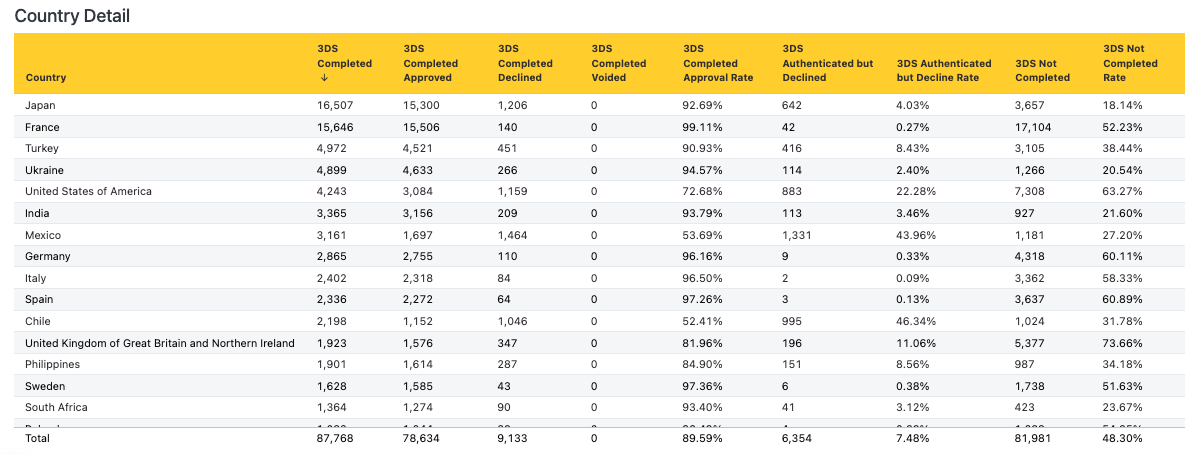
Two grids break performance down by where the payment ran — Gateway detail and Country detail — using the same set of columns:

| Column | What it shows |
| Completed | Challenges that returned a 3DS result. |
| Approved | Successfully authenticated transactions the bank approved. |
| Declined | Successfully authenticated transactions the bank declined. |
| Voided | Successfully authenticated transactions the bank voided. |
| Approval rate | Approved ÷ (approved + declined). Voided and pending transactions are excluded. |
| Authenticated but declined | Transactions that passed 3DS processing but were still declined by the bank. |
| Authenticated decline rate | Authenticated-and-declined ÷ (authenticated and either approved or declined). |
| Not completed | Challenges that never returned a 3DS result. |
| Not completed rate | Not completed ÷ (completed + not completed). |
3DS outcome versus bank decision
These tables exist because 3DS processing outcome and the bank's authorization outcome are two separate concepts. A consumer can authenticate successfully through 3DS and the transaction still be declined by the issuing bank for reasons that have nothing to do with authentication — insufficient funds, fraud rules, or card restrictions, for example. When you see a high authorization decline rate for a gateway or country, that's a bank-side issue to investigate with your acquirer or issuer, not a 3DS problem.
Zero-state
If your account has no 3DS activity in the selected date range, the dashboard shows a message instead of empty charts and grids, so you know there's nothing to troubleshoot.
FAQs
Why does my 3DS challenge count say 'inferred'?
There's no single counter that directly tracks 3DS challenges. Instead, the dashboard calculates it as the sum of all eight outcome categories — the six 3DS result states plus the two 3DS-specific decline reasons. We label it as inferred so it's clear how the number is derived.
Why don't the three rate columns in the gateway and country grids add up to 100%?
Each rate uses a different denominator. Approval rate compares approved to approved-plus-declined. Authenticated decline rate looks only at authenticated transactions. Not-completed rate compares completed to completed-plus-not-completed. They answer three different questions, so there's no reason for them to sum to one total.
My gateway shows very little 3DS data of its own — is that a bug?
Not if you're on Checkout.com or Nuvei. On these gateways, Recurly runs 3DS challenge through a stand-alone 3DS service rather than a gateway-specific SDK, though the results data is sent to the gateway. Depending on the gateway, they may or may not display that information, so our 3DS dashboard can be your source of truth.
What's the difference between 'Failed' and '3DS action required'?
Failed means the 3DS check ran and the consumer wasn't able to authenticate — this was the final result of that interaction. 3DS action required means no result ever came back at all, usually because the challenge screen never rendered or the customer didn't complete it. Both typically result in a decline, but only one of them reflects an actual 3DS outcome. Note: Banks can sometimes approve transactions with a failed 3DS result, though quite rare.
Can I see how 3DS on a customer's first purchase affects later renewal approvals?
Not yet. Recurly stores the Network Transaction ID (NTID) and Transaction Link Id (TLID) from the original customer-initiated transaction and sents these values to later merchant-initiated renewals, which will make that comparison possible in a future release.
Updated 20 days ago