
Recovered revenue
Learn how Recurly's Recovered Revenue dashboard tracks revenue reclaimed from declined invoices across each recovery process.
Prerequisites
- Users must have Analytics user role permission.
Definition
- Expiration date changes: Automatically updates expiration dates for continuous invoices.
- Account updater: Refreshes payment details to prevent transaction failures.
- Intelligent retries: Strategically retries failed invoices to maximize recovery.
- Backup payment method: Automatically retries failed payments using a backup payment method.
- Customer updates: Lets customers update their payment method to resolve failed payments.
- External recovery: Recovers failed invoices using systems outside of Recurly.
- Forced recovery: When merchants manually initiate a collection attempt on a past-due invoice.
Key details
The Recovered Revenue dashboard gives you insight into how much revenue you've recovered through Recurly's system. By monitoring involuntary churn from declined invoices, it uses several mechanisms — including expiration date changes, account updater, and intelligent retries — to help maximize your rate of paid invoices.
How recovery works
- Expiration date changes: Updates the expiration date on an account's billing information, so invoices and subscriptions continue without interruption. This reduces the risk of service disruption and potential revenue loss.
- Account updater: When enabled, checks for credit card updates with card providers before a renewal, or when a one-time invoice or resubscribe results in a hard decline. Keeping payment details current helps reduce failed invoices and maintain steady revenue.
- Intelligent retries: Recurly's retry logic, which times retry attempts strategically to maximize the chance of turning a failed invoice into a successful one and reduce involuntary churn.
- Backup payment method: Securely stores an alternative payment method, so service continues uninterrupted even if a customer's primary payment method fails.
- Customer updates: When a customer updates their payment method — often prompted by a dunning email or another in-app notification — Recurly attempts collection on the failed automated invoice. This doesn't include manual invoices.
- External recovery: Applied when another system successfully collects on a failed invoice and sends an update to Recurly.
Features and benefits
The Recovered Revenue dashboard gives you an at-a-glance view of your revenue KPIs, a bar chart showing recovered revenue, and a chart breaking recovered revenue down by process — a complete picture of your business's health and Recurly's impact on revenue recovery.
Filter by invoice creation date or invoice closed date to track the success of automated invoice recovery, and view amounts by currency — the default includes all invoices converted to your primary currency. On the time graph, expect the current month to start low and rise as the month progresses and more invoices are recovered.
Recovered revenue KPI
These indicators give you a real-time snapshot of your revenue recovery, comparing current payment amounts to totals from last month, the previous month, three months ago, and a year ago. Use them to spot trends, track progress, and proactively manage involuntary churn.
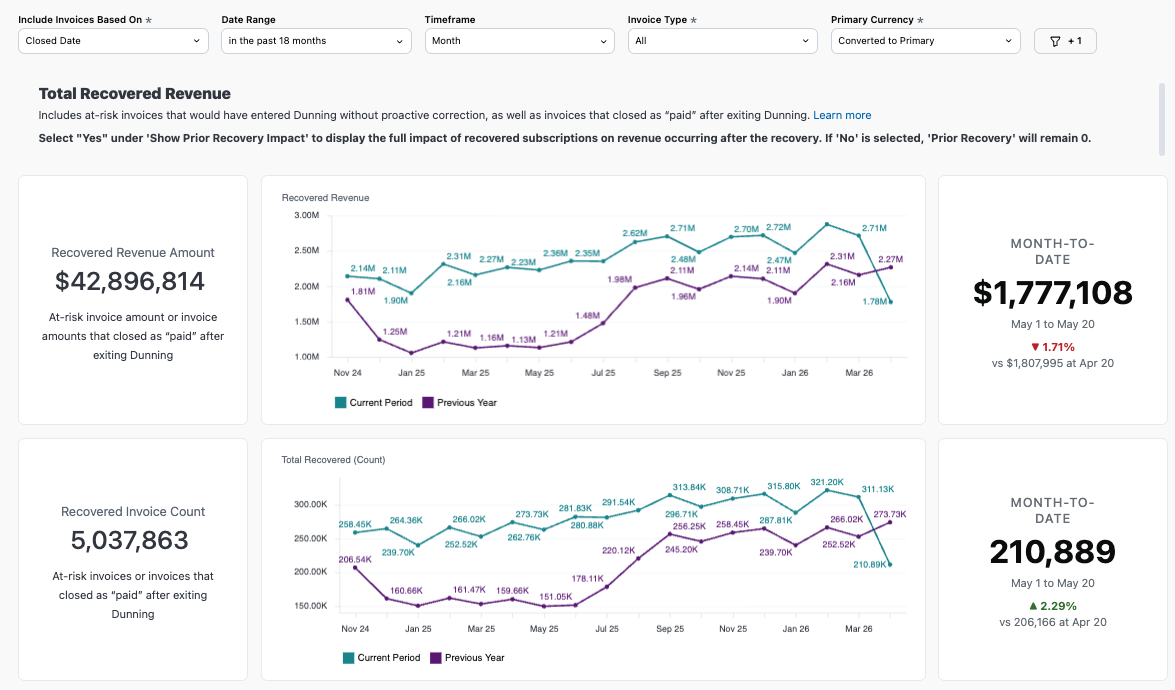
Recovered revenue chart
This bar chart shows the revenue Recurly has helped you recover by reducing involuntary churn from declined automated invoices — a clear view of Recurly's financial impact, useful for forecasting and resource planning. View it as total revenue saved or as a count of invoices recovered.
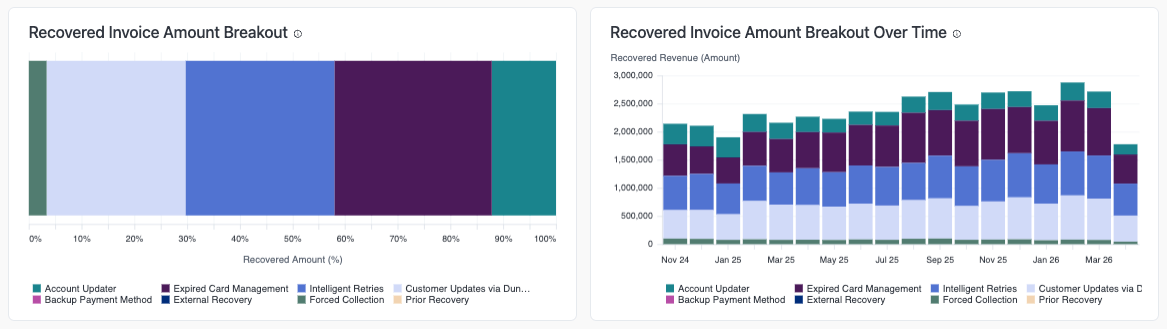
Recovered revenue detail
This breakdown shows how much revenue each process recovers — Expired Card Management, Account Updater, Intelligent Retries, Backup Payment Method, Customer Updates, and External Recovery — so you can see which tools are most effective and focus your efforts accordingly. View it as total revenue saved or as a count of invoices recovered.
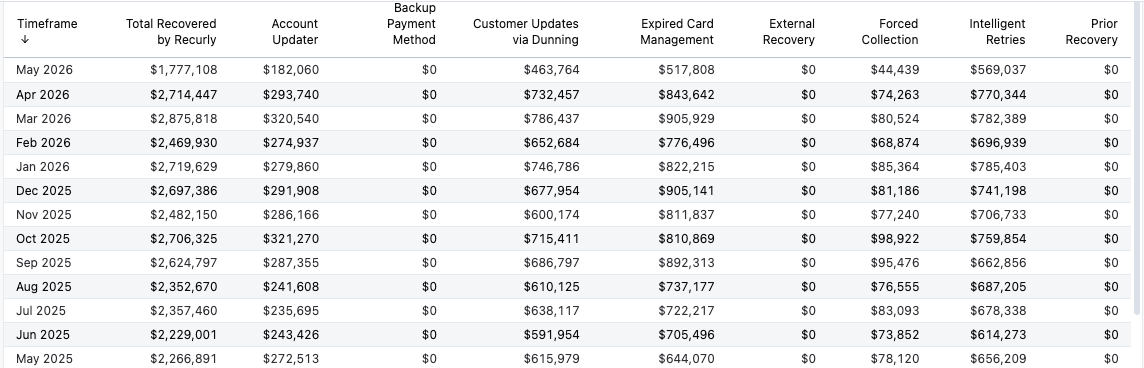
Understanding these features helps you get the most out of them, reducing involuntary churn and strengthening your revenue recovery.
Related dashboards
Explore related dashboards to learn more about how Recurly helps prevent churn and improve your recovered invoice rate. Review your dunning campaign strategy too, to keep increasing your dunning recoveries.
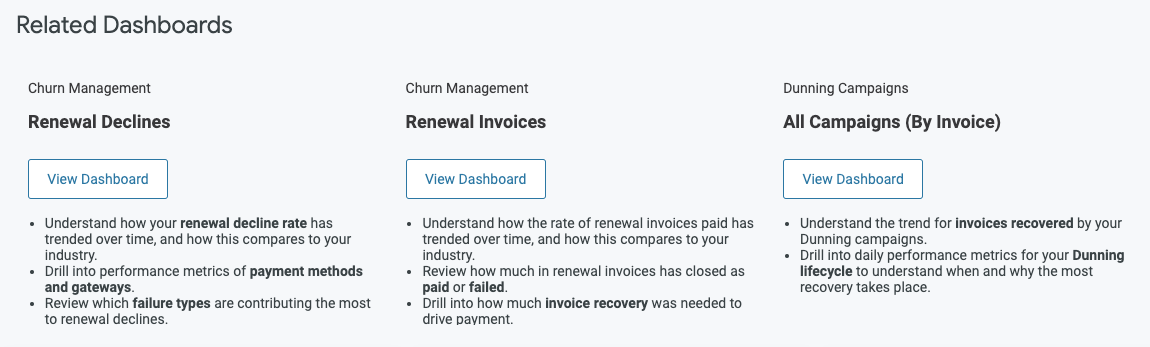
Updated 2 months ago