
Chargeback management for cards
Manage card chargebacks in Recurly — automatically create refund invoices, expire subscriptions, and configure gateway-specific chargeback webhooks for Adyen, Chase Orbital, and Stripe.
Definition
Supported gateways
- Adyen
- Chase Orbital
- Stripe
Additional gateways will be supported in the future.
Recurly chargeback process
How to enable
Request the feature
Contact Recurly Support or your account manager to enable chargeback management for your account.
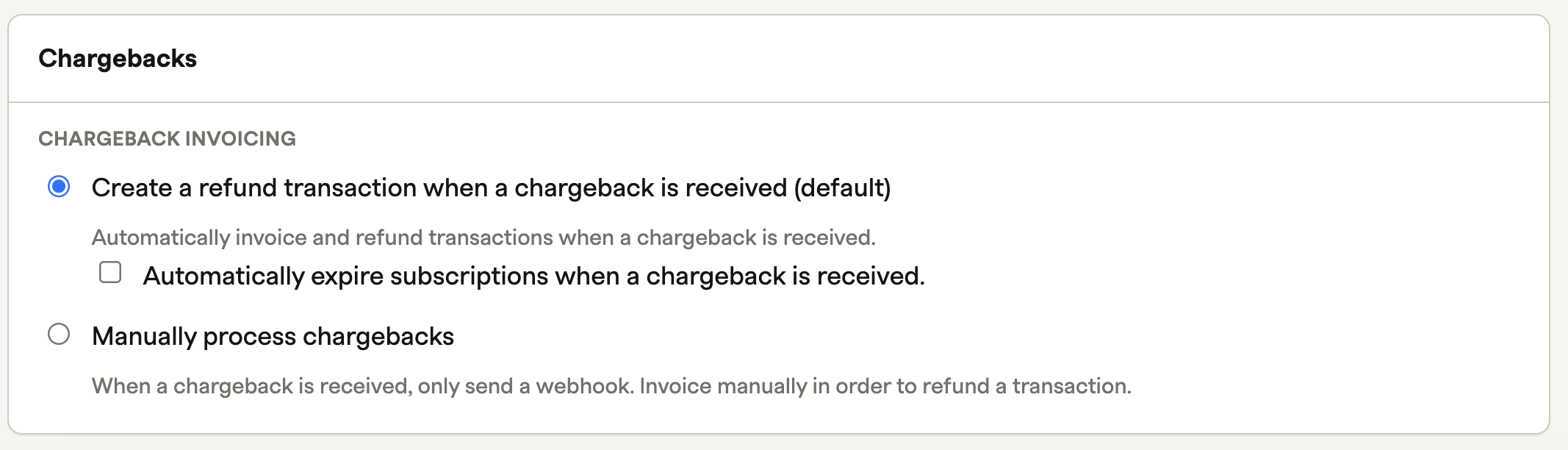
Gateway-specific setup
Adyen
Enable Adyen webhooks in Recurly
Follow the Adyen notifications configuration guide and enable the following webhook types: CHARGEBACK, SECOND_CHARGEBACK, DISPUTE_DEFENSE_PERIOD_ENDED.
Enable the CHARGEBACK_REVERSED webhook event
Enable the originalReference for CHARGEBACK_REVERSED events in Adyen. See Adyen dispute notification setup.
Manage disputes in Adyen
Certain webhook statuses require action in the Adyen Dashboard to trigger. For example, to receive a webhook with disputeStatus: "Accepted", you must accept the chargeback in your Adyen Dashboard. See managing Adyen disputes.
Chase Orbital
To enable chargeback management with Chase Orbital, you need to grant Recurly access to Chase chargeback file reports. Contact your Chase representative — they will set up access using Recurly's Partner ID to allow file downloads. No setup is required within Recurly for this process.
Fraud and service chargeback codes
Card networks use unique reason codes for fraud and service chargebacks. Reference the tables below and your gateway's documentation for details.
Fraud chargeback codes
| Network | Codes |
|---|---|
| Visa | 10.1, 10.2, 10.3, 10.4, 10.5 |
| Mastercard | 4837, 4840, 4849, 4863, 4870, 4871, 4999 |
| Cartes Bancaires | 45 |
| Discover | 4752, 4866, 4867, 7010, 7030 |
| Union Pay | 4515, 4514, 4562 |
| Diners | C46, C41, C42, C53, C54 |
| JCB | 534, 546, 526, 527 |
| Elo | 75, 83 |
| American Express | 4526, 4527, 4534, 4540, 4755, 4763, 4798, 4799, F10, F14, F24, F29, F30, F31, FR2, FR4, FR5, FR6 |
Service chargeback codes
| Network | Codes |
|---|---|
| Visa | 13.1, 13.2, 13.3, 13.4, 13.5, 13.6, 13.7, 13.8 |
| Mastercard | 4841, 4853, 4854, 4855, 4859, 4860, 6305 |
| Cartes Bancaires | 30, 41, 53 |
| Discover | 4755, 4553, 4541, 8002 |
| Union Pay | 4502, 4532, 4544 |
| Diners | D62, D66, D69, D70 |
| JCB | 502, 513, 516, 544, 554, 537, 538 |
| Elo | 30, 41, 53 |
| American Express | 4513, 4515, 4544, 4553, 4554, 4754, C02, C04, C05, C08, C14, C18, C28, C31, C32 |
For gateway-specific code documentation:
- Adyen — Adyen dispute reason codes
- Stripe — Chargeback status and code are visible in your Recurly Admin UI. See also Stripe dispute reason codes.

Updated 4 months ago