
Site activities export
Harness the power of Recurly's Site Activities export to monitor, track, and analyze site-level activities, ensuring transparency and control over your Recurly site's operations.
Access the export
Go to Admin → Admin Exports → Site Activities.
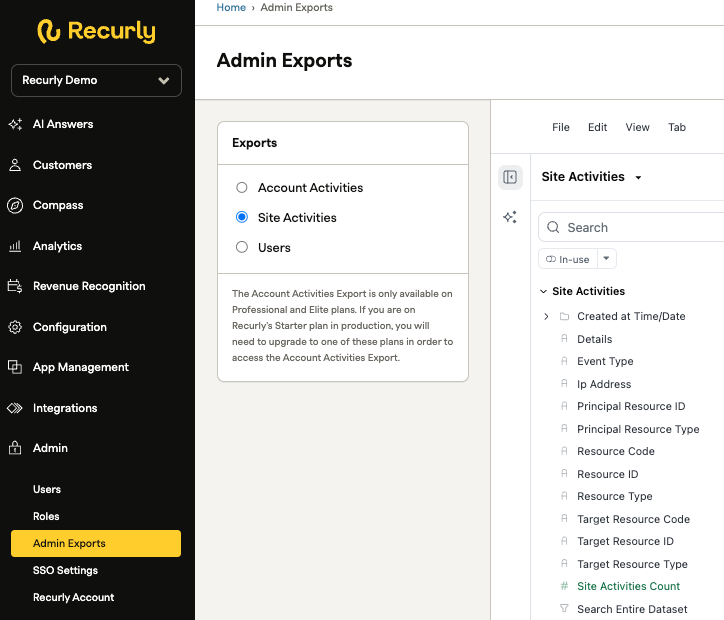
Explore interface
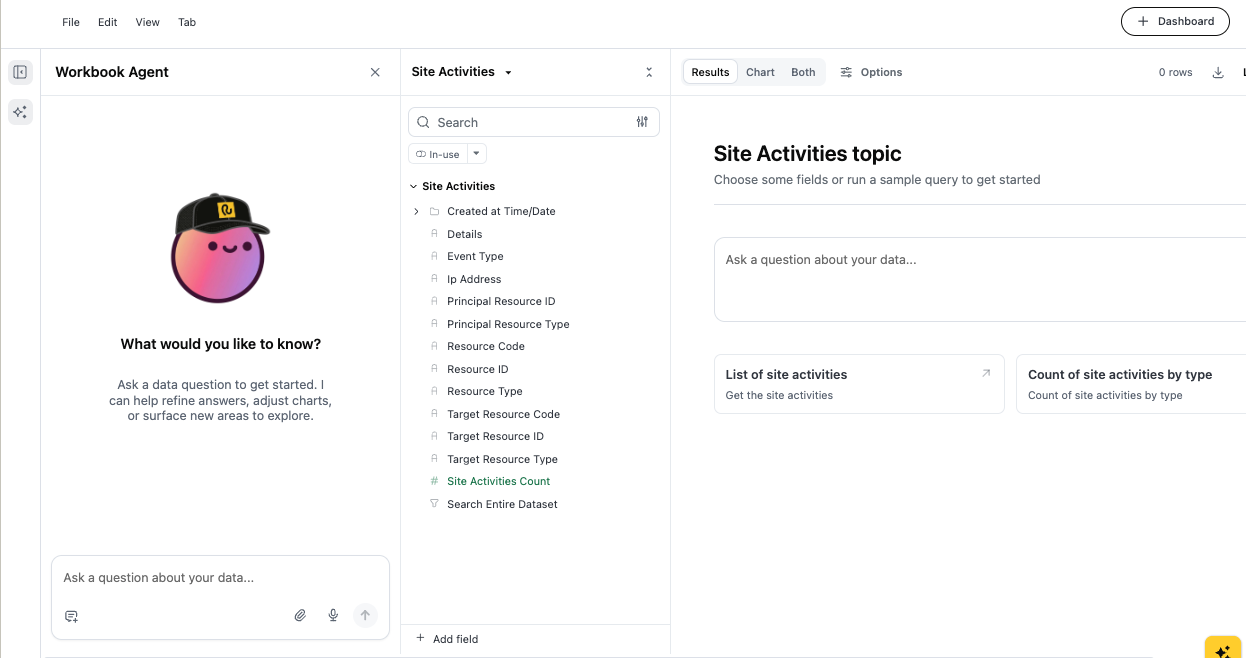
The Explore interface provides an interactive query builder for analyzing site activity data. It's divided into two panels:
| Panel | Description |
| Left — Workbook | Ask natural-language questions about your site activity data. The Workbook Agent suggests fields and runs queries on your behalf. |
| Center — Field picker | Browse and search the full field catalog, grouped by topic. Click any field to add it to your active query. Use the In-use filter to see only selected fields. |
Pre-built sample queries
Two sample queries are available to get started quickly:
- List of site activities — Returns a row-level list of all site activity events within the active date scope, including actor, action type, affected object, and timestamp.
- Count of site activities — Returns a grouped count of site activity events broken down by activity type, providing a quick summary of the most common actions across your site.
Workbook Agent
The Workbook Agent is the fastest way to start an analysis. Type a question in the text box at the bottom of the left panel and press Enter (or click the send icon).
Example prompts:
- "Show me all activity on account ABC123 in the last 14 days"
- "Which actors made the most changes to accounts this month?"
- "List all subscription cancellations performed via API in the past 30 days"
- "Count account activities by type for the current revenue period"
- "Show me all activities where the acted-upon object is a billing info record"
Build a report
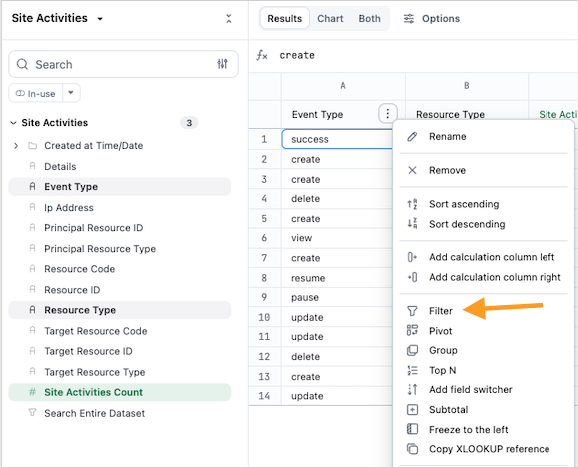
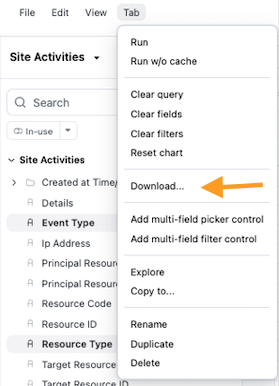
Export fields
| Id | Example | Description | Data type (max size) |
|---|---|---|---|
| event | plan | The type of event that triggered the entry in the audit log. | string |
| resource_identifier | druuid-1234... | The external UUID of the record that was audited. Typically the druuid of the record_id. | string |
| resource_type | plan | The external type of the record that was audited. | string |
| target_resource_identifier | druuid-5678... | The external UUID of the target of the record. | string |
| target_resource_type | site | The external type of the target of the record. | string |
| principal_resource_identifier | [email protected] or api-key-name | The external identifier of the principal — the user email or API key name/masked value. | string |
| principal_resource_type | user or api_key | The external type of the principal. | string |
Logged events
The table below lists every object and action that Recurly logs in the Site Activities export. Recurly continues to expand coverage — contact your CSM if you need activity logging for an object not listed here.
| Event | Actions | Trigger |
login | success | Successful user login to the merchant site. |
user | create, delete, update | A user is added, their role is updated, or they are removed from the site. |
role | create, update, delete | A role is created, updated, or removed from the site. |
account_updater | enable, disable, update | Account Updater settings are changed. |
analytics_settings | update | Analytics dashboard settings are updated. |
coupon_settings | update | Site-wide coupon settings are updated. |
currency_settings | update | Enabled currencies are updated. |
hosted_page_settings | update | Site-wide Hosted Payment Page (HPP) settings are updated. |
hosted_account_management_settings | update | Site-wide Hosted Account Management (HAM) settings are updated. |
invoice_settings | update | Site-wide invoice settings are updated. |
tax_settings | update | Site-wide tax settings are updated. |
custom_field_definition | create, update, delete | A custom field definition is added, updated, or removed. |
avalara_credentials | create, update, delete | Avalara credentials are added, updated, or removed. User updates only — excludes system-level invalidation. |
plan | create, update, delete | A plan is added, updated, or removed. Supported in Admin UI and API v3. Excludes plan email configuration. |
add_on | create, update, delete | An add-on is added to, updated on, or removed from a plan. Supported in Admin UI and API v3. |
measured_unit | create, update, delete | A measured unit is added, updated, or removed. |
coupon | create, update, expire, restore, generate_codes | A coupon is added, updated, expired, restored, or additional unique codes are generated. Admin UI only. |
unique_coupon_code | expire, restore | A unique coupon code is manually expired or restored. Admin UI only. |
email_settings | update | Email settings for a template are updated. |
email_templates | create, update, delete, reset | Email templates are created, updated, deleted, or reset. Excludes audience selector and attachment changes. |
payment_gateways | create, update, delete | A payment gateway is created, updated, or removed. Excludes default gateway changes. |
dunning_campaign | create, update, disable, enable | A dunning campaign is added, updated, disabled, or re-enabled. Admin UI only. Excludes plan dunning campaign ID changes. |
dunning_campaign_settings | update | Site-wide dunning campaign settings are updated. Admin UI only. |
item | create, update, disable, enable | An item is created, updated, disabled, or re-enabled. Supported in Admin UI and API v3. |
entitlement | create, update, delete | An entitlement configuration is created, updated, or removed. |
business_entity | create, update, delete | A business entity is created, updated, or removed. Admin UI only. Excludes RevRec GL accounting code creation. |
site_settings | update | General site configuration settings are updated. |
invoice_template | create, update | An invoice template is created or updated. |
webhook_endpoint | create, update, delete, pause, resume | A webhook notification endpoint is created, updated, deleted, paused, or resumed. Excludes pre-renewal webhook setting changes. |
api_key | create, view, update, regenerate, delete | A private API key is added, viewed, updated, regenerated, or deleted. |
public_key | regenerate | The public key is regenerated. |
shipping_method | create, update, delete | A shipping method is created, updated, or deleted. Admin UI only. Excludes RevRec fields. |
apple_pay_settings | update | Apple Pay configuration settings are updated. Excludes managed Apple Pay domain changes. |
Updated 3 months ago