
Payment retry recovery
Monitor retained revenue through intelligent retry strategies. Track how optimized retry logic helps recover initially failed payments.
This dashboard gives you a comprehensive view of Recurly's performance for automatic and intelligent retries over the current period, tracking at-risk revenue across all retry attempts and measuring how effectively initially failed transactions are being recovered.
Available on all Recurly plans
Prerequisites
- You must have the Analytics user role permission.
Definition
This dashboard gives you a comprehensive view of Recurly's performance for automatic and intelligent retries over the current period, tracking at-risk revenue across all retry attempts and measuring how effectively initially failed transactions are being recovered.
Key benefits
Protect revenue
Automatically identify and recover failed payments before they result in permanent revenue loss or customer churn.
Optimize retry strategy
Pinpoint exactly where in the retry cycle recoveries are succeeding or falling off, enabling smarter scheduling and fewer unnecessary attempts.
Monitor performance trends
Track period-over-period changes in recovery rates and transaction volumes, giving your team early warning signals when retry effectiveness declines.
Prioritize high-impact failures
See the volume and value of at-risk revenue in one place, so your team can focus on the failures that matter most to the bottom line.
Key details
General filters (top left corner)
- Date range — Adjust the time interval for your data to track and analyze long-term trends. The default view is typically 30 days.
- Country — See data specific to your country, offering relevant insights and comparisons.
- Gateway — Segment and analyze data by available payment processors — look at all gateways together or examine one at a time to understand where issues are happening.
- Payment method — See the breakdown of failed payments by the method your customers use, and select specific payment options to analyze.
- Initiated by — Select between CIT (customer-initiated) or MIT (merchant-initiated) transactions. CIT transactions typically require more payment authentication.
- Currency — Filter by the various currencies available for your site's geo-location.
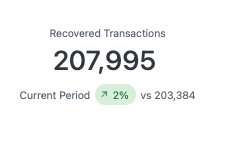
Recovered transactions
The total number of failed payment transactions successfully recovered through the retry engine in the current period, along with a comparison to the previous time period.
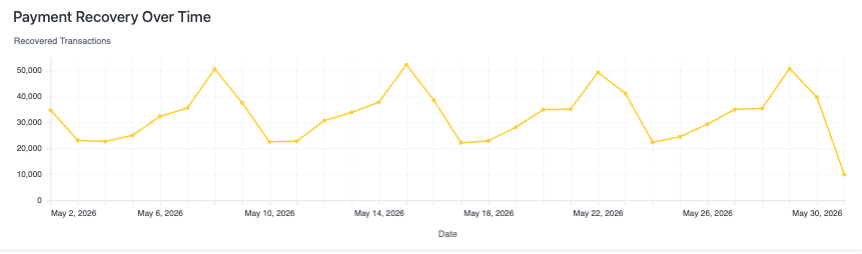
Payment recovery over time
This chart tracks the daily volume of successfully recovered payment transactions in the time period.
Revenue recovered
- Retry attempts — Total number of payments retried in the time period, compared to the previous time period.
- Revenue at risk — Total dollar value of all invoices whose first payment failed during the time period, with a comparison to the previous time period.
- Recovered revenue — Total revenue recovered through successful retries, including intelligent retries, Account Updater, payment method updates, and third parties reporting recovery back to Recurly. A comparison to the previous time period is also provided.
- Recovery rate — Percentage of at-risk revenue successfully recovered in the time period. Failures and recoveries are tracked as independent trends and aren't matched on a per-invoice basis, so this rate reflects overall recovery health rather than a precise cohort recovery rate.

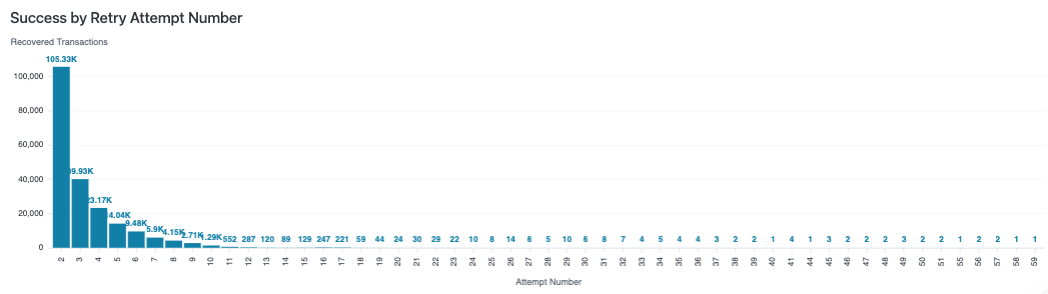
Success rate by retry attempt
This chart shows the distribution of successful payment recoveries broken down by which retry attempt successfully processed the payment.
Updated 2 months ago
Did this page help you?