
Dunning summary
See how Recurly's dunning mechanisms recover revenue from declined transactions, broken down by recovery method.
Prerequisites
- You must have the Analytics user role permission.
Definition
Key benefits
Recovered revenue
Recovered revenue KPI
These indicators give you a real-time snapshot of your revenue dynamics. They help you measure the effectiveness of your dunning recovery strategies by comparing your current payment amounts with totals from last month, the month before, three months ago, and a year ago — so you can identify trends, track progress, and proactively manage involuntary churn.
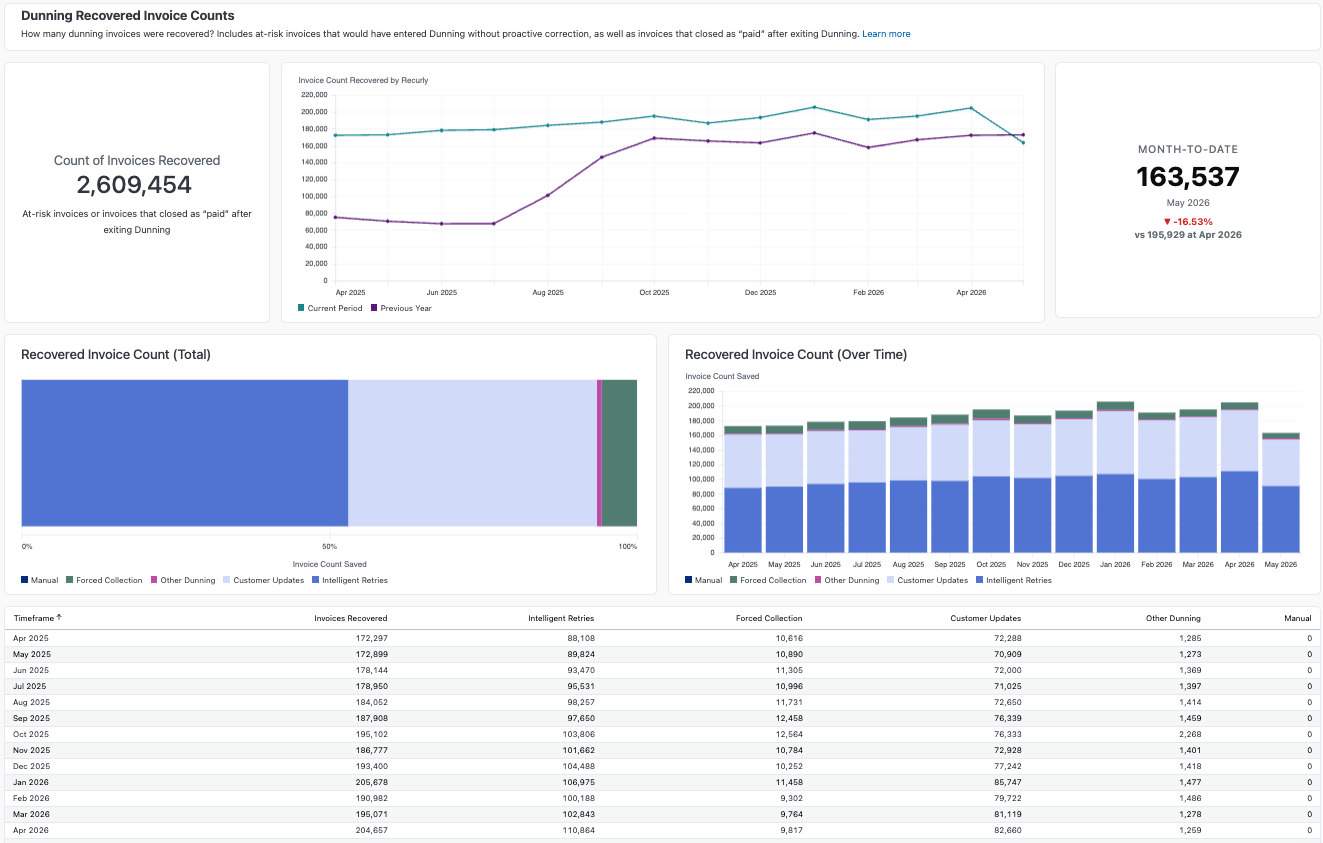
Dunning recovery chart
This bar chart visualizes the revenue Recurly has helped you recover by minimizing involuntary churn from declined invoices, giving you an at-a-glance view of the financial impact of Recurly's services for forecasting and resource allocation. These charts display as either total revenue saved or a count of invoices recovered.
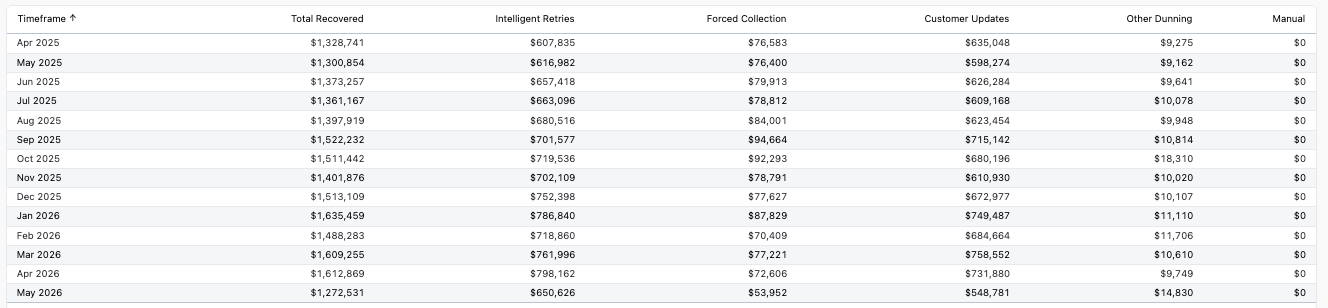
Dunning recovery detail
This breakdown shows the amount recovered through each process — Account Updater, Customer Updates, Intelligent Retries, and Manual Collection — so you can see which tools are most effective and focus your efforts on the most productive areas. These charts display as either total revenue saved or a count of invoices recovered.
Dunning recovery
The Dunning Recovery dashboard gives you a detailed view of the revenue you've successfully recaptured through Recurly's dunning system. It's a focused part of the broader Recovered Revenue dashboard, concentrating on invoices that fail their initial payment attempt and subsequently enter dunning. The dashboard draws on several recovery methods to maximize the collection of payments.
Recovery methods
- Account Updater — Proactively updates credit card information ahead of subscription renewals, one-time invoice payments, or re-subscription attempts that would otherwise result in a hard decline, keeping payment details current and minimizing failed transactions.
- Customer updates (dunning) — Prompts customers to update their payment method after a failed transaction, through dunning emails or other integrated notifications, helping you recover potential lost revenue.
- Intelligent Retries — Uses data-driven timing and logic to optimize retry attempts, converting failed payments into successes and reducing involuntary churn.
- Forced collection — Lets merchants manually initiate a collection attempt on a past-due invoice when automated processes don't succeed.
- Manual — Any manually created invoice that entered dunning and was successfully recovered, including collection attempts merchants make directly on a failed invoice.
- Other — Invoices recovered through any other method not listed above, including expiration date forwarding on retries and external recoveries.
By understanding these dunning recovery features, you can maximize their use and significantly reduce involuntary churn, strengthening your revenue recovery.
Dunning summary
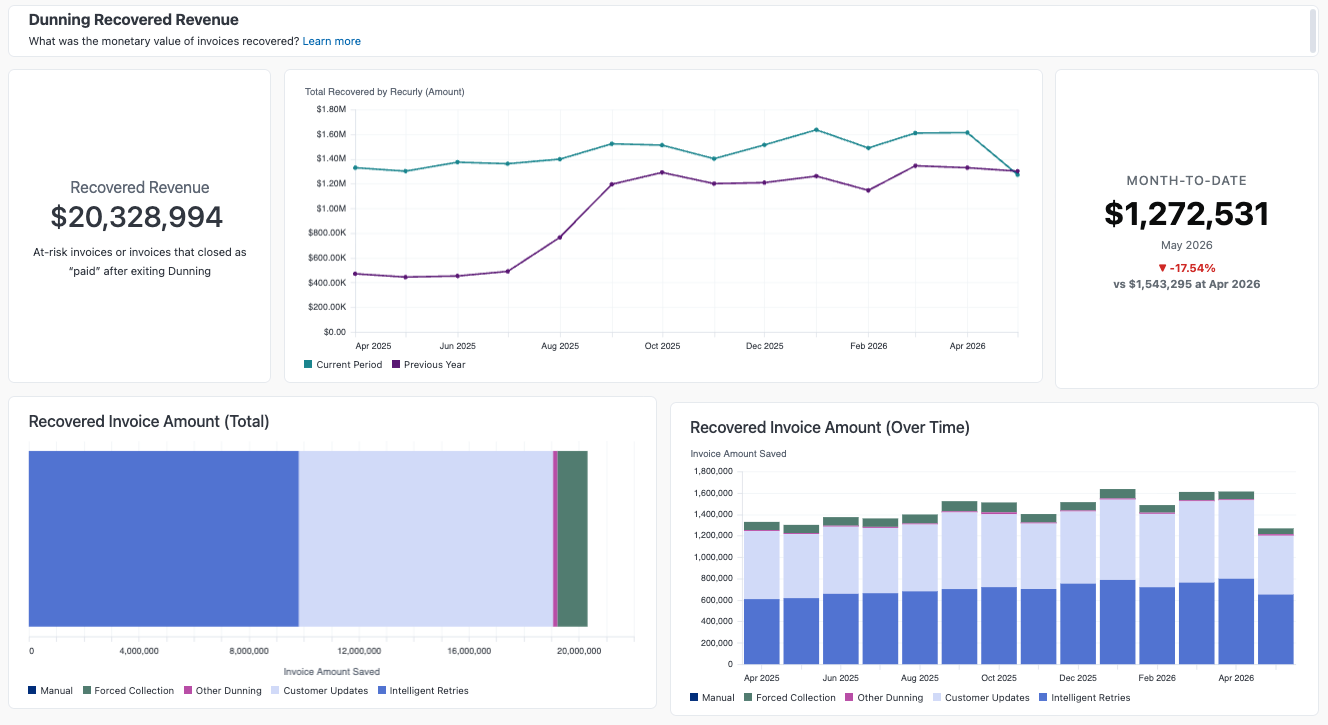
Recovered invoice revenue
Recovered invoice counts
Updated about 2 months ago