
User ID matching
Guide for configuring how Recurly Engage matches authenticated users via unique browser-stored identifiers.
Prerequisites
- You must have Company or App Administrator permissions in Engage.
Limitations
- Developer assistance may be required for custom storage or decoding logic.
Definition
Key benefits
Key details
When authenticated users visit your site, their unique User ID is stored in the browser. Configure Engage to read this value from one of the following sources:
- localStorage item
- sessionStorage item
- Cookie
- dataLayer variable
Specify the storage location and key in the User ID Matching form:
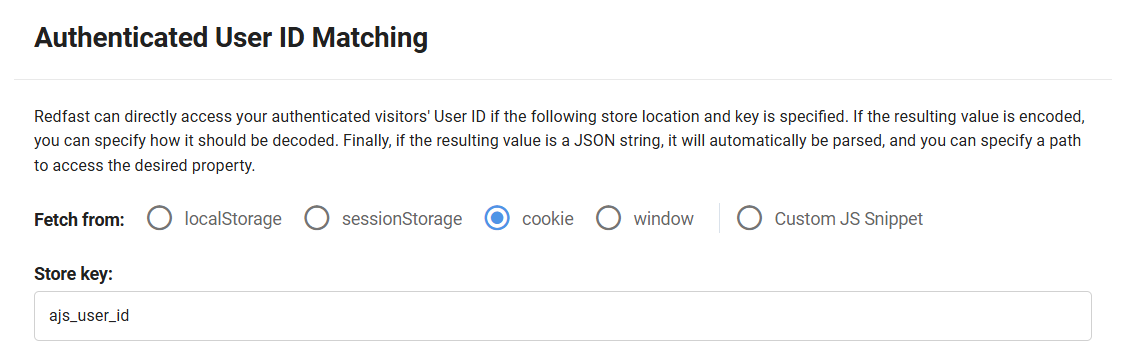
If the value is encoded (such as Base64), select the appropriate decode option:

If the decoded value is a JSON object, provide a property path to extract the final ID:

Once you've configured everything, scroll to the bottom and click Save:

For assistance, contact [email protected].
fetchUserId examples
fetchUserId examplesFor complex cases, choose Custom JS Snippet and implement a fetchUserId function in Settings → Custom JS Snippet. The examples below use the built-in RFHelpers. You can view all helper functions in RFHelpers on GitHub.
Basic example
Retrieve a JSON-wrapped ID from localStorage (common with Twilio Segment):
static fetchUserId() {
  // Get value from localStorage
  const value = window.localStorage.getItem('ajs_user_id'); // '"user123"'

  // Parse JSON if possible, otherwise return raw value
  return RFHelpers.tryParseJSON(value); // 'user123'
}
Cookies and decoding
Read a Base64-encoded ID from a cookie and decode it:
static fetchUserId() {
  // Get cookie value
  const value = RFHelpers.getCookie('encoded_user'); // 'dXNlcjEyMw=='

  // Decode Base64
  return RFHelpers.decodeBase64(value); // 'user123'
}
JavaScript object digging
Decode a JWT from a window variable and extract a nested user.id:
static fetchUserId() {
  // Get JWT token
  const token = window['_JWT_USER_VAR'];

  // Decode JWT payload
  const obj = RFHelpers.decodeJWT(token);
  // e.g. { auth: '{"user":{"id":"user123"}}', ... }

  // Extract nested ID
  return RFHelpers.dig(obj, 'auth.user.id'); // 'user123'
}
Multiple fallbacks
Combine methods to handle various sources:
static fetchUserId() {
  // Path-based logic
  if (window.location.pathname.startsWith('/app/')) {
    return window.localStorage.getItem('USERID');
  }

  // Try cookie
  const cookie = RFHelpers.getCookie('user');
  if (cookie) return cookie;

  // Fall back to JWT in localStorage
  const local = window.localStorage.getItem('auth_token');
  if (local) {
    const decoded = RFHelpers.decodeJWT(local);
    return RFHelpers.dig(decoded, 'auth.id');
  }
}
Updated about 1 month ago