
Drill down metrics
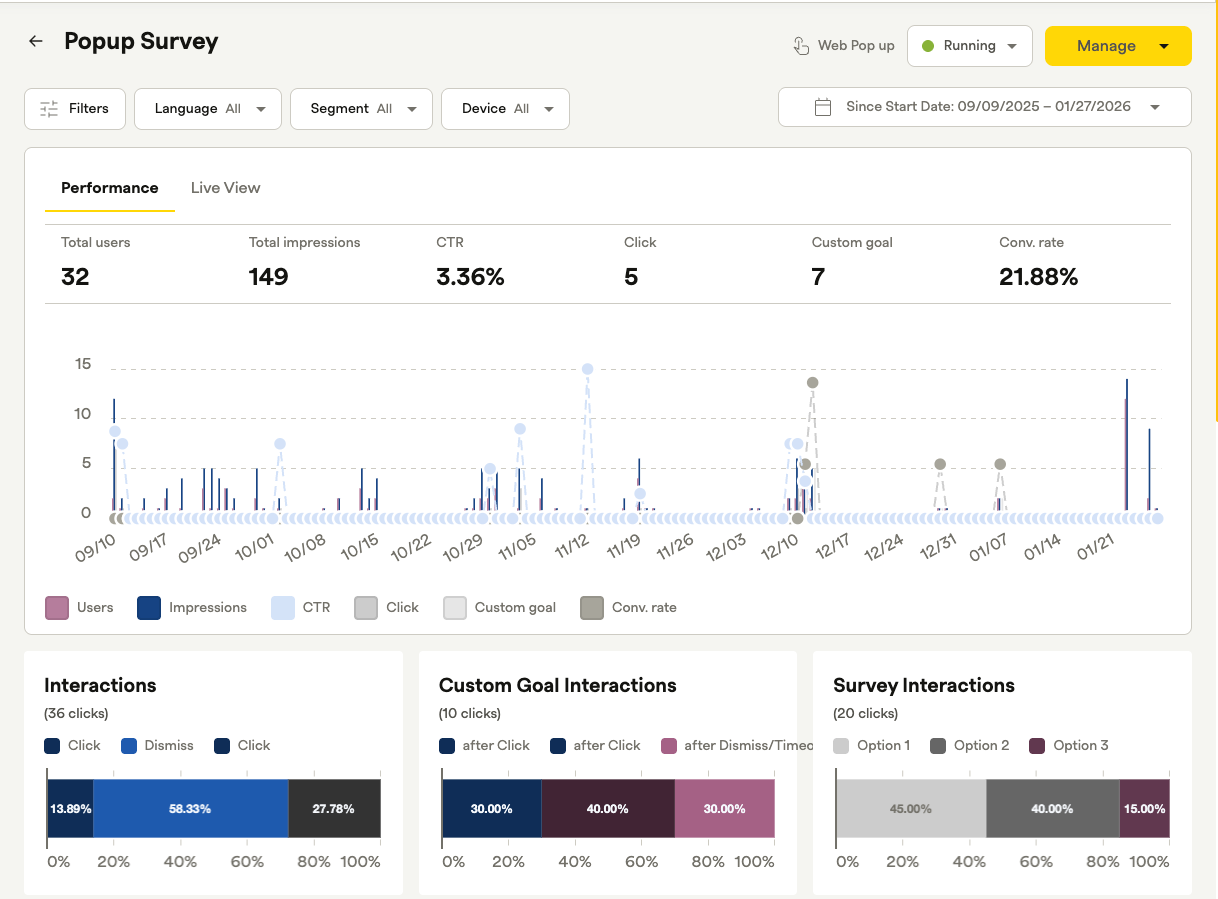
Unlock deeper insights with Granular Analytics for Pulse. Learn how to use Drill Down Metrics to filter prompt performance by language, segment, and device category for more precise user behavior analysis.
Drill Down Metrics in Pulse go beyond aggregate data, so you can slice prompt performance across multiple dimensions. See how specific audience subsets interact with your content without creating a separate prompt for every market or user trait. The initial rollout covers three high-priority filters: language (localization), user segment, and device category.
Available on all Recurly plans
Definition
Drill down metrics break a prompt's aggregate performance data into filtered views, so you can see how specific audience subsets engage with it.
Key benefits
Multi-dimensional insights
Get a holistic view of how different user groups engage with the same prompt.
Optimized localization tracking
Instead of running separate prompts for every region, use a single localized prompt and filter performance by language, such as EN-GB versus EN-US.
Targeted performance visibility
Attribute interactions to specific segments to see how "Premium Subscribers" and "Trial Users" respond to the same call to action.
Device-specific analysis
Understand engagement patterns across platforms, including phone, tablet, and TV.
Operational efficiency
Reduce dashboard clutter by consolidating regional campaigns into single, multi-segment prompts while keeping full reporting granularity.
Key details
- Language/Locale: Filter results based on the specific translation the user viewed.
- Segment: Filter by the most specific user segment (for example, specific market segments or subscription tiers).
- Device Category: Drill down into performance for Phone, Tablet, or TV SDKs.
Updated about 1 month ago
Did this page help you?