
Email notifications
You can now receive notifications when prompts are set to expire.
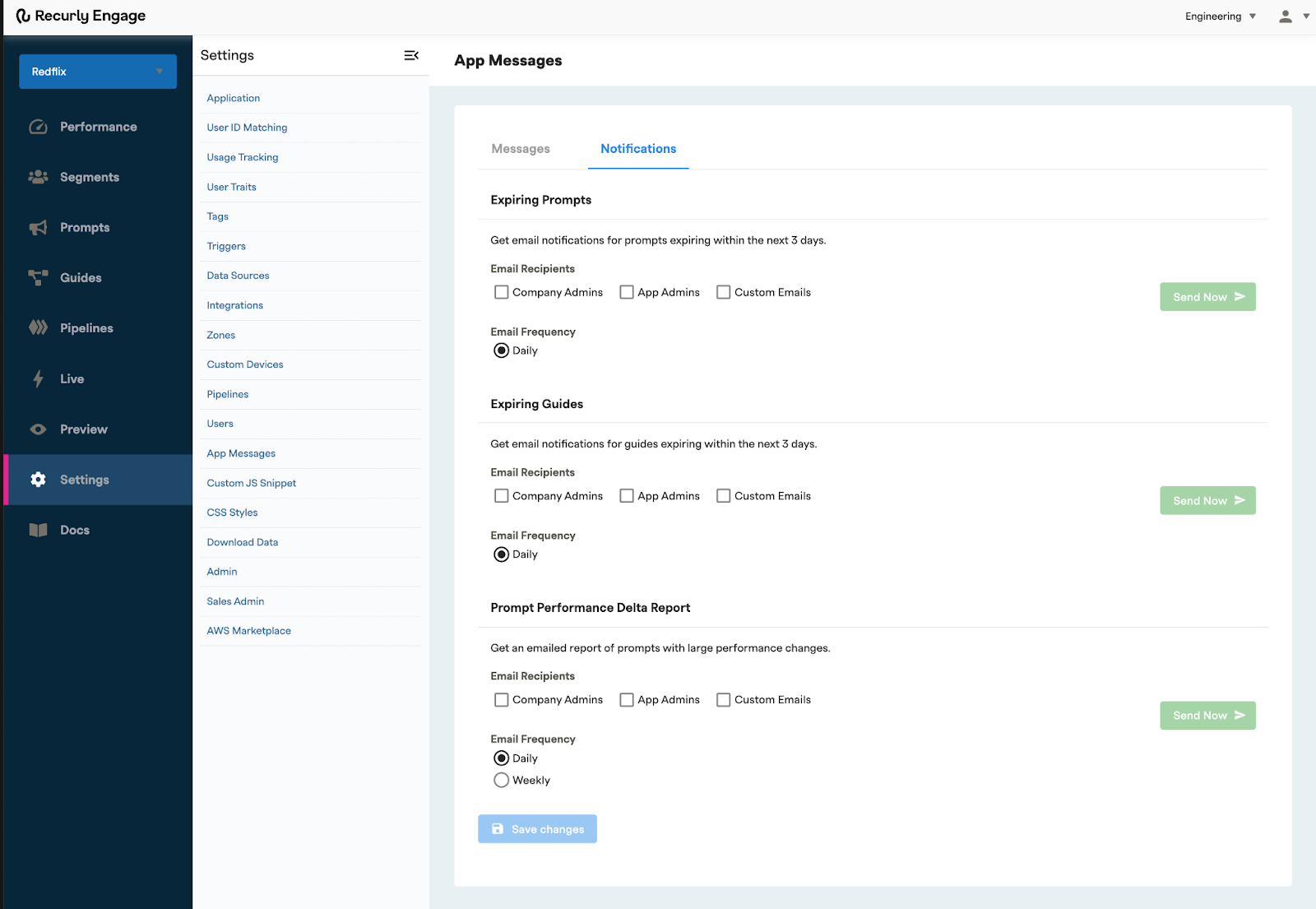
Recurly Engage can send automatic email alerts when a prompt or guide is set to expire, so you can manage your content proactively. Staying ahead of expirations helps you keep the user experience consistent and avoid unintended interruptions.
Available on all Recurly plans
Definition
Expiring content notifications are automatic email alerts sent when a prompt or guide is about to expire. You choose who receives them and how often.
Key benefits
Proactive content management
Receive automatic email alerts when a prompt or guide is about to expire, so you can stay ahead of content changes.
Uninterrupted user experience
Avoid unintended service interruptions and content gaps by knowing exactly when to update or replace your content.
Protected performance
Get notified about expiring content that may be crucial to user engagement, so you can act and maintain performance.
Key details
To enable email notifications for expiring prompts and guides, follow these steps.
1
Confirm your Recurly Engage access
Make sure you're an active Recurly Engage member. If you're not, book a demo.
NoteWeekly notifications trigger on Mondays.
Updated about 1 month ago
Did this page help you?