
Mobile interstitial prompts
Guide to creating and managing full-screen mobile interstitial prompts in Recurly Engage.
Mobile interstitials are native, full-screen prompts that render directly inside your mobile app to spotlight offers, announcements, or calls to action. Configure text, colors, buttons, and triggers from the Recurly Engage admin console, and the SDK handles the native rendering on iOS and Android.
Available on all Recurly Engage plans
Prerequisites
- Company, App Administrator, or App Member permissions in Recurly Engage.
Definition
A mobile interstitial is a native-style, full-screen prompt delivered within your mobile app to highlight offers, announcements, or calls to action.
Key benefits
Full-screen impactCaptures the entire device viewport for maximum visibility.
Native renderingUses the device SDK to ensure smooth performance and consistent styling.
Flexible configurationCustomize text, visuals, and interactive buttons for mobile-specific use cases.
Key details
Recurly Engage supports the creation and delivery of full-screen interstitials on mobile devices such as iPhones and Android phones.
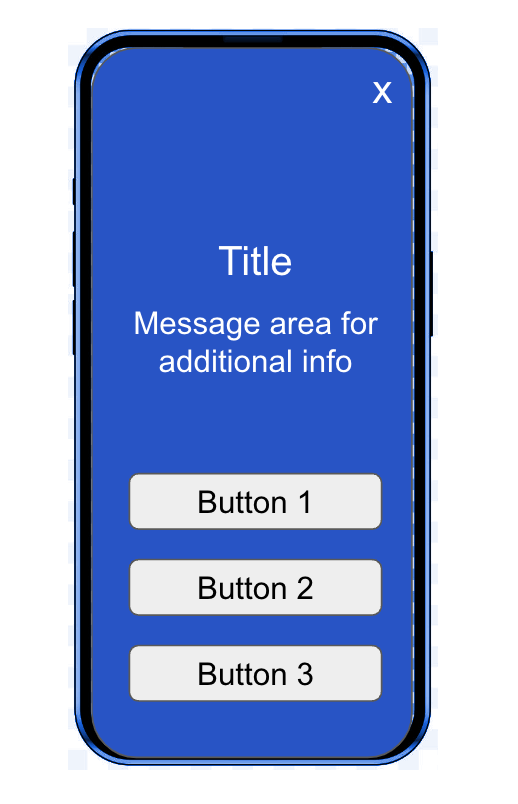
UI elements
Use the Recurly Engage admin console to configure these properties; the SDK renders native buttons at runtime.
| Item | Type | Description |
| Title | Text | Headline text |
| Message | Text | Message body |
| Background color | Hex color | Solid background color |
| Background image | Image | Full-screen background image |
| Legal text | Text | Legal disclaimer |
| Close button | Radio | Allow the user to close the prompt, or force it to display for a set time |
| Close timer | Number | Countdown in seconds before auto-close |
| Buttons | Up to three native SDK buttons | |
| • Text | Text | Button label |
| • Text color | Hex color | Button text color |
| • Background | Hex color | Button background color (8-character hex with alpha) |
| • Font family | Dropdown | System fonts on iOS or Android |
| • Border radius | Number | Corner radius, in pixels |
| • Border color | Hex color | Button border color (8-character hex with alpha) |
| • Border width | Number | Border thickness, in pixels |
| • In-app SKU | Text | In-app purchase product or SKU code |
| • Deep link | Link | Deep link URL |
Triggers
Configure when to show the prompt by specifying a screen name or element click ID in your app. For implementation details, see the Recurly Engage iOS and Android SDK docs.
Updated 22 days ago
Did this page help you?