
Google Analytics
Configuration guide for integrating Recurly Engage with Google Analytics Measurement Protocol via API actions.
Prerequisites
- You must have Company or App Administrator permissions in Engage.
- A valid Google Analytics property with Measurement Protocol enabled.
Definition
Key benefits
Key details
Create an action
[TODO: Dev/PO review — possible issue: the endpoint and the tid (Tracking ID) parameter follow the Universal Analytics Measurement Protocol, which Google has retired. Confirm this still works with Google Analytics 4.]
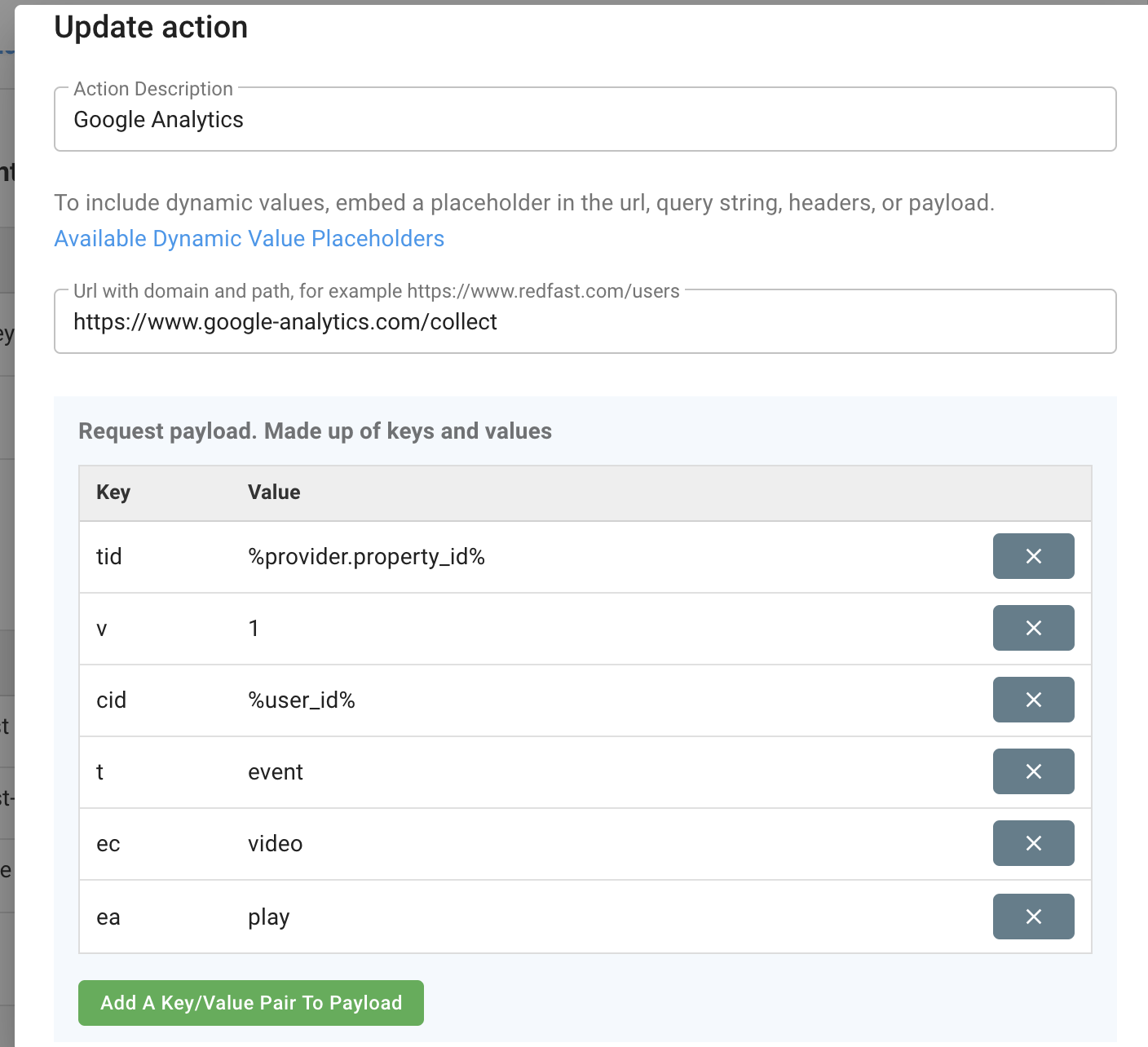
Follow the steps to create an API action. The action must be a POST request to the Google Analytics Measurement Protocol endpoint: https://www.google-analytics.com/collect.
Specify the payload
Add parameters to the payload, static or dynamic, using Measurement Protocol fields. Required parameters include:
v— Protocol versiontid— Web property ID (Tracking ID)t— Hit type (for example,event)
Optional parameters include:
cid— Client IDea— Event actionel— Event label
For a full list of supported parameters, see the Measurement Protocol Parameter Reference.
Add the action to a prompt or experience
Once the action is defined, attach it to a prompt or experience by following the steps to add the action.
Updated 24 days ago