
Variable considerations
Configure variable consideration (VC) templates and rules in Recurly RevRec, upload transaction data, and understand how VC estimates apply automatically to transaction lines.
Configuring variable considerations
- Accrual Account: A liability account used for VC accrual.
- Contra Account: A revenue account for VC revenue.
- Clearing Account: A clearing account associated with VC.
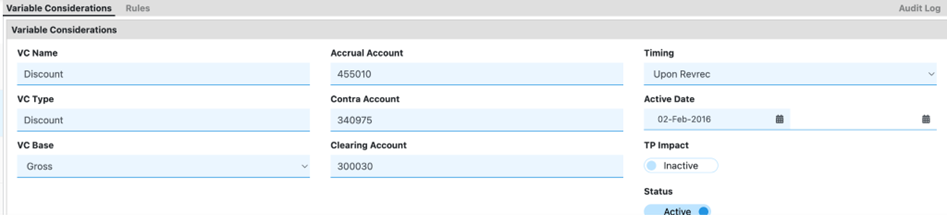
Below is an example of a completed VC template:
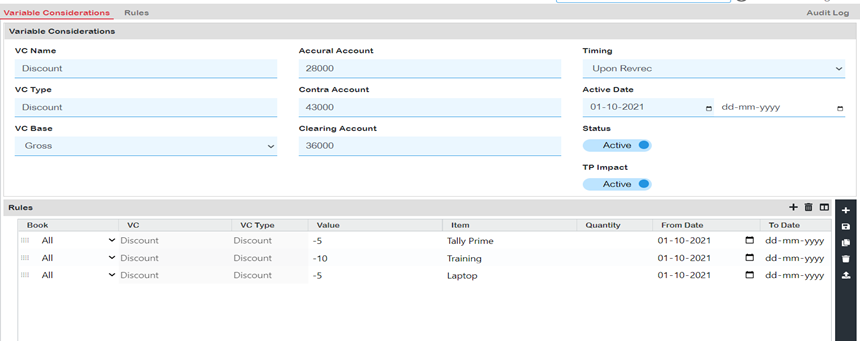
Uploading files to VC
There are two ways to import data for Variable Considerations:
If VC applies, integrate invoices directly from the Recurly platform into Recurly RevRec.
Load a sales order file for which VC is applicable into the system.
Once data is collected and available in the system, Recurly RevRec automatically calculates VC based on your configured rules. The calculated VC amounts are visible in the system as shown below.
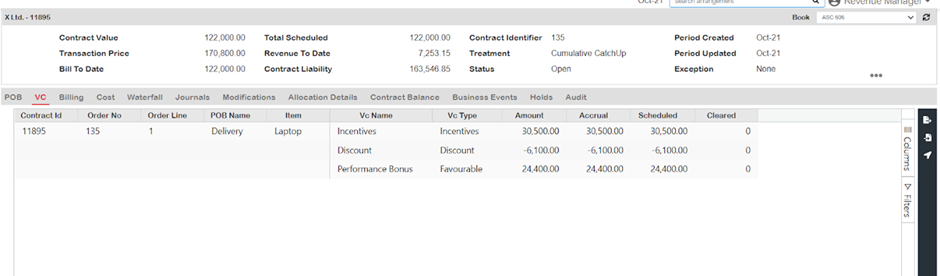
Key details
VC in the Revenue Workbench
VC estimates are automatically applied to transactions based on the VC rules defined during setup. You can also manually modify VC in the Revenue Workbench — right-click the item you want to change in the VC tab to see the available adjustment options.
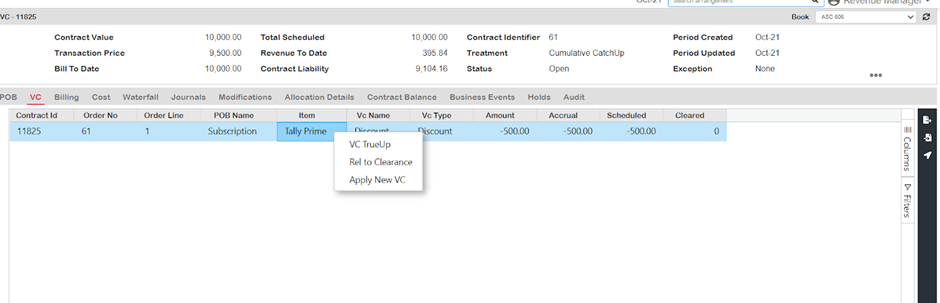
Any changes to variable consideration are reflected in the Revenue Workbench. Adjustments or updates can be made through VC true-up or by initiating clearance to release the updated information.
- The transaction price in the Revenue Workbench reflects the price after variable consideration adjustments.
- Revenue to date in the Revenue Workbench is the cumulative sum of revenue, allocations, and favorable variable considerations scheduled for the respective period.
- The Revenue Workbench provides visibility into the waterfall analysis for variable consideration, showing the breakdown and impact on revenue recognition.
- VC Accrual represents either the amount calculated by the system or the liability that will be cleared once actuals are incorporated into the process.
Updated 3 months ago