
Autobill for external data
Auto Bill in Recurly RevRec generates invoice lines directly from uploaded sales orders, so you don't import separate billing files when subscription and billing terms align.
Auto Bill lets Recurly RevRec generate your invoice lines directly from the sales orders you upload — no separate billing files required. When your subscription and billing terms align, the system creates the matching invoices for you, keeping billing and recognition in sync end to end. It's one less parallel import to maintain.
Part of Recurly RevRec — learn more
Limitations
- Upfront billing only — the sales order must reflect the full contract value at upload, and the billing cadence must match the subscription term.
- No post-generation edits — invoices created via Auto Bill can't be updated or canceled. Any revisions require manual invoice imports.
Definition
Auto Bill generation reads your imported subscription or contract records and automatically creates the corresponding invoice lines. When subscription and billing terms align, it eliminates the need to upload separate billing files.
Key benefits
Simplified imports
Upload only your subscription records — the system crafts the matching invoices.
Unified revenue flow
Keep recognition and billing together in one process for cleaner financial reporting.
Reduced operational overhead
No more maintaining parallel invoice uploads — let Auto Bill handle it.
Enabling Auto Bill
You can turn on Auto Bill in one of two ways: flag it directly in your upload file, or configure a data rule that applies it automatically. Both start from Setup → Attribute Labels.

Method 1: Auto Bill attribute in your upload file
Once flagged, you don't need to import any separate invoice records for those lines — Auto Bill creates them automatically.
Method 2: Configuring a data rule
3
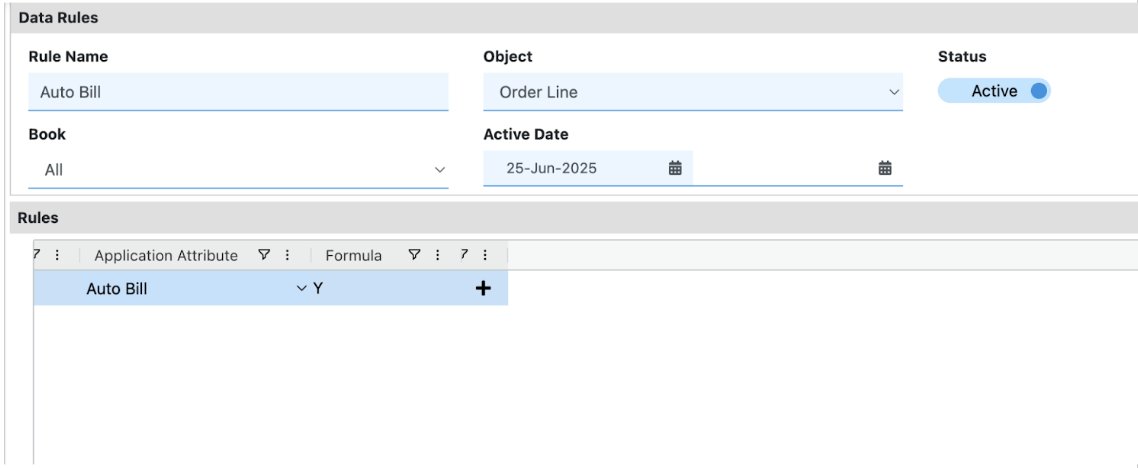
With this rule active, every uploaded line defaults to Auto Bill = Y, so the system generates invoices without any file-level flags.
NoteAuto Bill only works for full-term, upfront-billed subscriptions. If your billing cadence diverges from the subscription term, continue importing billing records manually.
Updated 4 months ago
Did this page help you?