
Profiles
Configure application-level controls in Recurly RevRec using Profiles, including currency, overage, contract revision, and revenue duration settings.
Profiles set application-level controls for Recurly RevRec — from your global reporting currency to how the system distinguishes a contract modification from routine activity. Configure them once in Set Up to apply these defaults across your account.
Available as part of Recurly RevRec
Configuring profiles
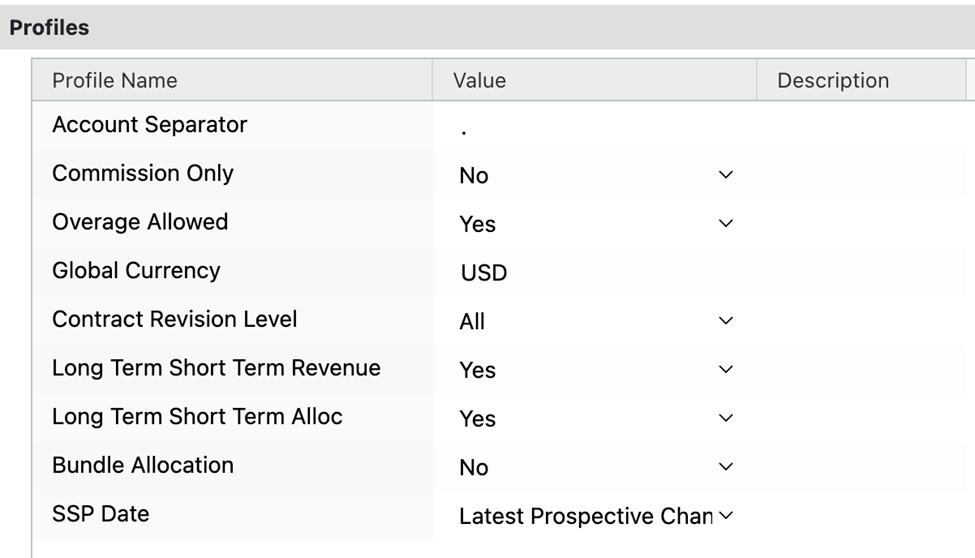
- Account separator: Specifies the value used for account separation.
- Commission only: Indicates whether only commission data is present.
- Global currency: Designates the primary currency for financial reporting.
- Overage allowed: Enable this if invoicing above the transaction amount is allowed.
- Contract revision level: Determines when a contract alteration counts as a Contract Modification.
- Revenue duration: Differentiates between short-term (within a year) and long-term (beyond a year) revenue for GAAP and IFRS disclosure.
- SSP date: When configured in the profile, Recurly RevRec sets the SSP date for all transaction lines to the earliest sales order book date.
Updated 3 months ago
Did this page help you?