
Datasets
Datasets in Recurly RevRec are custom, user-defined tables of attributes that power your reports and analysis, refreshing nightly to keep insights current.
Datasets are dynamic, user-defined tables of attributes — like item, account, region, or customer — that drive every report and analysis in Recurly RevRec. Pick the fields you care about, and the dataset becomes a reusable table for reporting. Once created, datasets refresh nightly, so your insights always reflect the latest sales and revenue data.
Part of Recurly RevRec — learn more
Definition
A dataset is a custom collection of fields (attributes) from your sales orders and contracts, organized into a reusable table for reporting and analysis. Datasets can't be deleted — only inactivated — which preserves historical integrity while preventing future use.
Key benefits
Tailored analytics
Pick exactly the attributes you need — item, liability account, region, customer — and build bespoke data tables.
Always current
Datasets auto-refresh daily, so your dashboards and reports reflect the latest sales and revenue.
Safe versioning
Inactivate outdated datasets instead of deleting them, keeping audit trails intact while retiring superseded configurations.
Creating a dataset
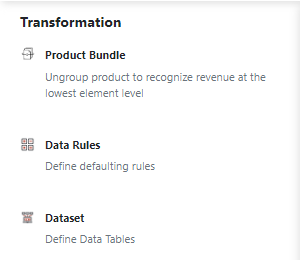
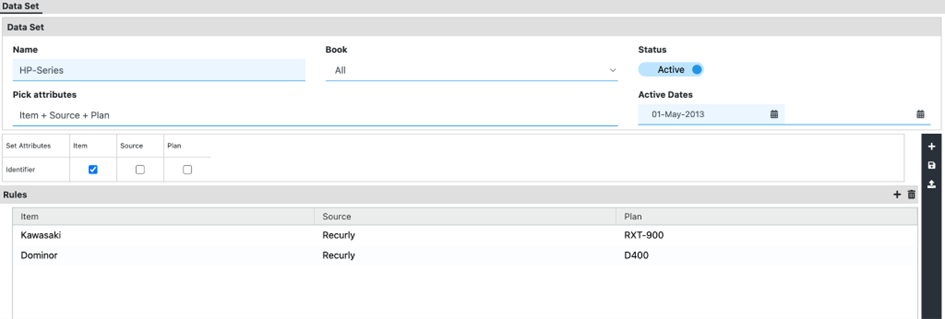
Once saved, any uploaded sales order with matching identifiers populates your new dataset. You'll see the data reflected in the Revenue Workbench and across all analytics reports, for consistent, accurate insights.

NoteDatasets can't be permanently deleted. You can only toggle a dataset to Inactive to retire it from future use while retaining its historical records.
FAQs
How do I manage and use datasets for custom data ingestion in the RevRec application?
Go to Application Setup → Data Sets to define schemas, map fields, and set validations. You can load data via the UI or API, then reference those datasets in Data Transformation rules and the Workbench.
Updated 4 months ago
Did this page help you?