
Books (ASC606 vs IFRS15)
Configure ASC 606 and IFRS 15 books in Recurly RevRec to control revenue recognition treatment, including how to set up your primary and secondary books.
Books determine how Recurly RevRec treats revenue for your transactions. Set up multiple books to apply different recognition rules side by side, and designate one as your Primary Book under either ASC 606 or IFRS 15 — whichever fits your organization's country of origin or account currency.
Available as part of Recurly RevRec
Definition
In Recurly RevRec, books determine the revenue treatment for your transactions. You can establish multiple books to apply different revenue recognition rules, and choose a Primary Book — ASC 606 or IFRS 15 — based on your organization's country of origin or account currency. At least one primary book must be configured before Recurly RevRec can process revenue transactions.
Creating books
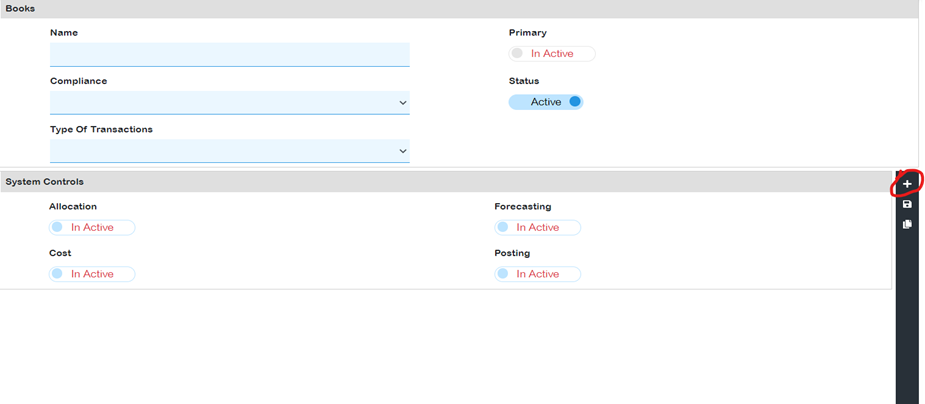
- Name: Must be unique (for example, "Revenue subledger book").
- Compliance: Choose the relevant accounting standard — ASC 606 or IFRS 15.
- Type of transactions: Choose booking or pipeline transactions.
- Primary: Mark this if it's your main book. Only one Primary book is allowed; unmarked books become secondary, and you can have multiple secondary books.
- Status: Mark as Active if the book is in use. Once a book is deactivated, it can't be reactivated.
- System controls: Choose from Allocation, forecasting, cost, and posting. Primary books must always have posting active.

After your books are established, the Revenue Workbench lets you view contracts under each book individually or collectively, and reports are tailored based on the books you've created.
NoteSecondary books exclusively use pipeline features for forecasting, resembling orders booked through opportunities rather than sales orders.
Updated 3 months ago
Did this page help you?