
Subscription order logic
Learn how Recurly Commerce creates subscriptions from a Shopify order and how to combine or separate the resulting orders.
Limitations
- Using Process Now on a contract only processes that individual contract — sibling contracts created from the same order aren't affected.
- Manual order creation isn't recommended while combining orders is turned on.
Definition
Key benefits
How is a subscription created on Commerce
The Subscription Plans you create dictate how a Subscription is created. When a subscriber checks out, Recurly Commerce groups their products into contracts based on Plan and delivery cadence.
The rules
- If a subscriber purchases a Subscription to one product on one Plan, that results in one Subscription on Recurly Commerce.
- If a subscriber purchases two products on two different Plans, that splits into two Subscriptions — one per product.
- If two products share a Plan and a third product is on a separate Plan, the result depends on delivery cadence: if the two products on the shared Plan also share the same delivery cadence, you get two Subscriptions — one for the shared Plan and one for the separate Plan. If those two products have different delivery cadences, you get three Subscriptions, one per product and Plan combination.
| Scenario | Result |
| Two products, same Plan, same delivery cadence | One contract |
| Two products, same Plan, different delivery cadence | Two contracts |
| Two products, different Plans, same delivery cadence | Two contracts |
| Three products, two Plans, mixed delivery cadences | Up to three contracts |
Spotting a split subscription in the Merchant Portal
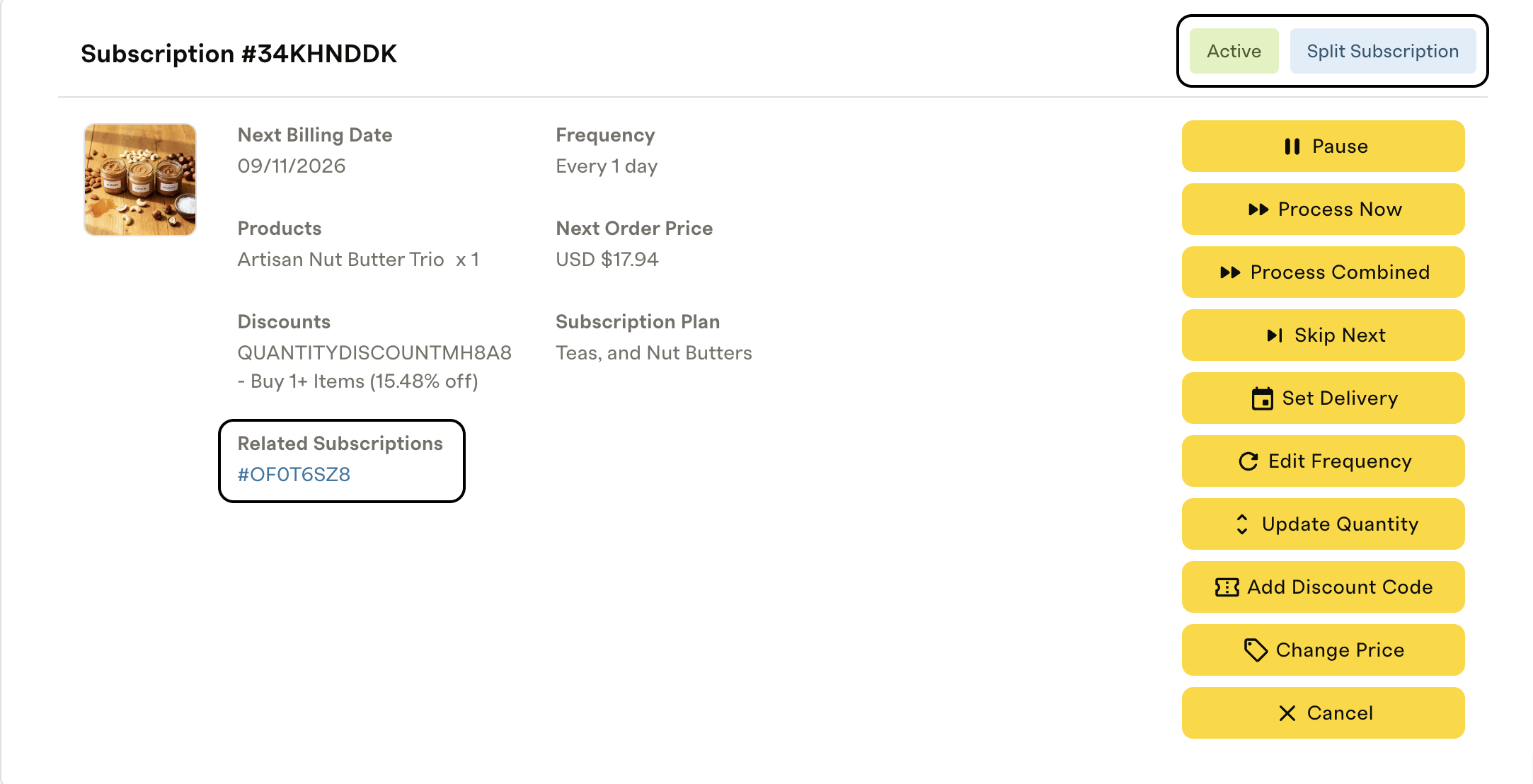
Two visual indicators show that a Subscription was split from a shared order:
- A Split Subscription pill appears next to the Subscription status.
- A related Subscriptions callout appears in the Subscription's information section.
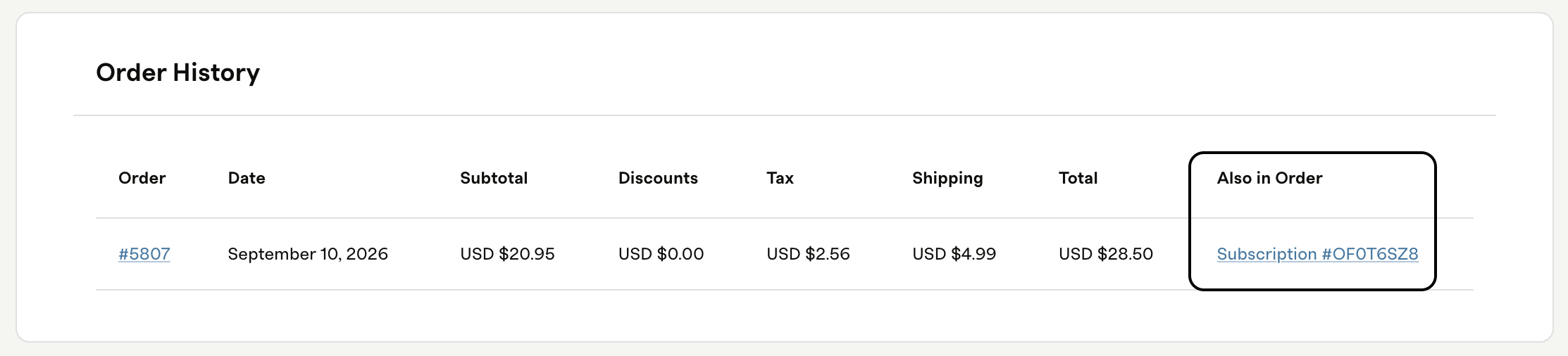
Order History also shows the Shopify order and calls out any other Subscriptions included in that same order, so you can navigate between related contracts.
How to enable or disable combining orders
In your Commerce settings, you can decide whether eligible Subscriptions combine into a single order or bill separately.
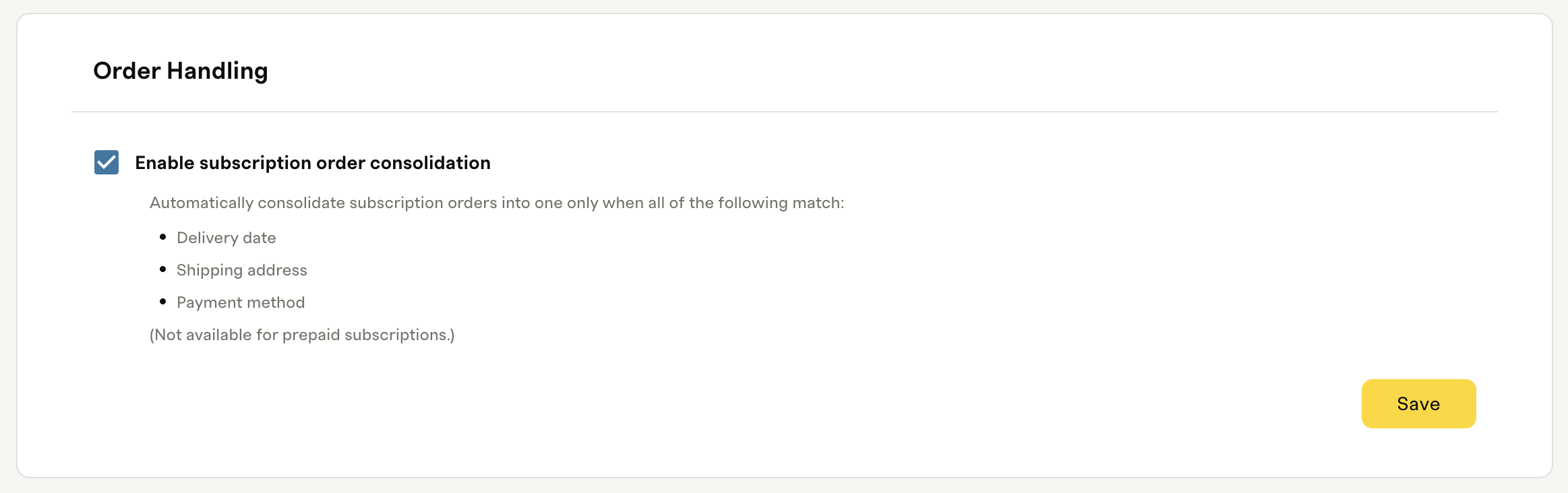
On
Contracts that meet the consolidation rules combine into a single order and charge.
Off (default)
Every contract generates its own individual order and billing attempt.
FAQs
Split Subscriptions
When does a Shopify order result in multiple subscriptions?
An order creates multiple Subscription contracts when products belong to different Plans, have different delivery cadences, or both. Both the Plan and the delivery cadence have to match for products to share a single contract. This applies to subscribe-and-save Subscriptions only — one-time purchases are excluded, and prepaid Subscriptions always split into their own contracts.
How many confirmation emails does a subscriber receive?
One Shopify order confirmation email regardless of how many contracts are created, plus one Commerce Subscription Created email per contract. So a checkout that results in three contracts sends one order email and three Subscription Created emails.
Can a subscriber manage each subscription independently?
Yes. Each contract can be paused, cancelled, or modified on its own. Cancelling one Subscription doesn't cancel the others created from the same order.
What happens when a subscriber adds a product to an existing subscription?
Any product added to an existing Subscription — including one-time add-ons — automatically inherits that Subscription's delivery cadence. The subscriber can't choose a different delivery schedule for the add-on.
How do discounts work across split subscriptions?
Subscribe-and-save discounts apply to the specific contract the discounted products belong to. Special quantity discounts apply per contract — if products share a contract, the discount applies to everything on it; if they're on separate contracts, the discount applies to each one individually. Special order discounts apply to all contracts when products are split across separate ones.
Do cancellation surveys and contract terms apply to split subscriptions?
Yes. A cancellation survey configured on a Plan appears whenever any contract tied to that Plan is cancelled. Contract terms, such as early cancellation fees, apply individually to each contract that's cancelled.
What does a subscriber see in the Customer Portal?
Each contract is listed separately, and subscribers can manage each one on its own. The Merchant Portal also shows the "split from" relationship between sibling contracts, so you can understand how they're connected.
Combined orders
When are multiple subscriptions combined into one order?
Contracts combine into a single renewal order when all four of these are true on the renewal date: the customer name matches, the contracts renew on the same day, they ship to the same address, and they use the same payment method. If any of these differ, Recurly Commerce creates separate orders.
How many charges will a subscriber see on their statement?
One charge for all combined contracts. If contracts can't be combined — for example, because of different addresses or payment methods — the subscriber sees a separate charge per order.
What happens if one subscription is out of stock?
Recurly Commerce processes what it can. The out-of-stock contract is excluded from the combined order, and the remaining in-stock contracts process normally. The subscriber gets an out-of-stock notification for the affected contract, and it doesn't block the rest of the order.
What if a subscriber skips one of their subscriptions?
The skipped contract is excluded from the combined order. The remaining eligible contracts combine and process as usual.
Can a merchant turn this feature on or off?
Yes. You can enable or disable order consolidation at any time from your Commerce settings. When it's off, every contract bills and fulfills separately.
What does a subscriber see in the Customer Portal when orders are combined?
An informational alert in their Upcoming Orders section explains that their Subscriptions may consolidate into a single order. In Order History, they see the combined order with all Subscription items listed, and can click through to any individual Subscription from there.
What does a merchant see in the Merchant Portal when orders are combined?
The combined Shopify order linked to every Subscription contract that was part of it. The Order History table includes clickable Subscription links for easy navigation, and an alert in Upcoming Orders flags that the total may reflect consolidation.
How many emails does a subscriber receive for a combined renewal?
One upcoming order reminder email per contract — so a subscriber with three contracts gets three reminders — and one order-placed confirmation email per combined order, regardless of how many contracts were combined.
What happens if a payment fails on a combined order?
Recurly Commerce sends a failed payment notification per failing payment method, and ensures a subscriber's account isn't placed into dunning more than once for the same issue.
What is the exact time window used to combine orders?
The daily window for combining orders runs from 00:00:00 UTC to 23:59:59 UTC. All eligible orders placed within this 24-hour UTC calendar day are automatically considered for combination.
Do Klaviyo events still work when subscription contracts are split or combined?
Yes, when a subscription contract is split or combined, Recurly Commerce still generates all standard Klaviyo events (like order confirmations, upcoming order reminders, and cancellations). However, Recurly Commerce does not send a specific split or merged event.
Updated about 1 month ago