
Dunning Campaign
Turn a failed payment notification into a recovery opportunity.
Prerequisites
- You must have an active Recurly Commerce account
- Dunning campaign settings are configured under Settings > Dunning Campaign
- Payment retry settings are configured separately under Settings > Payment Retries
Limitations
- Merchants can configure only one dunning campaign at a time
- The dunning campaign enforces a maximum of one email per day per subscriber
- Dunning emails are sent via Commerce transactional email templates — customization is available in Notifications
Definition
Key benefits
Key details
How dunning works with Payment Retries
Dunning campaigns handle subscriber communication; Payment Retries handle charge recovery. Both activate on payment failure and run independently based on your configuration — neither tool waits for the other.
- Payment Retries re-attempt the charge on the schedule you've set, working silently in the background
- Dunning campaign emails fire on the day offsets you define, keeping the subscriber informed and prompting them to act
This means a subscriber might receive a dunning email on day one while a retry attempt fires on day two — or simultaneously. The combination gives the payment every chance of succeeding while the subscriber stays informed throughout.
If payment succeeds at any point — from a retry or a subscriber updating their payment method — the dunning campaign ends automatically, the subscription returns to active, and no further emails are sent.
Configure a dunning campaign
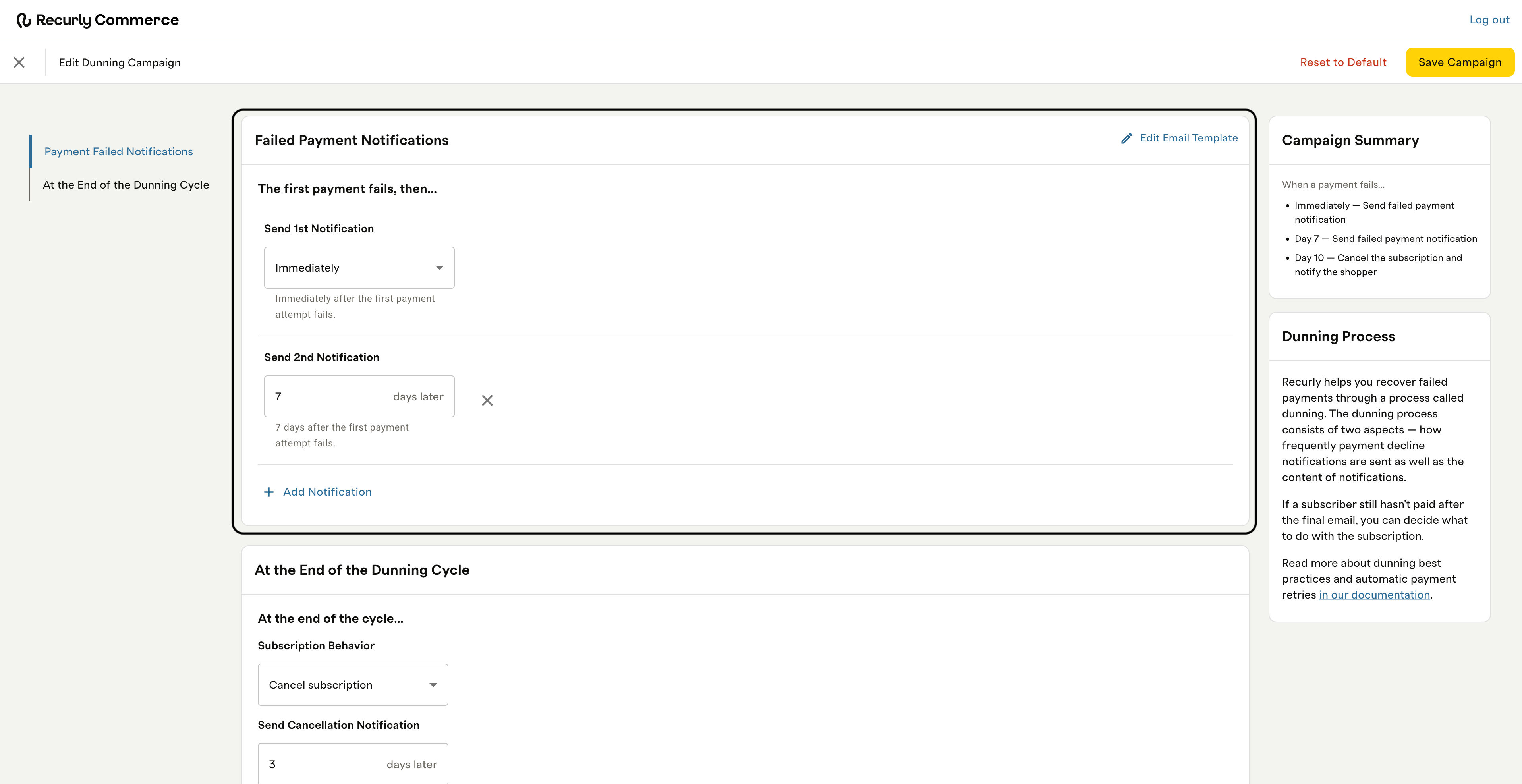
In Commerce, navigate to Settings > Dunning Campaign and select Edit Dunning Campaign. A Campaign Summary panel on the right updates in real time as you configure notifications, giving you a live preview of the full dunning sequence before you save.
The campaign configuration has two sections:
Failed payment notifications
Define the emails sent to subscribers during the dunning cycle. Each notification is triggered at a day offset relative to the initial payment failure.
At the end of the dunning cycle
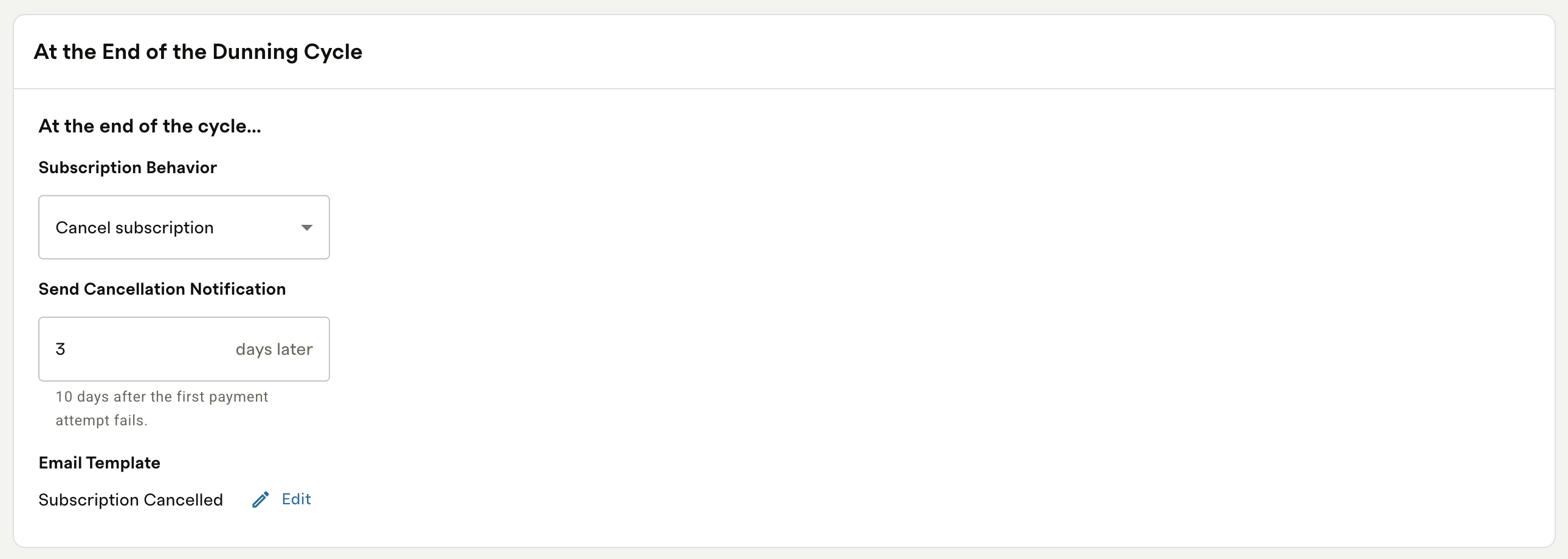
Define what happens when the dunning cycle completes without a successful payment.
Subscription behavior — choose what happens to the subscription:
- Cancel subscription: the subscription is cancelled and the subscriber receives a cancellation notification
- Pause subscription: the subscription is paused and the subscriber retains access until manually reactivated
- Leave the subscription active: the subscription remains active and the subscriber receives one final failed payment notification
Send cancellation (or pause) notification — set the number of days after the initial failure to send the end-of-cycle email. The Email Template field shows which template will be used. Click Edit to customize it in Notifications.
Once configured, click Save Campaign to activate.
Customize email templates
Dunning campaign emails use Commerce transactional email templates, editable in Notifications. There are two entry points within the campaign itself:
- Failed payment notifications: click Edit Email Template in the top right of the Failed Payment Notifications section
- End-of-cycle notification: click Edit next to the Email Template field in the At the End of the Dunning Cycle section
Klaviyo integration
If you use the Klaviyo integration, Commerce also fires payment-related metrics directly to Klaviyo — including Commerce Billing Attempt Failed, Commerce Payment Failed, and Commerce Payment Failed Retry. These can be used to trigger flows and campaigns in Klaviyo that run alongside or in place of your dunning campaign emails. See the Klaviyo integration doc for the full list of available metrics and how to configure them.
Notification log
Every dunning email sent is recorded in the Notification Log. Use it to confirm which emails were sent to a subscriber and when, and to troubleshoot any gaps in communication.
Automatic campaign resolution
If a subscriber updates their payment method and the charge processes successfully at any point during the dunning cycle, the campaign ends automatically:
- No further dunning emails are sent — even if one was scheduled for that day
- The subscription status returns to active
- The normal renewal schedule resumes without alteration
FAQs
What happens when retries are exhausted before the campaign ends?
If retries reach their maximum count before the final dunning notification fires, retries stop — but the dunning campaign continues on its notification schedule. No terminal action (cancel, pause, or keep live) is applied until the campaign completes via its final notification. This means a subscriber can exhaust all retry attempts but remain in their current status until the final scheduled email fires and the campaign ends.
Does the dunning campaign stop if a retry succeeds?
Yes. If a retry recovers the payment at any point during the dunning cycle, the campaign ends immediately — no further emails are sent and the subscription returns to active.
Can I configure different dunning campaigns for different subscription plans?
Not yet. Commerce currently supports one dunning campaign per merchant. Support for multiple campaigns assigned to specific plans is planned for a future release.
Will a subscriber receive more than one dunning email per day?
No. Commerce enforces a maximum of one dunning email per day per subscriber, regardless of how your campaign is configured.
Updated 3 months ago