
Invoice dashboard
Efficiently manage and understand your Recurly invoices with our comprehensive Invoices Dashboard. Gain insights, control, and clarity in your billing processes.
Overview
Required plan
This feature or setting is available to all customers on any Recurly subscription plan.
Prerequisites
- Active Recurly account with admin access.
Definition
The Invoices Dashboard in Recurly provides a centralized platform for viewing, managing, and understanding various aspects of customer invoices. This dashboard allows for detailed oversight of invoice types, statuses, numbering, display elements, and collection methods, alongside specialized features like subscription changes, dunning management, and refunds.
Key benefits
- Enhanced Invoice Tracking: Seamlessly view and manage all customer invoices, including the ability to search, filter, and sort, ensuring effective invoice oversight.
Key details
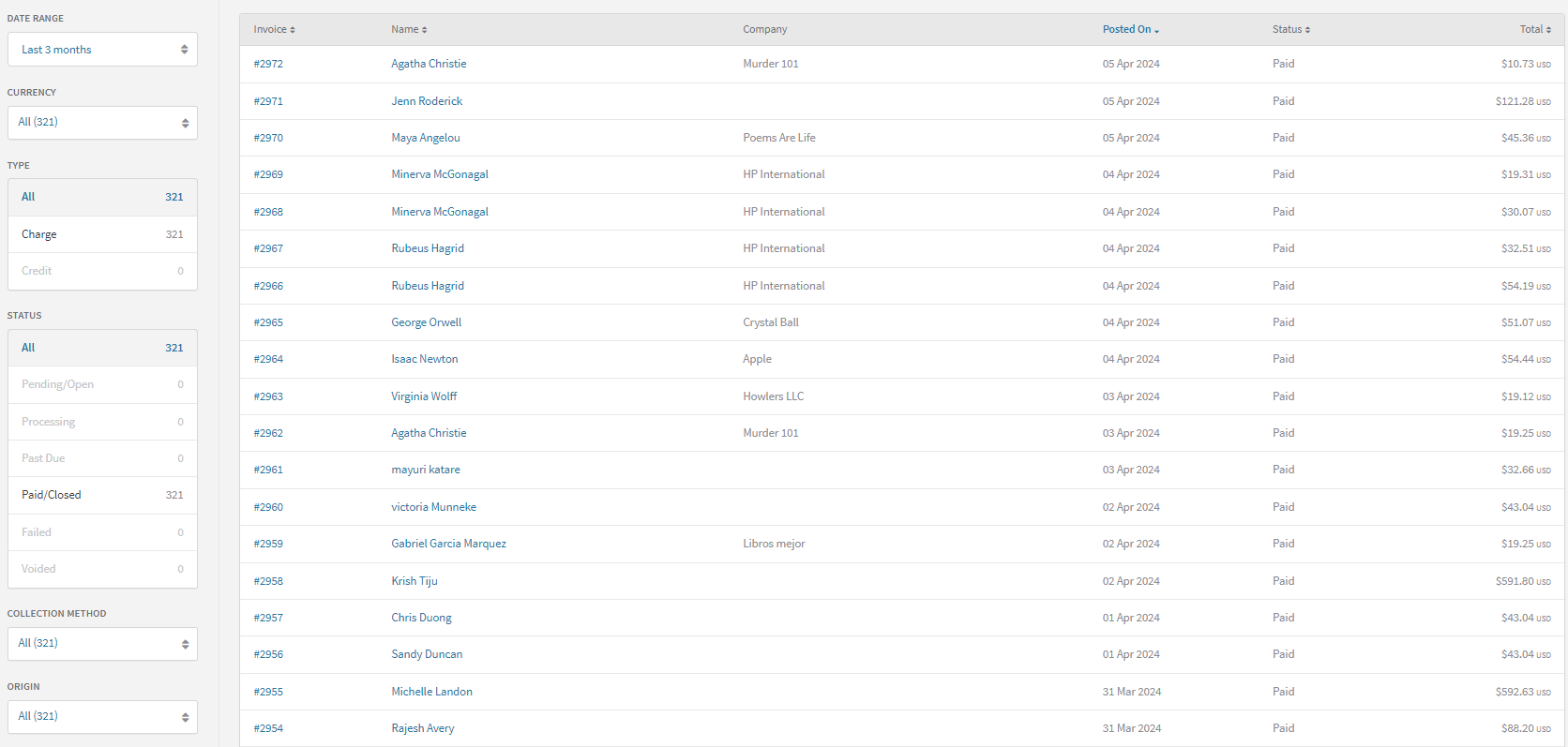
View invoices
You can view all your customer invoices in the Recurly Admin Console. Navigate to Customers > Invoices to access them.
Search
Find specific invoices quickly using the search feature. You can search by:
- Account code
- Account username
- Account email address
- Account first and last name
- Account company name
- Invoice number
- Invoice PO (Purchase Order) number
- Bill To address on the invoice
- VAT (Value Added Tax) number on the invoice
- Total amount of the invoice
- Discount amount on the invoice
- Tax amount on the invoice
- Reason for invoice recovery
Filter
Narrow down the invoice list using filters. You can filter invoices by:
- Posted date of the invoice
- Currency
- Type of invoice
- Note: Legacy invoices originating from purchases are included under the Charge filter, and those originating from refunds are under the Credit filter.
- Status of the invoice
- Collection method used
- Origin of the invoice
Sort
Organize the invoice list more effectively by sorting. You can sort by:
- Invoice number
- Account display name
- Posted date of the invoice
- Status of the invoice
- Total amount of the invoice
To sort the list, simply click on the desired column header.
Invoice statuses
Pending/Open
- Initial State: Invoices start as Pending, indicating they are neither paid nor past due.
- Automatic Collection: Invoices automatically attempting collection will shift to Paid or Past Due based on the transaction result.
- Manual Collection: Invoices under manual collection remain Pending until payment is received or the selected term option's date is reached.
Processing
- Definition: An invoice is processing when a payment is initiated but the result is pending. Common with ACH / Direct Debit payments.
- Outcome: The invoice will be updated to Paid or Past Due/Failed, depending on the transaction's outcome.
Past Due
- Criteria: An invoice becomes past due if it remains unpaid by the due date specified by the selected term option.
- Automatic Collection: Invoices automatically decline on initial transactions.
- Manual Collection: Invoices switch to Past Due 24 hours after the due date.
- Note: Account balances can be applied to past due invoices via the UI or the following API endpoints:
Paid/Closed
- Definition: An invoice is Paid when the total balance is settled.
- Automatic Zero Balance: Invoices with a zero balance due at post (due to adjustments, discounts, or credits) are immediately marked Paid.
- Manual Collection: Invoices under manual collection reach a Paid state once the full balance is paid.
Failed
- Definition: An invoice is marked as Failed when deemed uncollectable and written off as bad debt.
- Credit Invoices: For invoices with the Credit Invoices feature, failing an invoice generates a corresponding write-off credit invoice, balancing the failed charge invoice to zero.
Credit invoice statuses
Open
- Initial State: Every credit invoice begins as Open, indicating an outstanding credit balance.
Processing
- Definition: A credit invoice enters a Processing state when a refund transaction is initiated but the result is pending. This often occurs with ACH bank payments.
- Balance Adjustments: The processing transaction amount is temporarily deducted from the invoice balance. If the transaction is declined, the balance increases again.
- Impact on Other Transactions: If the credit invoice has a partial balance not covered by the processing transaction, new charge invoices on the account can use the remaining balance as payment during this period.
- Status Outcome: After the transaction response, the invoice status updates to Closed if successful with no remaining balance, or reverts to Open if declined.
Closed
- Definition: A credit invoice is Closed when it has no outstanding credit balance.
- Reopening Conditions: A Closed credit invoice can be reopened if a credit payment from the invoice is voided. This usually happens if the corresponding charge invoice is failed.
- Balance Usage: A Closed status can result from the entire credit balance being used for payments or a combination of credit payments and voided balances.
Voided
- Definition: A credit invoice is Voided if it's identified as a mistake.
- Implications: Voiding a credit invoice implies that its credit balance was neither used for payments nor refunded.
Updated 20 days ago