---
updatedAt: 2026-05-28T04:03:23.000Z
agentTools:
  siteIndex: https://docs.recurly.com/llms.txt
  projectIndex: https://docs.recurly.com/recurly-subscriptions/llms.txt
---

# Item catalog

How to create, manage, and sell items from the Recurly item catalog as one-time charges, plan add-ons, and recurring subscription charges.

<span id="rp-close"></span>

<div class="rp-page">
  <div class="rp-overview">The item catalog is a centralized library of everything you sell. Define an item once and use it anywhere — as a one-time charge on an account, a recurring add-on on a plan, or directly on an individual subscription. The catalog keeps your product attributes consistent across every sales channel while giving you the flexibility to price and package items however your business needs.</div>
  <div class="rp-video" style={{paddingTop:"56.25%"}}>
    <iframe src="https://www.youtube.com/embed/h61lgTgxoRs" title="Item catalog overview" allow="accelerometer; autoplay; encrypted-media; gyroscope; picture-in-picture" frameborder="0" allowfullscreen></iframe>
  </div>
  <div class="rp-plan"><i class="fa-solid fa-key" aria-hidden="true"></i> Available on all Recurly plans</div>
  <div class="rp-toc">
    <a class="rp-toc-pill" href="#definition"><span class="rp-toc-num">1</span>Definition</a>
    <a class="rp-toc-pill" href="#key-benefits"><span class="rp-toc-num">2</span>Key benefits</a>
    <a class="rp-toc-pill" href="#the-items-dashboard"><span class="rp-toc-num">3</span>The items dashboard</a>
    <a class="rp-toc-pill" href="#create-an-item"><span class="rp-toc-num">4</span>Create an item</a>
    <a class="rp-toc-pill" href="#manage-items"><span class="rp-toc-num">5</span>Manage items</a>
    <a class="rp-toc-pill" href="#sell-items"><span class="rp-toc-num">6</span>Sell items</a>
    <a class="rp-toc-pill" href="#item-data-and-exports"><span class="rp-toc-num">7</span>Item data and exports</a>
    <a class="rp-toc-pill" href="#api-and-client-libraries"><span class="rp-toc-num">8</span>API and client libraries</a>
  </div>
</div>

### Prerequisites

<ul class="rp-list">
  <li>Your site must have <a href="https://docs.recurly.com/docs/credit-invoices-release" target="_blank">Credit Invoices</a>, <a href="https://docs.recurly.com/docs/only-bill-what-changed" target="_blank">Only Bill What Changed</a>, and <a href="https://docs.recurly.com/docs/subscription-terms-new" target="_blank">Subscription Billing Terms</a> enabled. Recurly sites created after July 26, 2018 have these features and item catalog enabled automatically.</li>
</ul>

### Limitations

<ul class="rp-list">
  <li>Items are not supported for usage-based add-ons. For high-volume usage scenarios, use <a href="https://docs.recurly.com/docs/usage-based-billing" target="_blank">usage-based add-ons</a> instead.</li>
</ul>

# Definition

<div class="rp-definition">The item catalog is a collection of reusable sellable units — products, services, and add-ons — that can be sold as one-time charges or recurring subscription charges across any plan. Items are not inherently one-time or recurring; the same item can be used in both contexts for maximum flexibility.</div>

# Key benefits

<div class="rp-benefits">
  <div class="rp-benefit">
    <div class="rp-benefit-icon"><i class="fa-solid fa-shuffle" aria-hidden="true"></i></div>
    <strong>One item, every channel</strong>
    <span>Sell the same catalog item as a one-time charge, a plan add-on, or directly on a subscription — without duplicating your setup.</span>
  </div>
  <div class="rp-benefit">
    <div class="rp-benefit-icon"><i class="fa-solid fa-rotate" aria-hidden="true"></i></div>
    <strong>Reuse across plans</strong>
    <span>Define an item once and attach it to as many plans as needed, keeping pricing and attributes consistent across your entire product catalog.</span>
  </div>
  <div class="rp-benefit">
    <div class="rp-benefit-icon"><i class="fa-solid fa-shield" aria-hidden="true"></i></div>
    <strong>Built-in compliance support</strong>
    <span>Item name and description fields are guided by card brand regulatory requirements, helping you stay compliant without extra work.</span>
  </div>
</div>

# The items dashboard

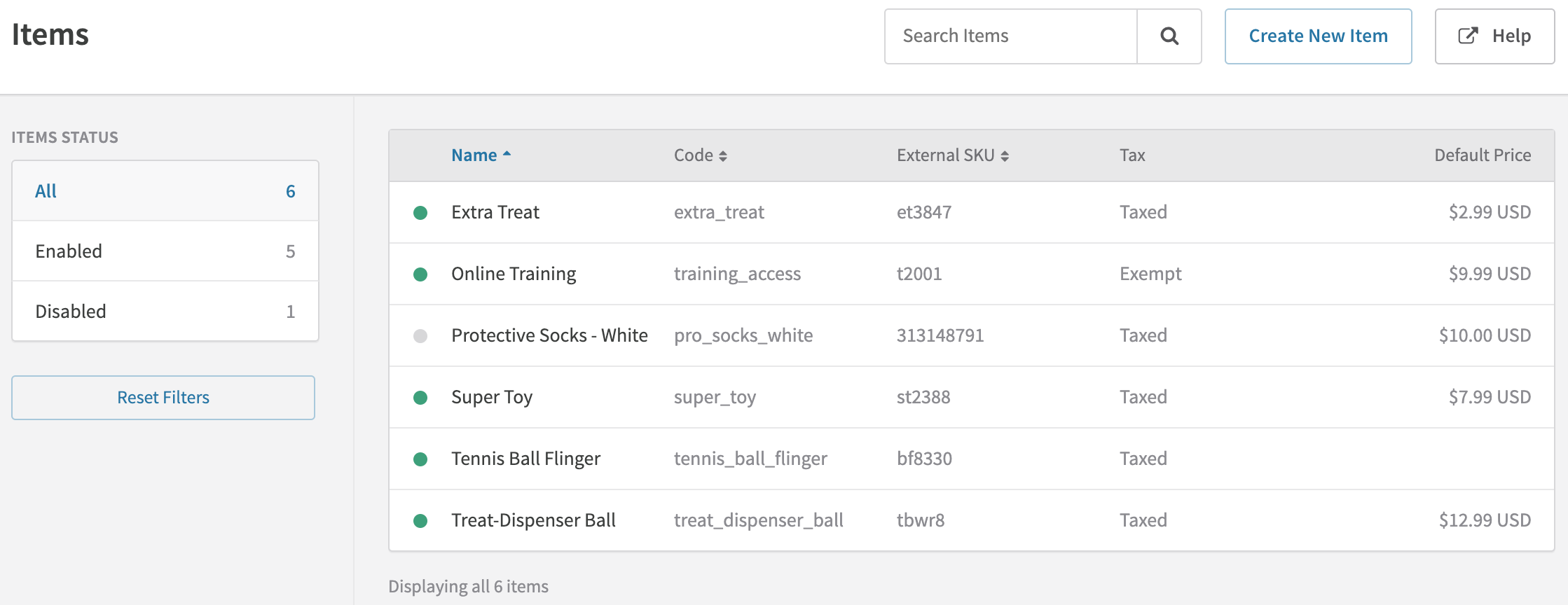
Your <a href="https://app.recurly.com/go/items" target="_blank">items dashboard</a> lists all items defined in your Recurly item catalog. Select any item name to view its details, edit it, or disable and re-enable it.

<span class="rp-zoom">
  <a class="rp-zoom-label" href="#zoom-items-dashboard">
    <img class="rp-zoom-img" src="https://files.readme.io/a436fec-Items__Recurly.png" alt="Item catalog dashboard showing list of items" />
  </a>
  <a id="zoom-items-dashboard" class="rp-zoom-overlay" href="#rp-close">
    <img src="https://files.readme.io/a436fec-Items__Recurly.png" alt="" />
  </a>
</span>

# Create an item

Under the **Configuration** menu, select **Items**, then click **Create New Item**. Items can also be created via the <a href="https://dev.recurly.com/docs/create-item" target="_blank">v2</a> and <a href="https://developers.recurly.com/api/v2019-10-10/index.html#operation/create_item" target="_blank">v3</a> APIs. For large catalog imports, use the <a href="https://developers.recurly.com/guides/multi_item_upload.html" target="_blank">Multi-Item Upload Guide</a> or contact Professional Services for assistance.

Define the following parameters when creating an item.

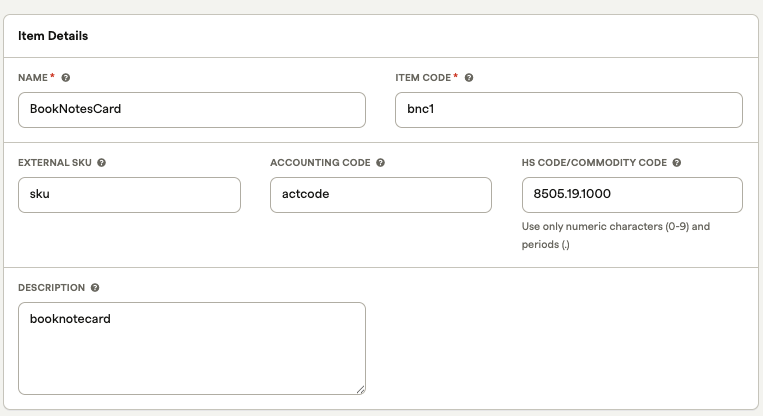
## Item fields

<table class="rp-gw-table">
  <tr class="rp-thead-row"><td>Field</td><td>Description</td></tr>
  <tr>
    <td><strong>Item name</strong></td>
    <td>Appears on the <a href="https://docs.recurly.com/docs/hosted-pages" target="_blank">Hosted Account Management Page</a> and the subscriber's invoice. Limit: 255 characters. Avoid special characters without checking with your gateway provider first.<br/><br/><strong>Card brand compliance requirements:</strong> The name must not match or closely resemble the merchant name, must not be contained within the merchant name, must not be a single character or only special characters, and must describe what was purchased — generic terms like "Services" or "Product" are not permitted.</td>
  </tr>
  <tr>
    <td><strong>Item code</strong></td>
    <td>The item's unique Recurly identifier, used in Hosted Account Management Page URLs and API requests. For Vertex users, enter the Product field value here. Limit: 50 characters. Accepts numbers, lowercase letters, dashes, pluses, and underscores only.</td>
  </tr>
  <tr>
    <td><strong>External SKU</strong></td>
    <td>Optional. Associates items in Recurly with other systems or platforms. Can be reused across items. Limit: 50 characters.</td>
  </tr>
  <tr>
    <td><strong>Item description</strong></td>
    <td>A description of the item, displayable to customers outside Recurly if configured via the API.<br/><br/><strong>Card brand compliance requirements:</strong> The description must detail what was purchased, must not match or closely resemble the merchant name, must not be a single character or only special characters, and must not use generic terms like "Services" or "Product."</td>
  </tr>
  <tr>
    <td><strong>Accounting code</strong></td>
    <td>Optional. Identifies invoice line items in exports. Limit: 25 characters. Accepts numbers, lowercase letters, dashes, pluses, and underscores only.</td>
  </tr>
  <tr>
    <td><strong>HS code / Commodity code</strong></td>
    <td>A Harmonized System (HS) code for invoice compliance on traded products — a six-digit international standard developed by the <a href="https://www.wcoomd.org/en/topics/nomenclature/overview.aspx" target="_blank">World Customs Organization</a> for classifying goods. Countries may add digits for regional classification. Limit: 25 lowercase alphanumeric characters.</td>
  </tr>
  <tr>
    <td><strong>Default price</strong></td>
    <td>The default charge amount for this item. Can be overridden at the time of charge creation.</td>
  </tr>
  <tr>
    <td><strong>Revenue recognition</strong></td>
    <td>If <a href="https://docs.recurly.com/docs/revenue-recognition" target="_blank">Revenue Recognition</a> is enabled, specifies how invoiced charges from this item are realized as revenue. Can be modified during charge creation.</td>
  </tr>
  <tr>
    <td><strong>Taxes</strong></td>
    <td>If taxation is enabled, specifies whether and how sales of this item are taxed. These values carry over to all sales of the item.</td>
  </tr>
</table>

<span class="rp-zoom">
  <a class="rp-zoom-label" href="#zoom-hs-code-field">
    <img class="rp-zoom-img" src="https://files.readme.io/6f59950ffaa1c46e6b94ba73a68b535526abd3c8aea540aedf997a7b1e7204b9-image.png" alt="HS code field in item creation form" />
  </a>
  <a id="zoom-hs-code-field" class="rp-zoom-overlay" href="#rp-close">
    <img src="https://files.readme.io/6f59950ffaa1c46e6b94ba73a68b535526abd3c8aea540aedf997a7b1e7204b9-image.png" alt="" />
  </a>
</span>

## Custom fields

Custom fields let you track additional item attributes beyond the standard fields — product variants, categories, family groupings, and more.

<span class="rp-zoom">
  <a class="rp-zoom-label" href="#zoom-custom-fields">
    <img class="rp-zoom-img" src="https://files.readme.io/65ddc56-Item_Details__Recurly.png" alt="Custom fields on the item details page" />
  </a>
  <a id="zoom-custom-fields" class="rp-zoom-overlay" href="#rp-close">
    <img src="https://files.readme.io/65ddc56-Item_Details__Recurly.png" alt="" />
  </a>
</span>

See the <a href="https://docs.recurly.com/docs/custom-fields" target="_blank">custom fields documentation</a> for details on creating custom fields. To add one to your items, select **Item** as the Recurly Object when creating the field — it will then appear on the item form in the UI and through the API.

## Item ID

When looking up an item via the API or in exports, you'll see a system-generated 19-character alphanumeric Item ID. This ID cannot be user-specified or edited.

# Manage items

## Editing items

Editing an item's attributes updates them going forward but does not affect past sales, existing plans, or existing subscriptions containing that item. For example, updating a default price changes it for new plans and charges only — previously created plans, subscriptions, and one-time charges keep their original price. Exports reflect item attributes as they were at the time of billing.

Items can be managed via the <a href="https://developers.recurly.com/api/latest.html#tag/item" target="_blank">Items API</a> and the Recurly Admin Console.

## Disabling items

Disabling an item prevents it from being sold going forward. Existing uninvoiced charges for the item are not affected and should be removed manually if needed. Disabled items can still be edited to stay in sync with your system of record. Once re-enabled, an item can be actively sold again. Disabling and re-enabling can be done via the Admin Console and the API.

## Webhooks for item management

Use item-specific webhook notifications with the Items API to keep your catalog in sync with downstream systems. Webhooks are available for item creation, updates, disables, and re-enables. See the <a href="https://developers.recurly.com/pages/webhooks.html#item-notifications" target="_blank">webhook documentation</a> for details.

# Sell items

Items can be sold as one-time charges on accounts or as recurring charges (add-ons) on plans and subscriptions.

## One-time item charges

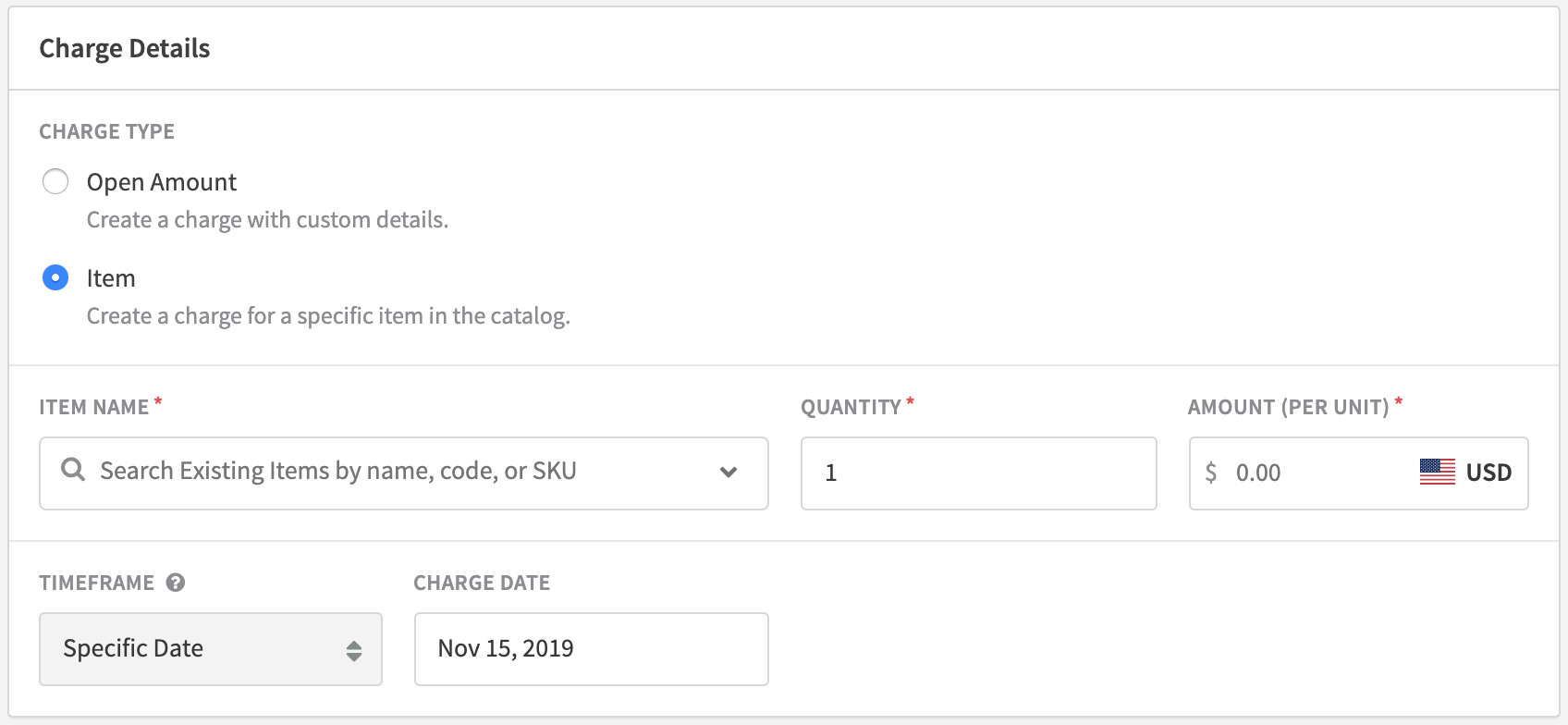
When creating a one-time charge via the Admin Console, select **Item** as the charge type. Via the API, provide the appropriate item code. The charge description, product code, accounting code, tax settings, price, and revenue recognition all auto-populate from the item — though price and revenue recognition can be overridden for the individual charge.
<span class="rp-zoom">
  <a class="rp-zoom-label" href="#zoom-one-time-charge">
    <img class="rp-zoom-img" src="https://files.readme.io/c9d0bfa-Add_Charge__Recurly.png" alt="Creating a one-time item charge in the Admin Console" />
  </a>
  <a id="zoom-one-time-charge" class="rp-zoom-overlay" href="#rp-close">
    <img src="https://files.readme.io/c9d0bfa-Add_Charge__Recurly.png" alt="" />
  </a>
</span>

One-time item charges can be created via the <a href="https://developers.recurly.com/api/latest.html#tag/purchase" target="_blank">Purchases</a>, <a href="https://developers.recurly.com/api/latest.html#tag/line_item" target="_blank">Line Items</a>, or <a href="https://dev.recurly.com/docs/adjustment-object" target="_blank">Adjustments</a> API endpoints.

## Recurring item sales

Items can be sold on a recurring basis as add-ons on plans and subscriptions. Two approaches are available.

### Selling items as plan add-ons

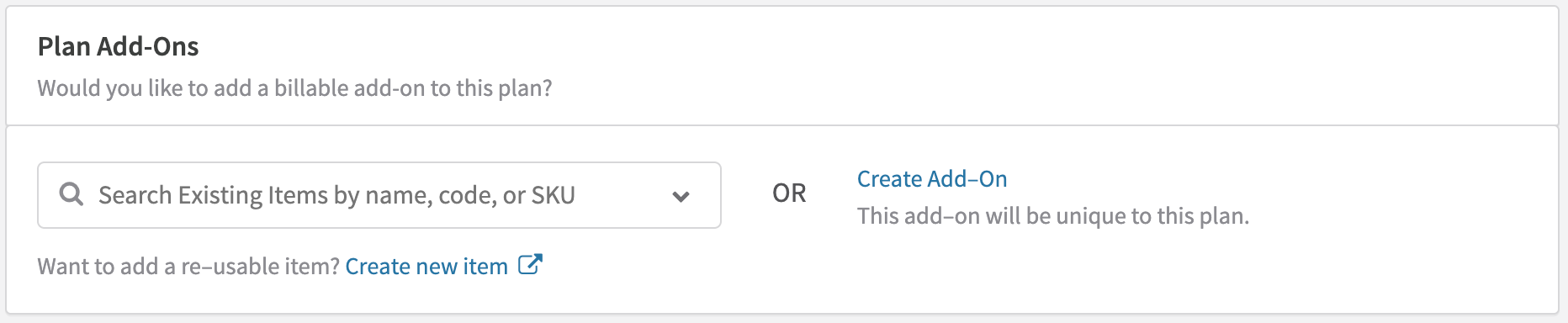
Configuring items as add-ons on a plan restricts what subscribers to that plan can select. To set this up, select the desired item(s) from the dropdown in the Plan Add-Ons section of the New Plan page, or provide the item code(s) when creating a plan via the API.
<span class="rp-zoom">
  <a class="rp-zoom-label" href="#zoom-plan-addons-item">
    <img class="rp-zoom-img" src="https://files.readme.io/f55b784-Plan_Add-Ons.png" alt="Creating a recurring item-based add-on on a plan" />
  </a>
  <a id="zoom-plan-addons-item" class="rp-zoom-overlay" href="#rp-close">
    <img src="https://files.readme.io/f55b784-Plan_Add-Ons.png" alt="" />
  </a>
</span>

Add-on name, code, accounting code, tax settings, revenue recognition, and price all auto-populate from the item. The price can be overridden at the plan level. Item-based plan add-ons can be configured via the <a href="https://developers.recurly.com/api/v2019-10-10/index.html#operation/create_plan" target="_blank">Plans</a> or <a href="https://developers.recurly.com/api/v2019-10-10/index.html#operation/create_plan_add_on" target="_blank">Plan Add-Ons</a> endpoints and charged via <a href="https://developers.recurly.com/api/latest.html#tag/purchase" target="_blank">Purchases</a> or <a href="https://developers.recurly.com/api/v2019-10-10/index.html#operation/create_subscription" target="_blank">Subscriptions</a>.

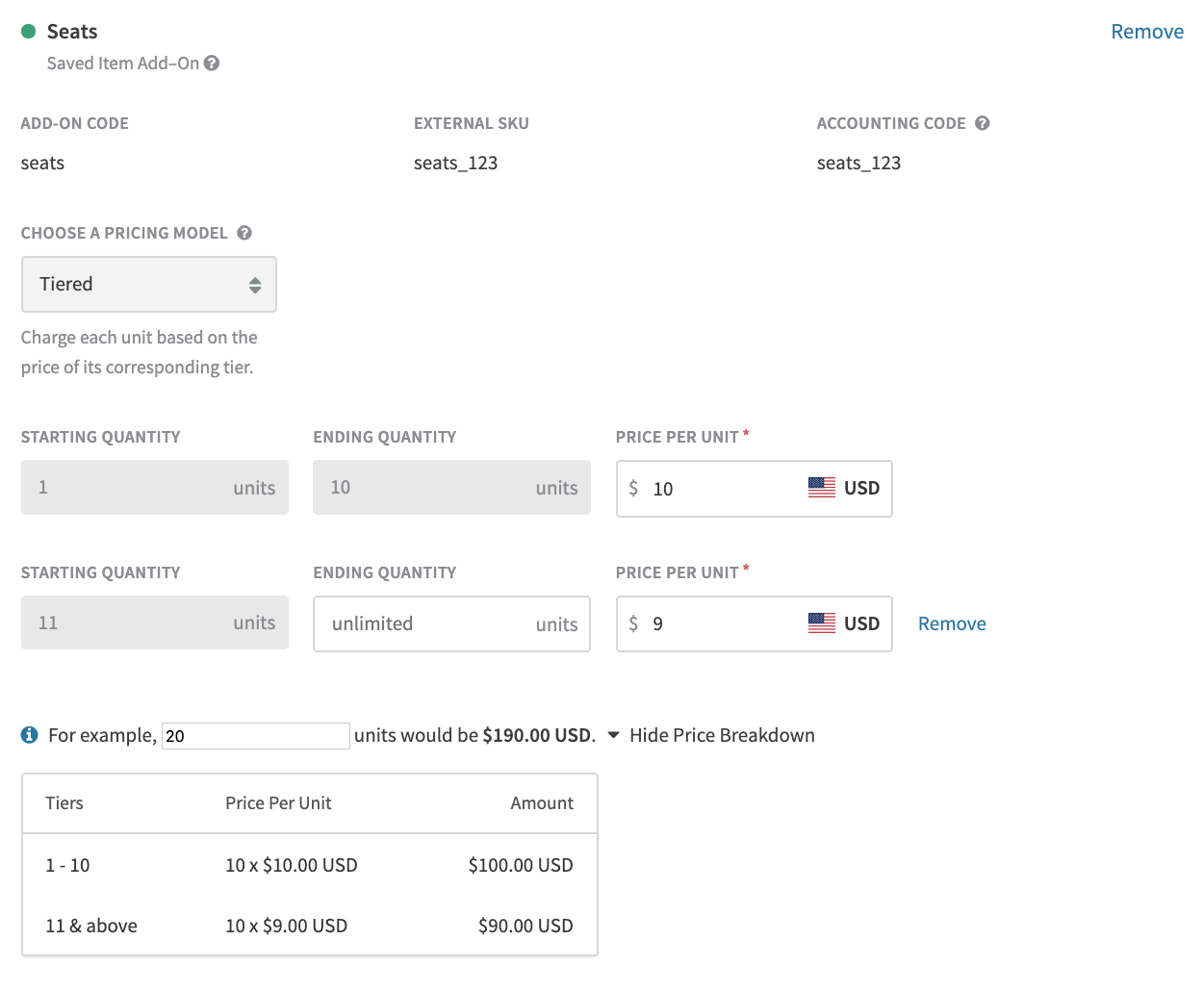
**Quantity-based pricing for item add-ons**

Items can be sold with fixed pricing or any available <a href="https://docs.recurly.com/docs/billing-models#section-quantity-based" target="_blank">quantity-based pricing</a> model when added to a plan. Select your pricing model and configure tiers as needed. Use the built-in calculator to validate that specific unit amounts charge as expected. Once saved, tiers and prices can be updated on the plan or subscription for personalized pricing. To change the pricing model itself, create a new add-on.
<span class="rp-zoom">
  <a class="rp-zoom-label" href="#zoom-quantity-pricing">
    <img class="rp-zoom-img" src="https://files.readme.io/3731327-Image_2020-05-28_at_1.36.33_PM.png" alt="Creating an item-based add-on with quantity-based pricing" />
  </a>
  <a id="zoom-quantity-pricing" class="rp-zoom-overlay" href="#rp-close">
    <img src="https://files.readme.io/3731327-Image_2020-05-28_at_1.36.33_PM.png" alt="" />
  </a>
</span>

### Selling items directly on subscriptions

If all catalog items should be available as potential add-ons, or if you manage item availability in your own platform, you can skip plan-level configuration and specify items directly on each individual subscription instead.

To enable this, check **Add all items on subscriptions to this plan** in the Plan Add-Ons section, or use the `allow_any_item_on_subscriptions` field in the <a href="https://developers.recurly.com/api/v2019-10-10/index.html#operation/create_plan" target="_blank">API</a>.

<span class="rp-zoom">
  <a class="rp-zoom-label" href="#zoom-items-on-subscriptions">
    <img class="rp-zoom-img" src="https://files.readme.io/e43c396e7df2ea7334c33b3be6c520f42af025dfdab81b0305922019dfa27101-image.png" alt="Add all items on subscriptions checkbox on the plan add-ons section" />
  </a>
  <a id="zoom-items-on-subscriptions" class="rp-zoom-overlay" href="#rp-close">
    <img src="https://files.readme.io/e43c396e7df2ea7334c33b3be6c520f42af025dfdab81b0305922019dfa27101-image.png" alt="" />
  </a>
</span>

This makes all active catalog items available as add-ons on subscriptions to that plan. New items added to the catalog become available automatically; disabled items are blocked from new subscriptions. When creating a subscription, select or provide the items to include as recurring charges.

<div class="rp-callout rp-callout-note">
  <div><strong><i class="fa-solid fa-circle-info" aria-hidden="true"></i> Note</strong> When items are sold directly on subscriptions, only fixed pricing is supported. For quantity-based pricing, configure the item as a plan add-on and provide the quantity with the subscription. To help prioritize quantity-based pricing for direct subscription items, reach out to <a href="mailto:support@recurly.com" target="_blank">support@recurly.com</a>.</div>
</div>

It's also possible to combine plan add-ons and direct subscription items on the same plan. The same item-based add-on can be added up to twice — once tied to the plan add-on and once configured directly on the subscription — supporting sales at multiple prices if needed. The `add_on_source` field in the API distinguishes between the two instances.

# Item data and exports

## Item usage across plans and subscriptions

Use the [Items — Associated Plans](https://docs.recurly.com/recurly-subscriptions/docs/items-associated-plans) and [Items — Associated Subscriptions](https://docs.recurly.com/recurly-subscriptions/docs/items-associated-subscriptions) exports to see which plans and subscriptions contain a specific item. These are useful for assessing the impact of disabling or editing an item, and for analyzing pricing and packaging across your sales channels.

## Item sales data

Item sales data is available in the Adjustments exports and via the <a href="https://developers.recurly.com/api/latest.html#tag/line_item" target="_blank">Line Items</a> and <a href="https://dev.recurly.com/docs/adjustment-object" target="_blank">Adjustments</a> API endpoints.

<table class="rp-gw-table">
  <tr class="rp-thead-row"><td>Export</td><td>Minimum version</td></tr>
  <tr><td>Adjustments</td><td><a href="https://docs.recurly.com/docs/adjustments-exports#section-adjustments" target="_blank">Version 3</a></td></tr>
  <tr><td>Adjustments — Coupons</td><td><a href="https://docs.recurly.com/docs/adjustments-exports#section-adjustments-coupons" target="_blank">Version 2</a></td></tr>
  <tr><td>Adjustments — Taxes</td><td><a href="https://docs.recurly.com/docs/adjustments-taxes-export" target="_blank">Version 3</a></td></tr>
</table>

For purchases that include a catalog item, the item code, external SKU, and Recurly item ID are included in the export. The item code is also replicated in the Product Code field to support analysis across all sales channels.

# API and client libraries

All item catalog functionality requires <a href="https://docs.recurly.com/recurly-subscriptions/v2019-10-10/reference/getting-started-v2019-10-10" target="_blank">API version 2019-10-10</a> or above. We recommend always using the latest API version for the most up-to-date functionality.

## v3 client libraries

Minimum versions required for item catalog support. Each card links to the minimum release — click "Latest releases" for the most recent version.

<div class="rp-sdk-grid">
<Cards>
  <Card title="Ruby — 3.9.0" href="https://github.com/recurly/recurly-client-ruby/releases/tag/3.9.0" target="_blank">
    Minimum version for item catalog. <a href="https://github.com/recurly/recurly-client-ruby/releases" target="_blank">Latest releases →</a>
  </Card>
  <Card title="Node.js — 3.10.0" href="https://github.com/recurly/recurly-client-node/releases/tag/3.10.0" target="_blank">
    Minimum version for item catalog. <a href="https://github.com/recurly/recurly-client-node/releases" target="_blank">Latest releases →</a>
  </Card>
  <Card title="Python — 3.8.0" href="https://github.com/recurly/recurly-client-python/releases/tag/3.8.0" target="_blank">
    Minimum version for item catalog. <a href="https://github.com/recurly/recurly-client-python/releases" target="_blank">Latest releases →</a>
  </Card>
  <Card title=".NET — 3.10.0" href="https://github.com/recurly/recurly-client-dotnet/releases/tag/3.10.0" target="_blank">
    Minimum version for item catalog. <a href="https://github.com/recurly/recurly-client-dotnet/releases" target="_blank">Latest releases →</a>
  </Card>
  <Card title="Go — 3.4.0" href="https://github.com/recurly/recurly-client-go/releases/tag/v3.4.0" target="_blank">
    Minimum version for item catalog. <a href="https://github.com/recurly/recurly-client-go/releases" target="_blank">Latest releases →</a>
  </Card>
  <Card title="Java — 3.9.0" href="https://github.com/recurly/recurly-client-java/releases/tag/3.9.0" target="_blank">
    Minimum version for item catalog. <a href="https://github.com/recurly/recurly-client-java/releases" target="_blank">Latest releases →</a>
  </Card>
  <Card title="PHP — 3.4.0" href="https://github.com/recurly/recurly-client-php/releases/tag/3.4.0" target="_blank">
    Minimum version for item catalog. <a href="https://github.com/recurly/recurly-client-php/releases" target="_blank">Latest releases →</a>
  </Card>
</Cards>
</div>

## Legacy v2 API

For sites on the older v2 API, the following minimum versions apply.

<table class="rp-gw-table">
  <tr class="rp-thead-row"><td>Feature</td><td>API version</td></tr>
  <tr><td>Item creation and one-time charges</td><td><a href="https://dev.recurly.com/v2.24" target="_blank">v2.24</a> and above</td></tr>
  <tr><td>Item-based plan add-ons</td><td><a href="https://dev.recurly.com/v2.25" target="_blank">v2.25</a> and above</td></tr>
  <tr><td>Items directly on subscriptions</td><td><a href="https://dev.recurly.com/v2.27" target="_blank">v2.27</a> and above</td></tr>
</table>

<div class="rp-sdk-grid">
<Cards>
  <Card title="Ruby — 2.18.10" href="https://github.com/recurly/recurly-client-ruby/releases/tag/2.18.10" target="_blank">
    Minimum v2 version for item catalog. <a href="https://github.com/recurly/recurly-client-ruby/releases" target="_blank">Latest releases →</a>
  </Card>
  <Card title="Python — 2.9.17" href="https://github.com/recurly/recurly-client-python/releases/tag/2.9.17" target="_blank">
    Minimum v2 version for item catalog. <a href="https://github.com/recurly/recurly-client-python/releases" target="_blank">Latest releases →</a>
  </Card>
  <Card title="PHP — 2.12.14" href="https://github.com/recurly/recurly-client-php/releases/tag/2.12.14" target="_blank">
    Minimum v2 version for item catalog. <a href="https://github.com/recurly/recurly-client-php/releases" target="_blank">Latest releases →</a>
  </Card>
  <Card title=".NET — 1.17.5" href="https://github.com/recurly/recurly-client-net/releases/tag/1.17.5" target="_blank">
    Minimum v2 version for item catalog. <a href="https://github.com/recurly/recurly-client-net/releases" target="_blank">Latest releases →</a>
  </Card>
</Cards>
</div>

# Sub pages

* [Line items](https://docs.recurly.com/recurly-subscriptions/docs/line-items.md)

# Sibling pages

* [Plans](https://docs.recurly.com/recurly-subscriptions/docs/plans.md)
* [Add-ons](https://docs.recurly.com/recurly-subscriptions/docs/add-ons.md)