---
updatedAt: 2026-06-04T16:06:44.000Z
agentTools:
siteIndex: https://docs.recurly.com/llms.txt
projectIndex: https://docs.recurly.com/recurly-subscriptions/llms.txt
---
# Prepaid account balance
Prepaid account balance lets customers pay in advance, building a balance that automatically offsets future subscription and one-time purchase invoices.
Prepaid account balance lets your customers pay ahead of time — the amount they pay is added to their account balance and automatically applied to future subscription renewals and one-time purchases until it runs out.
Available on all Recurly plans
Prerequisites
The Credit Invoices and Only Bill What Changed features must both be enabled on your site before you can use prepaid account balance. Contact support@recurly.com or your CSM if either setting isn't active.
Prepaid account balance is a feature that lets customers pay in advance. The prepaid amount is credited to their account balance and automatically applied to settle future subscription and one-time purchase invoices — no manual intervention needed.
# Key benefits
Immediate cash flowCollect payment upfront before the subscription period begins, improving your financial predictability and stability.
Higher acquisition and conversionOffer discounts on prepaid amounts to make your plans more attractive and give customers a reason to commit early.
Lower transaction costsWhen subscribers pay from their account balance, there are no transaction fees or interchange charges — reducing your per-invoice processing costs.
# Setting up a prepaid account balance
You can create a prepaid account balance via API v3, API v2, or the Admin Console.
## Via API v3
Send a Purchase request containing a `line_item` with `"origin": "prepayment"`.
## Via API v2
Send a Purchase request for a charge adjustment with `"origin": "prepayment"`.
## Via the Admin Console
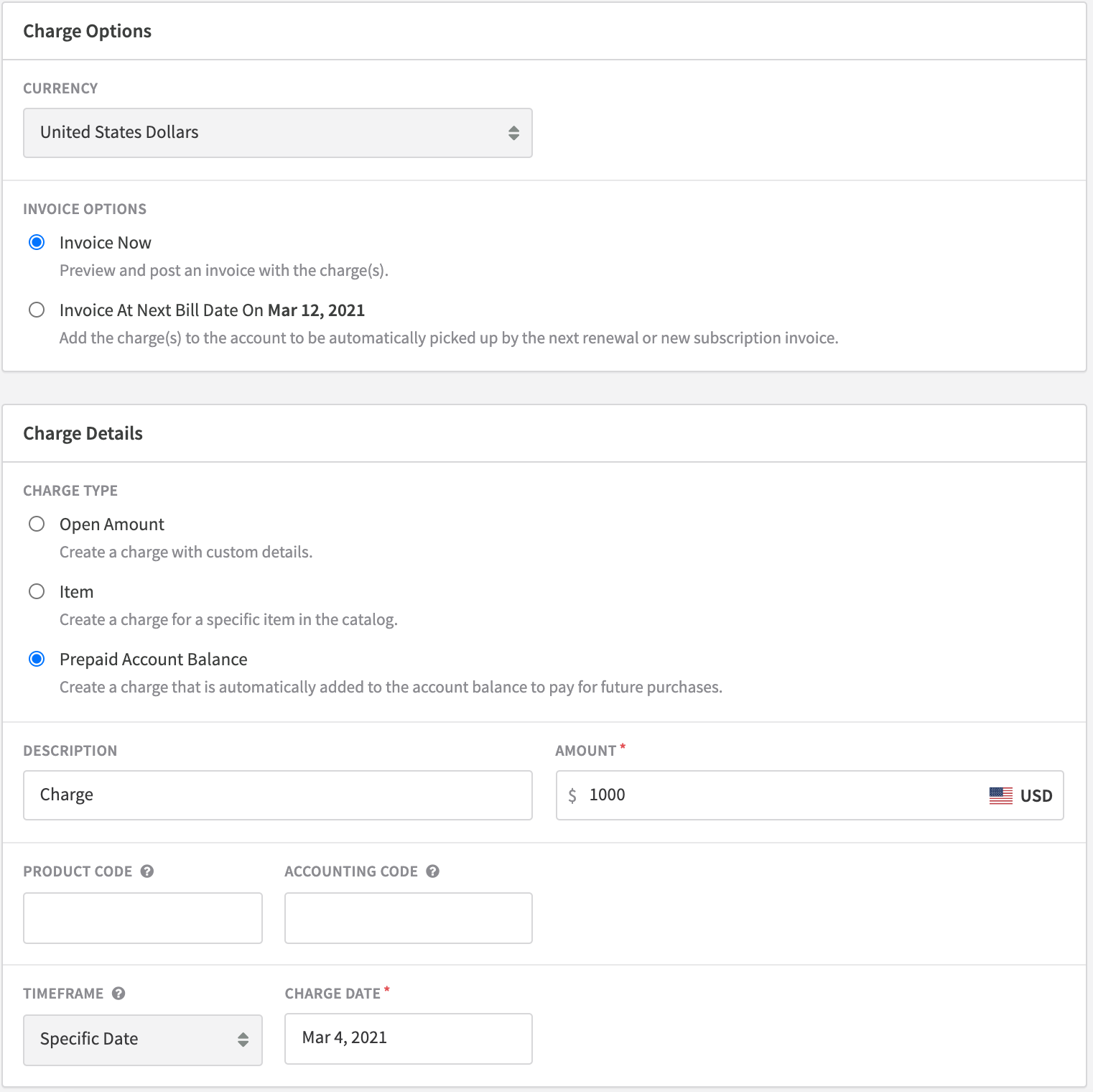
Create a charge with an immediate time frame. Select **Prepaid Account Balance**, enter an amount, and preview the charge before confirming.
## What happens after a successful purchase
Once the purchase is processed, the transaction amount is added to the account balance. All future subscription renewals and one-time purchases are automatically deducted from that balance until it's depleted.
If a purchase transaction fails, the invoice is marked as failed and enters the dunning process for collection.
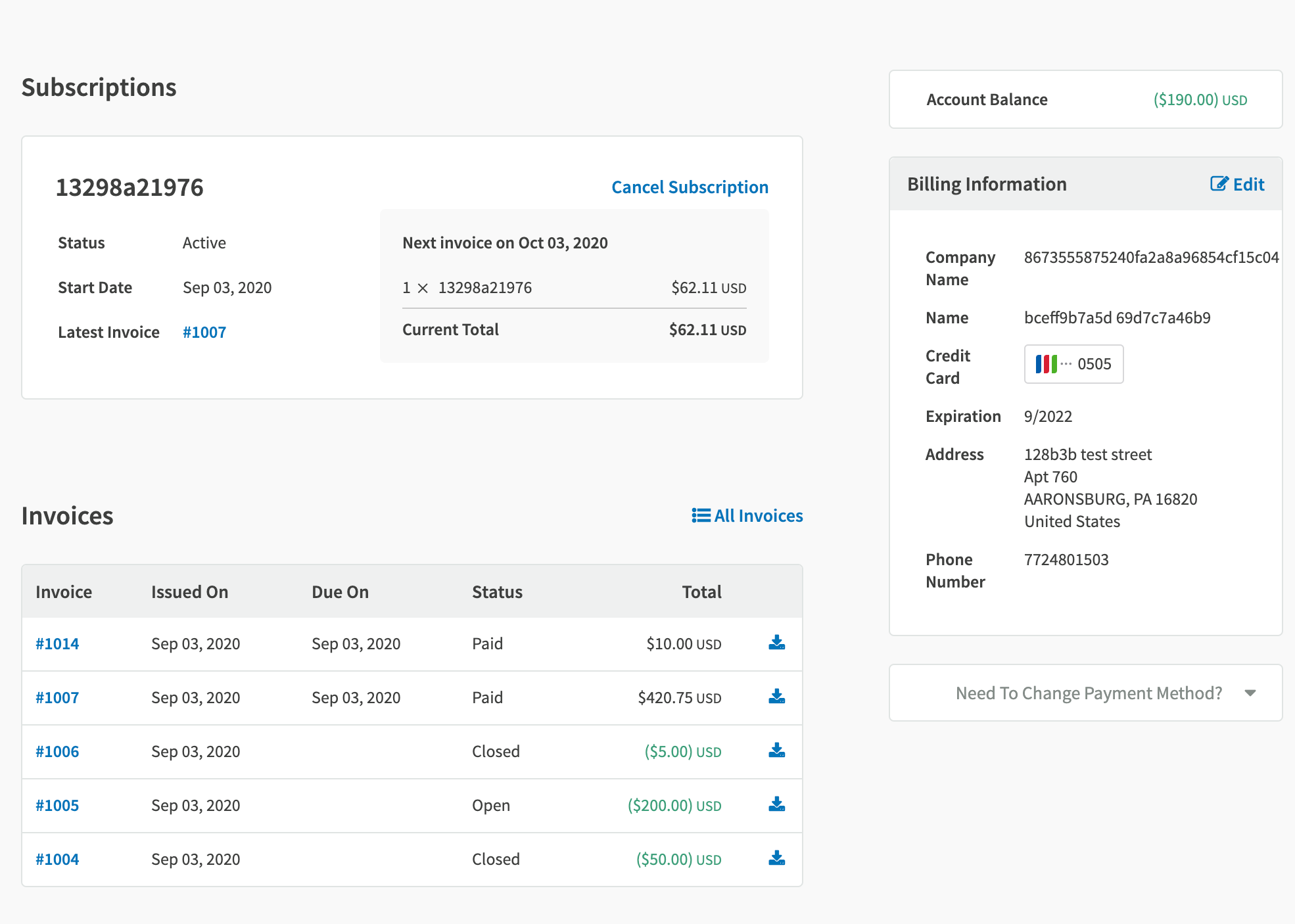
The Hosted Account Management page displays the account balance, active subscriptions, and all associated invoices — giving subscribers full visibility into their account.
## Manual collection
For accounts using manual collection, the account balance stays in a processing state until the manual payment is collected.
## Asynchronous payment methods
Prepayments made through ACH, other direct debit methods, or the UI will not fund the prepaid balance until Recurly receives a successful transaction notification from the payment provider.
# Considerations
Keep the following in mind when using prepaid account balances:
Prepaid balances should be tax-exempt. Taxes are applied on the invoice when the actual product or service is sold.
Do not mix prepaid account balance line items with other line items in the same purchase request.
Prepaid account balance purchases must be invoiced immediately — not at renewal.
A prepaid account balance cannot be used to fund another prepaid account balance. Subsequent prepayment purchases will not draw from the existing balance.
Revenue recognition for account balances must be managed by you, the merchant.
See Adjustments for details on how credits and account balances are applied to invoices.
# Refunds
Prepaid account balances that haven't been used can be refunded. The refund is returned to the original payment method used for the prepayment.
# Sibling pages
* [Fixed recurring pricing](https://docs.recurly.com/recurly-subscriptions/docs/fixed-recurring-pricing.md)
* [Ramp pricing](https://docs.recurly.com/recurly-subscriptions/docs/ramp-pricing.md)
* [One-time pricing](https://docs.recurly.com/recurly-subscriptions/docs/one-time-pricing.md)
* [Usage-based billing](https://docs.recurly.com/recurly-subscriptions/docs/usage-based-billing.md)
* [Quantity-based pricing](https://docs.recurly.com/recurly-subscriptions/docs/quantity-based-pricing.md)
* [Hybrid pricing](https://docs.recurly.com/recurly-subscriptions/docs/hybrid-pricing.md)
* [Currencies](https://docs.recurly.com/recurly-subscriptions/docs/currencies.md)