---
updatedAt: 2026-10-15T19:32:13.000Z
agentTools:
  siteIndex: https://docs.recurly.com/llms.txt
  projectIndex: https://docs.recurly.com/recurly-subscriptions/llms.txt
---

# Tax inclusive pricing

Tax inclusive pricing lets merchants display prices that already include applicable taxes, ensuring subscribers see a consistent all-in price at checkout and on invoices.

<div class="rp-page">
  <div class="rp-overview">

Tax inclusive pricing lets you display prices that already account for any applicable taxes — so subscribers always see one clear, all-in number. You can set tax inclusivity at the subscription level, and it works seamlessly with Recurly's native tax solution, Avatax, and Vertex.

  </div>

  <div class="rp-plan"><i class="fa-solid fa-key" aria-hidden="true"></i> Available on all Recurly plans</div>

  <div class="rp-toc">
    <a class="rp-toc-pill" href="#definition"><span class="rp-toc-num">1</span>Definition</a>
    <a class="rp-toc-pill" href="#key-benefits"><span class="rp-toc-num">2</span>Key benefits</a>
    <a class="rp-toc-pill" href="#how-it-works"><span class="rp-toc-num">3</span>How it works</a>
    <a class="rp-toc-pill" href="#discounts-and-tax-inclusivity"><span class="rp-toc-num">4</span>Discounts</a>
    <a class="rp-toc-pill" href="#invoicing"><span class="rp-toc-num">5</span>Invoicing</a>
    <a class="rp-toc-pill" href="#integration-with-recurlyjs"><span class="rp-toc-num">6</span>Recurly.js integration</a>
  </div>

</div>

# Definition

<div class="rp-definition">

Tax inclusive pricing allows merchants to set prices that already include any applicable taxes. Rather than calculating and displaying tax as a separate line item after the fact, the full tax obligation is baked into the displayed price — giving subscribers a consistent, predictable number every time.

</div>

<div class="rp-callout rp-callout-important">
  <strong><i class="fa-solid fa-circle-exclamation" aria-hidden="true"></i> Limitations to review before enabling</strong>
  <ul>
    <li><strong>Once enabled, tax inclusive pricing cannot be disabled on your Recurly site.</strong></li>
    <li>The tax inclusivity status of a subscription cannot be changed after it's created.</li>
  </ul>
</div>

**Prerequisites:**

* A subscription to Recurly's out-of-box tax solution, or a direct integration with Avatax or Vertex

# Key benefits

<div class="rp-benefits rp-benefits-2x2">
  <div class="rp-benefit">
    <div class="rp-benefit-icon"><i class="fa-solid fa-eye" aria-hidden="true"></i></div>
    <strong>Transparent pricing</strong>
    <span>Subscribers see one clear number — no surprise tax line at checkout.</span>
  </div>
  <div class="rp-benefit">
    <div class="rp-benefit-icon"><i class="fa-solid fa-sliders" aria-hidden="true"></i></div>
    <strong>Per-subscription flexibility</strong>
    <span>Set tax inclusivity at subscription creation to meet the needs of different customer segments or regions.</span>
  </div>
  <div class="rp-benefit">
    <div class="rp-benefit-icon"><i class="fa-solid fa-circle-check" aria-hidden="true"></i></div>
    <strong>Works with your tax stack</strong>
    <span>Compatible with Recurly's native tax solution, Avalara AvaTax, and Vertex — no rework needed.</span>
  </div>
  <div class="rp-benefit">
    <div class="rp-benefit-icon"><i class="fa-solid fa-file-invoice-dollar" aria-hidden="true"></i></div>
    <strong>Invoice control</strong>
    <span>Choose whether taxes appear as a separate line item on invoices or stay hidden inside the all-in price.</span>
  </div>
</div>

# How it works

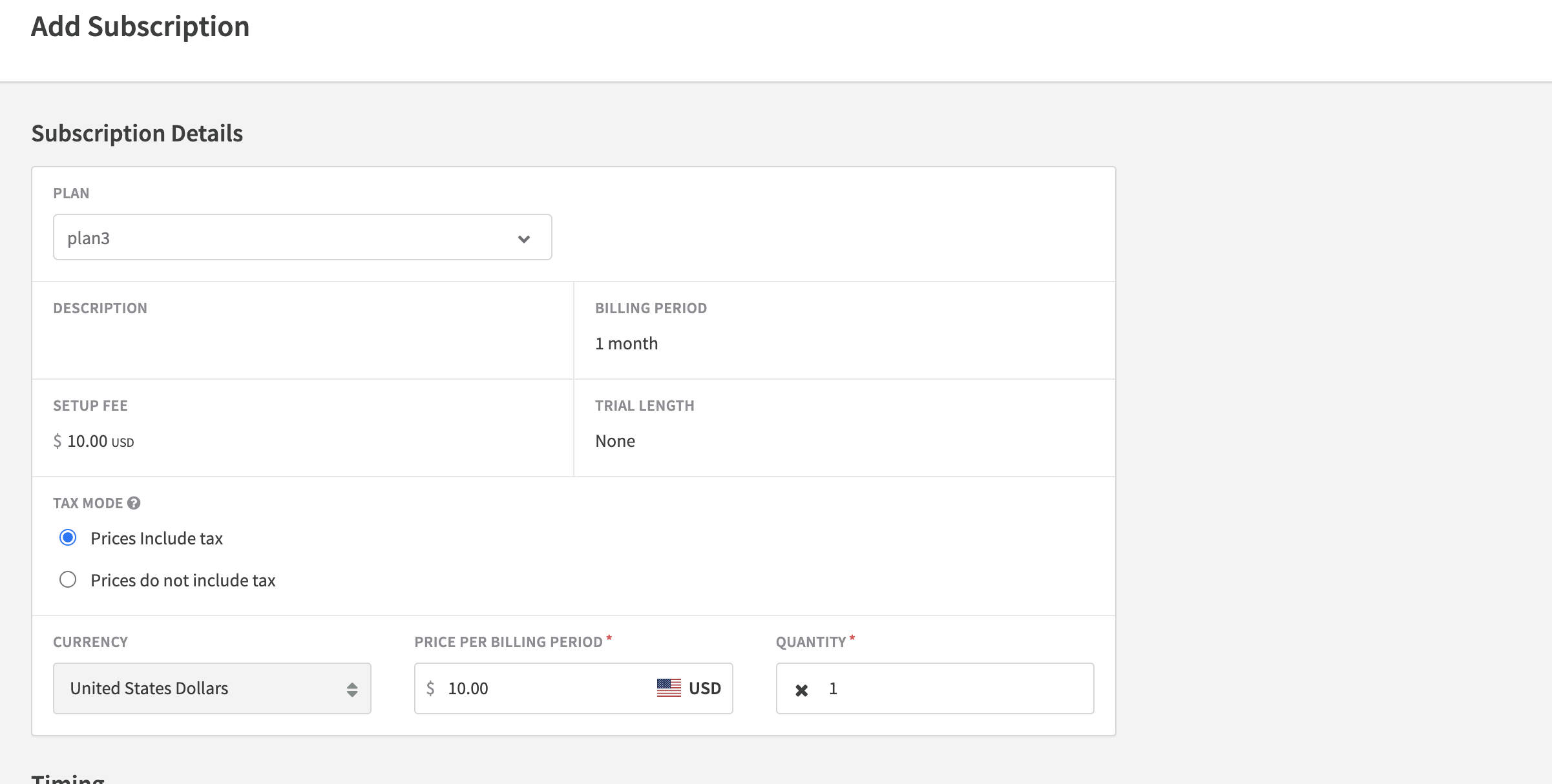
When you create a subscription plan, you configure it as usual. At the point of **subscription creation**, you select the tax inclusivity status for that subscriber. From that point forward, it's locked in — the subscriber's final price reflects the tax treatment you chose.

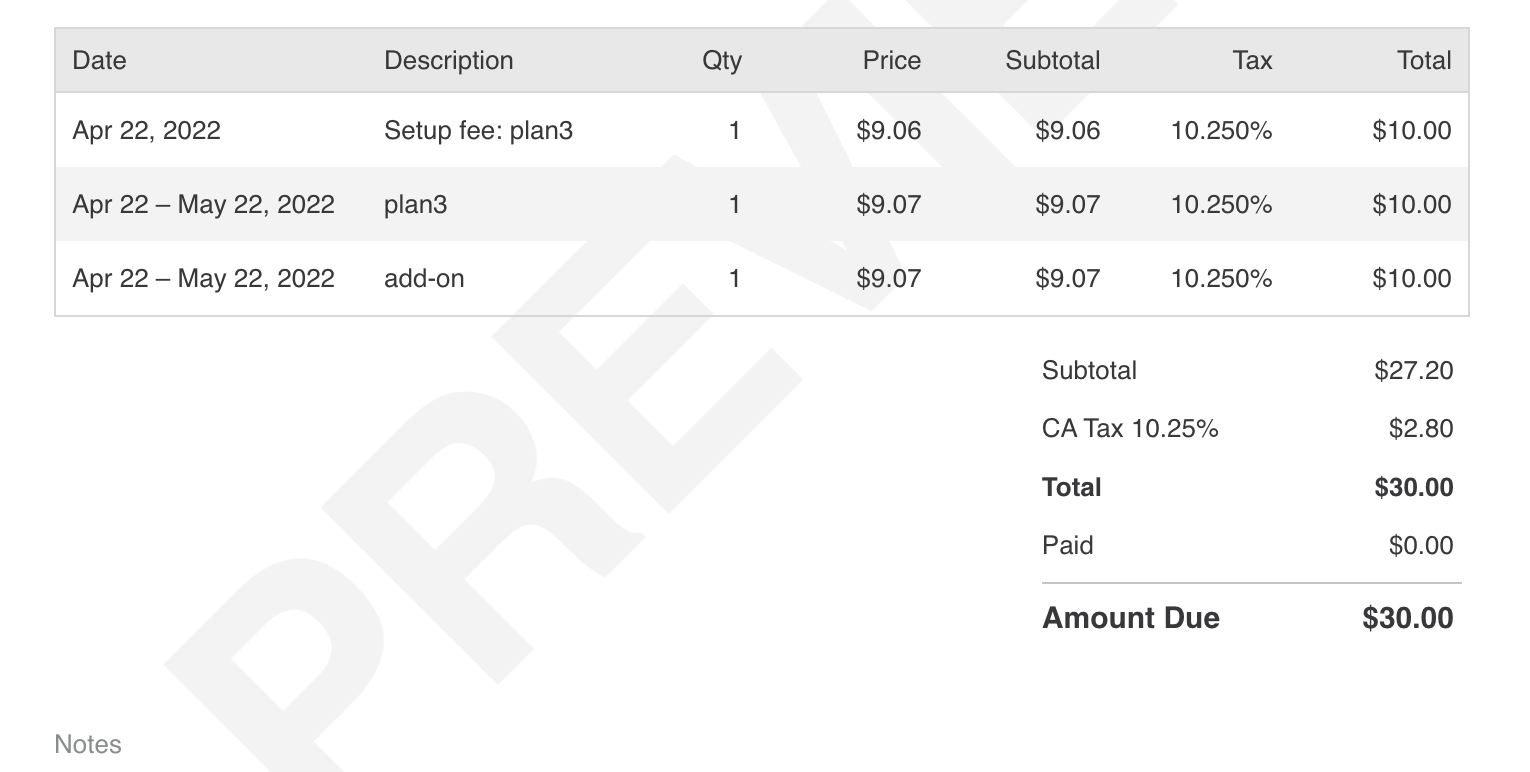
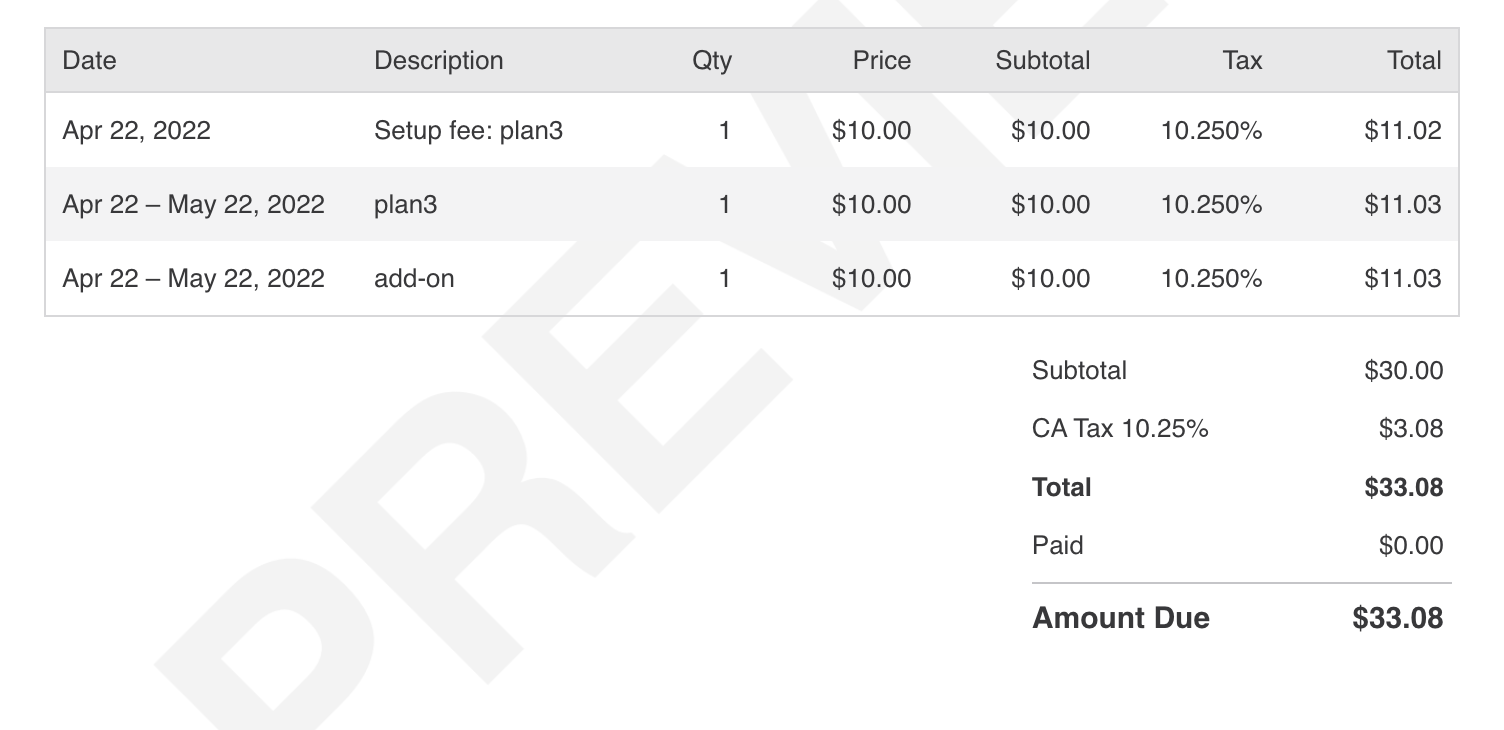
For example: a plan priced at $10.00 can produce different final prices for two subscribers if their tax rates differ, while both see a clean, tax-inclusive number at checkout.

<span class="rp-zoom">
  <a class="rp-zoom-label" href="#">
    <img src="https://files.readme.io/7f758cf-Screen_Shot_2022-04-22_at_12.12.14_PM.png" alt="Tax inclusive pricing configuration in the Recurly dashboard" />
  </a>
</span>

Items created outside of the plan page inherit the tax inclusivity status of the associated subscription. For one-time purchases, you can add a charge to an account and select the tax inclusivity preference at that time.
<span class="rp-zoom">
  <a class="rp-zoom-label" href="#">
    <img src="https://files.readme.io/6195d9b-Screen_Shot_2022-04-22_at_12.23.30_PM.png" alt="Subscription creation showing tax inclusive option selected" />
  </a>
</span>

<span class="rp-zoom">
  <a class="rp-zoom-label" href="#">
    <img src="https://files.readme.io/8de7238-Screen_Shot_2022-04-22_at_12.23.19_PM.png" alt="Subscription creation showing tax exclusive option selected" />
  </a>
</span>

<div class="rp-callout rp-callout-tip">
  <strong><i class="fa-solid fa-lightbulb" aria-hidden="true"></i> Setting it up</strong>
  Navigate to the pricing settings for subscriptions, plans, items, add-ons, or fees in your Recurly dashboard. Configure the desired price, then select the <strong>Tax Inclusive</strong> option when creating the subscription.
</div>

# Discounts and tax inclusivity

Discounts work as expected when tax inclusive pricing is active. Recurly handles the math automatically — you apply the discount, and the system adjusts both the subtotal and the tax amount proportionally.

<table class="rp-pm-table">
  <tr class="rp-thead-row">
    <td>Discount type</td>
    <td>Example</td>
    <td>Final price</td>
    <td>Breakdown</td>
  </tr>
  <tr>
    <td>Percentage discount</td>
    <td>20% off a $300.00 tax-inclusive price (10.25% tax rate)</td>
    <td>$240.00</td>
    <td>$217.69 subtotal + $22.32 tax</td>
  </tr>
  <tr>
    <td>Fixed amount discount</td>
    <td>$60.00 off a $300.00 tax-inclusive price (10.25% tax rate)</td>
    <td>$240.00</td>
    <td>$217.69 subtotal + $22.32 tax</td>
  </tr>
</table>

To apply a discount: choose the subscription or item, select your discount type (percentage or fixed amount), and apply it. Recurly recalculates automatically.

# Invoicing

When tax inclusive pricing is enabled on your site, you can choose whether taxes appear as a separate line item on invoices — or stay folded into the displayed price. This setting lives in your invoice template configuration and is **disabled by default**.

<span class="rp-zoom">
  <a class="rp-zoom-label" href="#">
    <img src="https://files.readme.io/6f2a0458032a3cc9c32c9a790d8135969cbb31651fd13cb303922f7c53b90fce-Screenshot_2026-06-03_at_5.33.26_PM.png" alt="Invoice template settings showing the show taxes option" />
  </a>
</span>

To configure: go to **Invoice templates** in your Recurly dashboard, create or edit a template, and toggle the option to show or hide taxes.

# Tax Inclusive Regions

When tax-inclusive pricing is enabled, you can choose which regions use tax-inclusive pricing. To configure regions, go to **Taxes → Tax** **Inclusive Regions**.

Once you save your selections, they'll stay in place even if you disable your tax integration. This makes it easy to switch from one tax integration to another without losing your configuration.

<Image src="https://files.readme.io/6d7a2d2816c80519a8550d529048957599184adfc29b20a9a9720bc3d029c39a-Screenshot_2026-08-04_at_2.38.21_PM.png" border={true} />

# Integration with Recurly.js

For accurate tax estimates in Recurly.js, follow this three-step sequence:

<div class="rp-steps">
  <div class="rp-step">
    <div class="rp-step-num">1</div>
    <div>
      <h4>Generate a token without a tax inclusive flag</h4>
      <p>Use Recurly.js to tokenize the billing info as usual — do not pass a <code>tax_inclusive</code> flag at this stage.</p>
    </div>
  </div>
  <div class="rp-step">
    <div class="rp-step-num">2</div>
    <div>
      <h4>Create the purchase or subscription via API</h4>
      <p>Use API v2 or v3 to create the purchase or subscription. Reference the token from step one in <code>billing_info.token_id</code>, and pass your <code>tax_inclusive</code> flag here.</p>
    </div>
  </div>
  <div class="rp-step">
    <div class="rp-step-num">3</div>
    <div>
      <h4>Use the preview route to show estimated taxes</h4>
      <p>Before finalizing the purchase, call the preview route to display estimated taxes to your subscriber. This gives them a complete picture of what they'll be charged.</p>
    </div>
  </div>
</div>
