---
updatedAt: 2026-05-28T04:30:59.000Z
agentTools:
  siteIndex: https://docs.recurly.com/llms.txt
  projectIndex: https://docs.recurly.com/recurly-subscriptions/llms.txt
---

# Fixed recurring pricing

Set up a subscription plan with a fixed base charge — simple for straightforward billing or configurable for complex, multi-period commitments.

<span id="rp-close"></span>

<div class="rp-page">
  <div class="rp-video" style={{paddingTop:"56.25%"}}>
    <iframe src="https://www.youtube.com/embed/P6RWS3X-yFw" title="Fixed recurring pricing overview" allow="autoplay; fullscreen; encrypted-media; picture-in-picture" frameborder="0" scrolling="no" allowfullscreen></iframe>
  </div>
  <div class="rp-overview">Fixed recurring pricing is Recurly's most straightforward billing model — a set charge billed at regular intervals, with the flexibility to support add-ons, multiple billing periods, and quantity control. Whether you're running a simple monthly subscription or a complex multi-term commitment, this model gives you a reliable foundation.</div>
  <div class="rp-plan"><i class="fa-solid fa-key" aria-hidden="true"></i> Available on all Recurly plans</div>
  <div class="rp-toc">
    <a class="rp-toc-pill" href="#definition"><span class="rp-toc-num">1</span>Definition</a>
    <a class="rp-toc-pill" href="#key-benefits"><span class="rp-toc-num">2</span>Key benefits</a>
    <a class="rp-toc-pill" href="#key-details"><span class="rp-toc-num">3</span>Key details</a>
    <a class="rp-toc-pill" href="#set-up-fixed-recurring-pricing"><span class="rp-toc-num">4</span>Set up fixed recurring pricing</a>
  </div>
</div>

# Definition

<div class="rp-definition">Fixed recurring pricing is a billing model where subscribers pay a set amount at regular intervals for access to a product or service. It supports optional or required add-ons, multiple billing periods, and quantity controls — making it adaptable to a wide range of subscription structures without sacrificing predictability.</div>

# Key benefits

<div class="rp-benefits rp-benefits-2x2">
  <div class="rp-benefit">
    <div class="rp-benefit-icon"><i class="fa-solid fa-circle-check" aria-hidden="true"></i></div>
    <strong>Simplicity</strong>
    <span>Easy to set up — all you need is a base charge to get started. No complex configuration required for straightforward subscriptions.</span>
  </div>
  <div class="rp-benefit">
    <div class="rp-benefit-icon"><i class="fa-solid fa-plus-circle" aria-hidden="true"></i></div>
    <strong>Add-on flexibility</strong>
    <span>Attach optional or required add-ons to any plan to offer additional services or features at an extra cost — increasing revenue without creating new plans.</span>
  </div>
  <div class="rp-benefit">
    <div class="rp-benefit-icon"><i class="fa-solid fa-sliders" aria-hidden="true"></i></div>
    <strong>Customization</strong>
    <span>Supports simple single-period subscriptions and complex, long-term commitments with multiple billing periods — all within the same model.</span>
  </div>
  <div class="rp-benefit">
    <div class="rp-benefit-icon"><i class="fa-solid fa-lock" aria-hidden="true"></i></div>
    <strong>Quantity control</strong>
    <span>Choose whether subscribers can set their own quantity at sign-up or lock it to a fixed amount — giving you full control over the billing process.</span>
  </div>
</div>

# Key details

Fixed recurring pricing works by anchoring every subscription to a base charge that repeats on a schedule you define. Add-ons extend the model naturally: an optional "premium support" add-on, for example, bills each month on top of the base charge without requiring a separate plan.

## Industry examples

<table class="rp-gw-table">
  <tr class="rp-thead-row"><td>Industry</td><td>Example</td></tr>
  <tr><td>Streaming media</td><td>Twitch charges $4.99/month</td></tr>
  <tr><td>Consumer goods</td><td>Bark charges $5/month for their Junior Subscription</td></tr>
  <tr><td>Services</td><td>FitForMe charges $11.65/month</td></tr>
</table>

# Set up fixed recurring pricing

<div class="rp-steps">
  <div class="rp-step">
    <div class="rp-step-num">1</div>
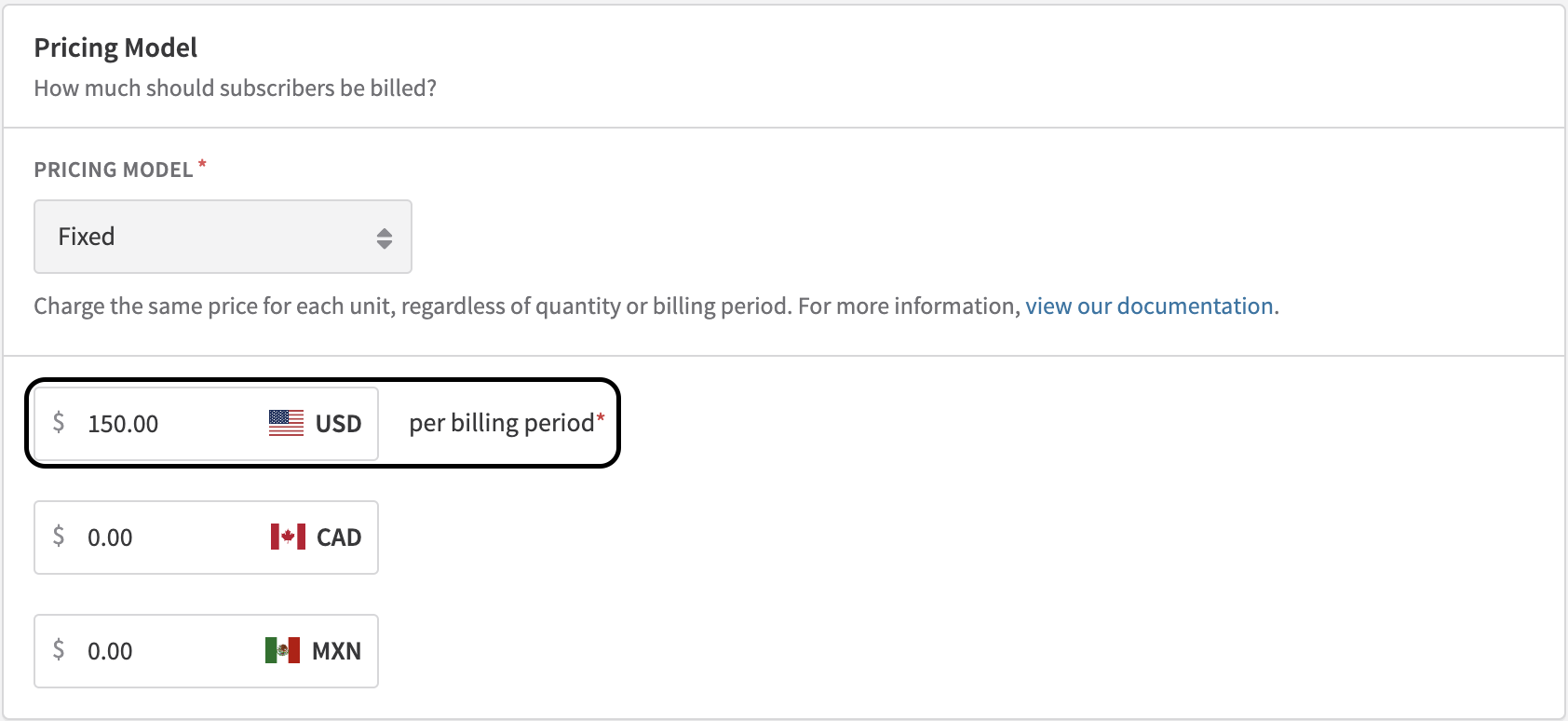
    <div><h4>Set up the base charge</h4><p>Create a plan with a base charge — this is the foundation of your subscription. Navigate to <strong>Configuration → Plans</strong> and select <strong>New Plan</strong>.</p></div>
  </div>
</div>

<span class="rp-zoom">
  <a class="rp-zoom-label" href="#zoom-plan-base-charge">
    <img class="rp-zoom-img" src="https://files.readme.io/27fbd3dae54ed4bb8e05ab6723cdc0d1b6c11eaccb828958a5437826196bcf58-image.png" alt="New plan form showing base charge configuration" />
  </a>
  <a id="zoom-plan-base-charge" class="rp-zoom-overlay" href="#rp-close">
    <img src="https://files.readme.io/27fbd3dae54ed4bb8e05ab6723cdc0d1b6c11eaccb828958a5437826196bcf58-image.png" alt="" />
  </a>
</span>

<span class="rp-zoom">
  <a class="rp-zoom-label" href="#zoom-plan-pricing-fields">
    <img class="rp-zoom-img" src="https://files.readme.io/15010df5beea41a49ed30c6eb8e7f1113c7f8241f071b22ad4aa49cdf68f1e3c-Screenshot_2025-01-07_at_11.45.37_AM.png" alt="Plan pricing fields in the new plan form" />
  </a>
  <a id="zoom-plan-pricing-fields" class="rp-zoom-overlay" href="#rp-close">
    <img src="https://files.readme.io/15010df5beea41a49ed30c6eb8e7f1113c7f8241f071b22ad4aa49cdf68f1e3c-Screenshot_2025-01-07_at_11.45.37_AM.png" alt="" />
  </a>
</span>

<div class="rp-steps">
  <div class="rp-step">
    <div class="rp-step-num">2</div>
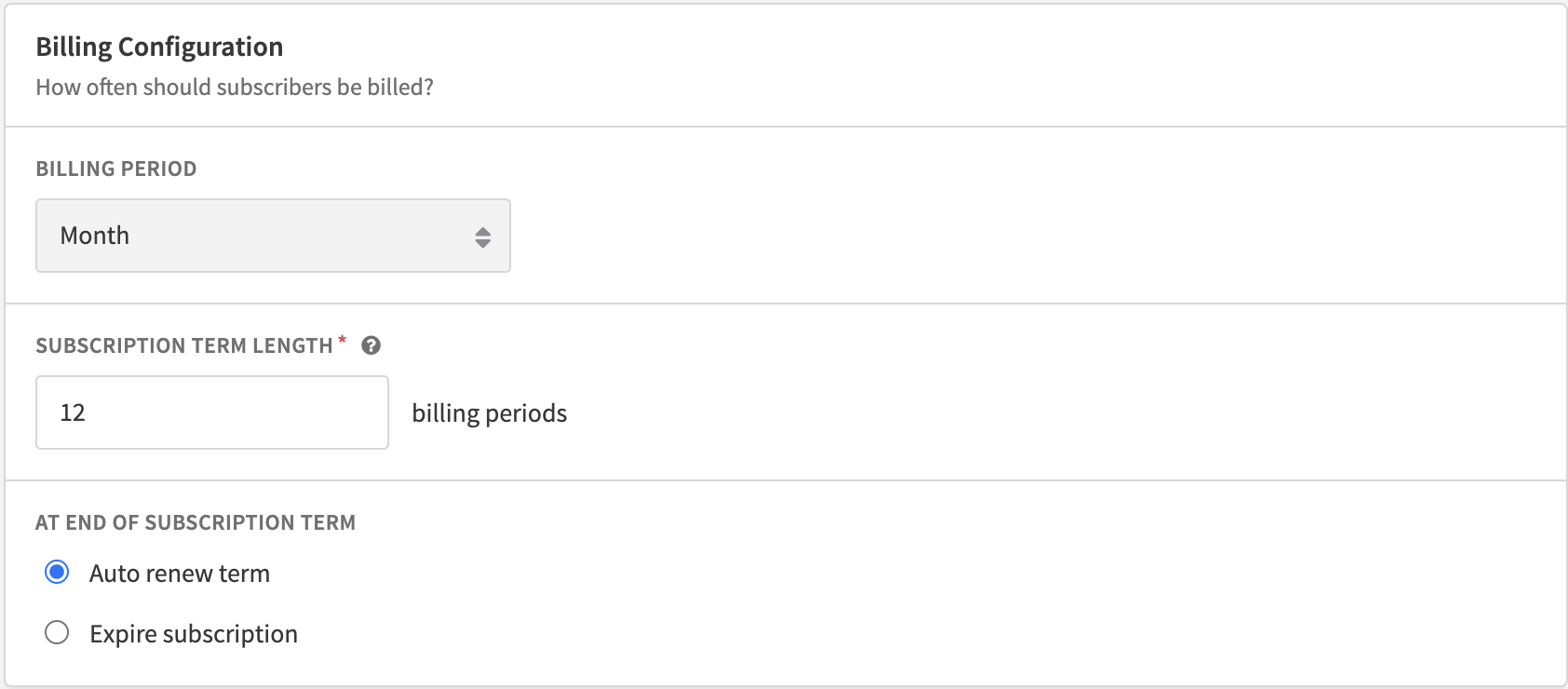
    <div><h4>Set subscription terms</h4><p>Define whether your subscription is a simple single-period plan or a longer-term commitment with multiple billing periods. See <a href="https://docs.recurly.com/docs/subscription-terms" target="_blank">Subscription Billing Terms</a> for full configuration details.</p></div>
  </div>
</div>

<span class="rp-zoom">
  <a class="rp-zoom-label" href="#zoom-subscription-terms">
    <img class="rp-zoom-img" src="https://files.readme.io/21b748c0ad05543c04f3038188475ae538e06c364fae0f21876ad4d01b5128ad-image.png" alt="Subscription billing terms configuration" />
  </a>
  <a id="zoom-subscription-terms" class="rp-zoom-overlay" href="#rp-close">
    <img src="https://files.readme.io/21b748c0ad05543c04f3038188475ae538e06c364fae0f21876ad4d01b5128ad-image.png" alt="" />
  </a>
</span>

<div class="rp-steps">
  <div class="rp-step">
    <div class="rp-step-num">3</div>
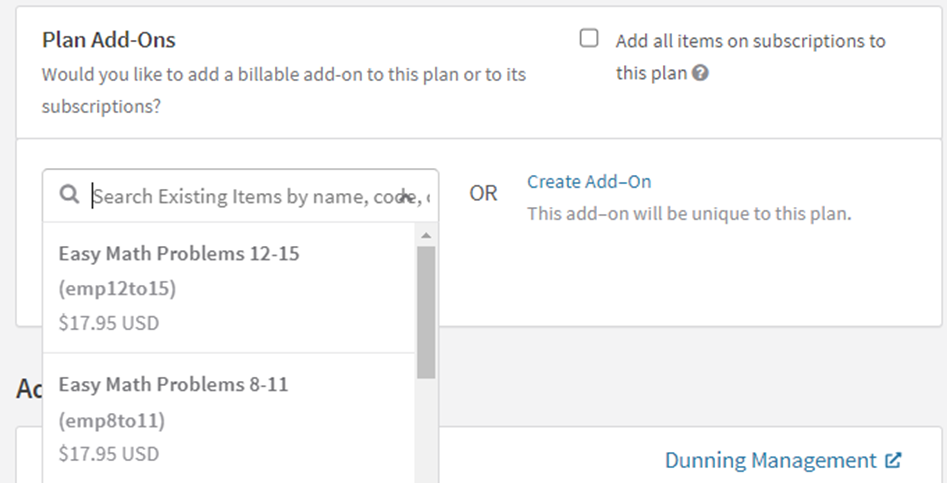
    <div><h4>Incorporate add-ons</h4><p>Add optional or required add-ons to offer additional services at an extra cost. For example, a "premium support" add-on bills each month on top of the base charge. Add-ons can also support hybrid pricing strategies for more complex customer needs.</p></div>
  </div>
</div>

<div class="rp-zoom-small">
  <span class="rp-zoom">
    <a class="rp-zoom-label" href="#zoom-plan-addons">
      <img class="rp-zoom-img" src="https://files.readme.io/34d9f61-image.png" alt="Plan add-ons configuration" />
    </a>
    <a id="zoom-plan-addons" class="rp-zoom-overlay" href="#rp-close">
      <img src="https://files.readme.io/34d9f61-image.png" alt="" />
    </a>
  </span>
</div>

<div class="rp-steps">
  <div class="rp-step">
    <div class="rp-step-num">4</div>
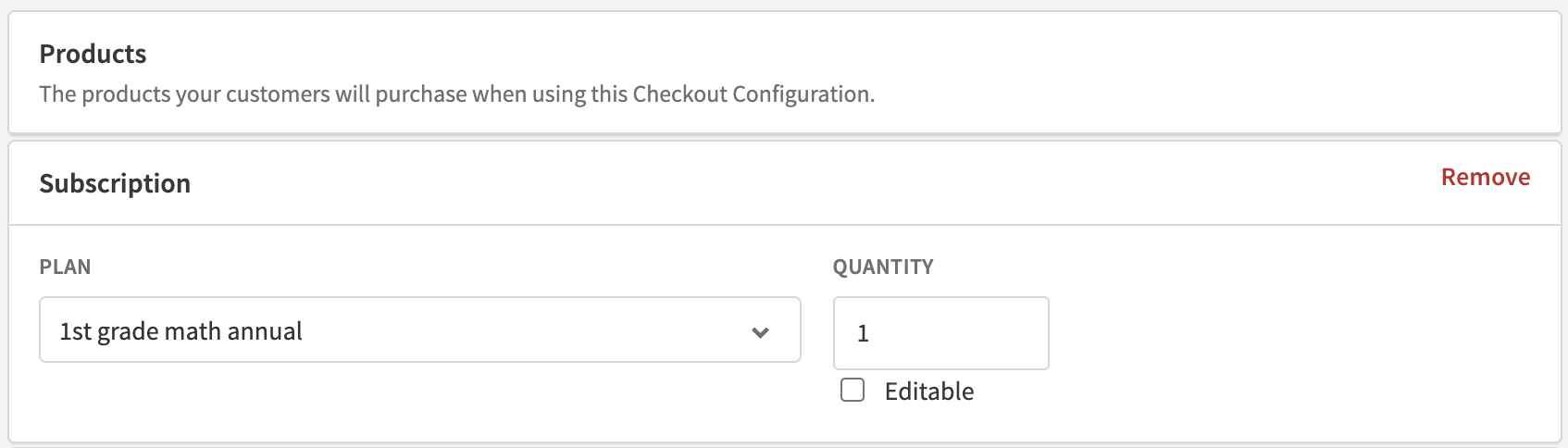
    <div><h4>Control quantity selection</h4><p>If you're using <a href="https://docs.recurly.com/docs/checkout" target="_blank">Recurly Checkout</a>, go to the checkout configuration page and set the <strong>Quantity</strong> field to editable or fixed. Locking quantity ensures consistency in billing; allowing it lets subscribers choose their own quantity at sign-up and can increase revenue.</p></div>
  </div>
</div>

<span class="rp-zoom">
  <a class="rp-zoom-label" href="#zoom-quantity-control">
    <img class="rp-zoom-img" src="https://files.readme.io/c05bc5cf7222e534dd8ae8ad603d025159011a0b7854c3c95a43016aed3cdb5b-image.png" alt="Checkout quantity control setting" />
  </a>
  <a id="zoom-quantity-control" class="rp-zoom-overlay" href="#rp-close">
    <img src="https://files.readme.io/c05bc5cf7222e534dd8ae8ad603d025159011a0b7854c3c95a43016aed3cdb5b-image.png" alt="" />
  </a>
</span>

# Sibling pages

* [Ramp pricing](https://docs.recurly.com/recurly-subscriptions/docs/ramp-pricing.md)
* [One-time pricing](https://docs.recurly.com/recurly-subscriptions/docs/one-time-pricing.md)
* [Usage-based billing](https://docs.recurly.com/recurly-subscriptions/docs/usage-based-billing.md)
* [Quantity-based pricing](https://docs.recurly.com/recurly-subscriptions/docs/quantity-based-pricing.md)
* [Hybrid pricing](https://docs.recurly.com/recurly-subscriptions/docs/hybrid-pricing.md)
* [Prepaid account balance](https://docs.recurly.com/recurly-subscriptions/docs/prepaid-account-balance.md)
* [Currencies](https://docs.recurly.com/recurly-subscriptions/docs/currencies.md)