
Salesforce integration
Seamlessly integrate Recurly with Salesforce for efficient data synchronization, enhanced workflows, and improved business processes.
Overview
Required plan
This feature is only available to customers on the Professional and/or Elite subscription plan. To request to upgrade to this plan, please reach out to your Recurly account manager or [email protected] for more details.
Prerequisites
- Salesforce account with appropriate permissions.
- Recurly account and API keys.
- Installation of the Recurly for Salesforce package.
- Configuration of sync settings in the Recurly Admin tab.
Limitations
- ❗️ The integration isn't compatible with Salesforce Professional edition, SalesforceIQ, or Developer Orgs. Also, it doesn't support linking Recurly data with the Salesforce Contact object.
- Customizations on Recurly custom objects within Salesforce are not directly supported by Recurly.
- Sync processes are subject to Salesforce's limits, potentially causing delays in data synchronization.
- Certain data fields and functionalities might require additional configurations or specific versions of the package.
Definition
Recurly for Salesforce is a robust integration tool that allows businesses to sync data between the Recurly platform and Salesforce. This integration facilitates the automatic transfer of account, subscription, invoice, and other related data, ensuring that business processes are streamlined and data integrity is maintained.
Key benefits
- Automated data sync: Ensure consistent and up-to-date data across both platforms with automated synchronization.
- Enhanced reporting: Utilize the "Recurly Reports" folder in Salesforce for detailed insights on sync errors and other data points.
- Customizable workflows: Implement Force.com customizations on Recurly objects to tailor the integration to specific business needs.
- Error notifications: Receive email alerts for sync failures, ensuring timely resolution and data integrity.
- Versatile integration: Compatible with Salesforce CPQ, allowing for further customization and enhanced functionalities.
Components of integration
Upon installation, the following custom objects will be integrated into your Salesforce organization:
- Recurly Accounts
- Recurly Subscriptions
- Recurly Plans
- Recurly Add Ons
- Recurly Items
- Recurly Invoices
- Recurly Line Items
- Recurly Transactions
- Recurly Logs
- Recurly Admin
Furthermore, custom fields and related objects will be added to native Salesforce objects:
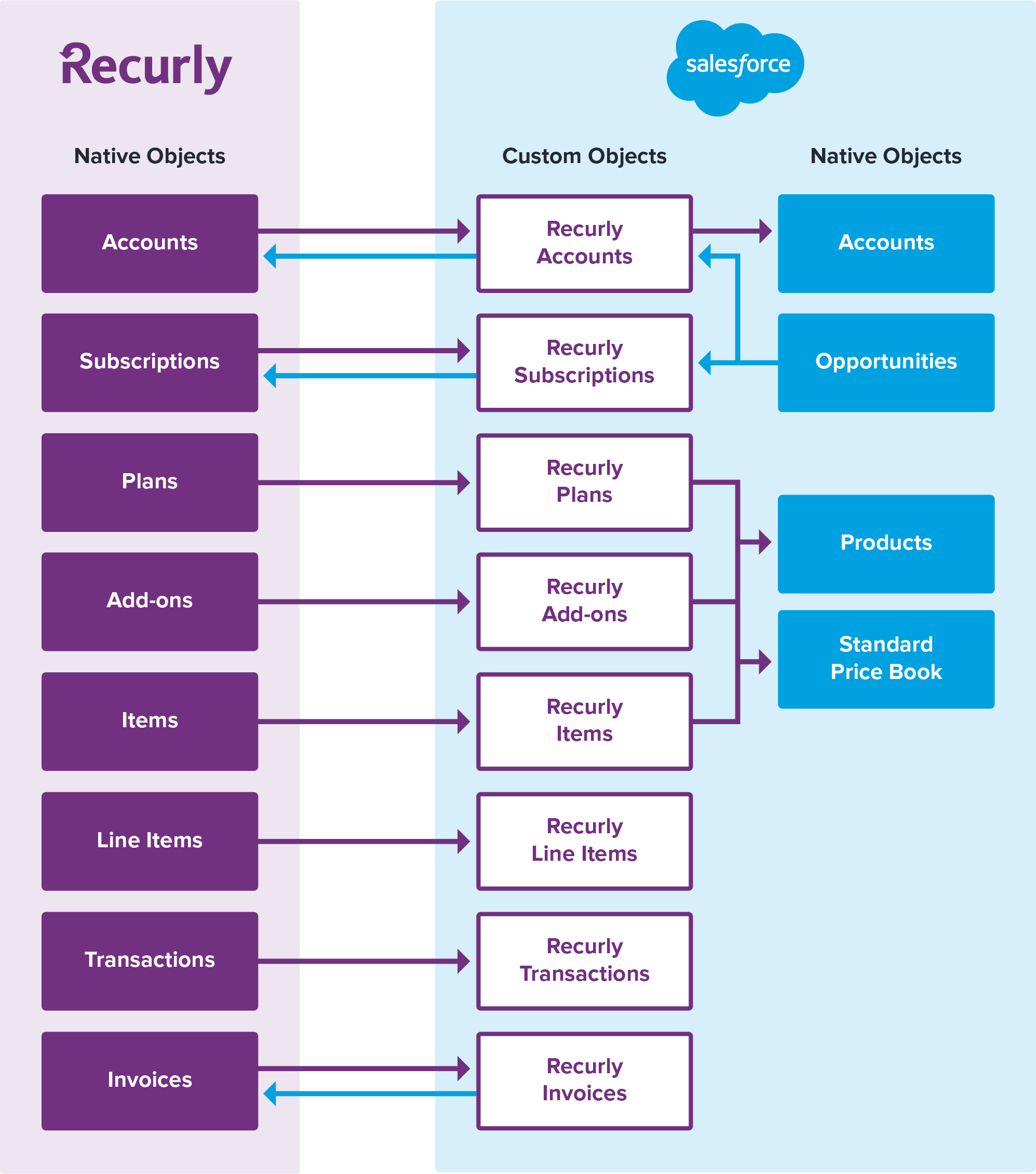
The data model below illustrates the synchronization of Recurly data with Salesforce. Detailed setup instructions will be provided once the feature is activated on your Recurly account.
Synchronization insights
Main objects editable within Salesforce include Recurly Accounts and Recurly Subscriptions. Some fields on the Recurly Invoices object can also be modified in Salesforce and synced back to Recurly. Additionally, new Recurly subscriptions and accounts can be initiated from Salesforce.
However, changes made to the following objects in Salesforce won't sync back to Recurly:
- Recurly Plans
- Recurly Add-Ons
- Recurly Items
- Recurly Line Items
- Recurly Transactions
For syncing custom fields from Recurly to Salesforce, refer to the Sync Custom Field Documentation.
Detailed object descriptions
Recurly accounts
Recurly syncs accounts with fields like Account Code, Company, Status, First Name, and more in the Recurly Accounts custom object in Salesforce. On the Recurly Account page, view related Recurly Subscriptions, Invoices, Line Items, and Transactions. If Recurly subscriptions are created from Salesforce opportunities, associated Opportunities can also be viewed.
Editing an account
Users can update fields like Company, First Name, Last Name, and more to sync back to Recurly using the Edit button on the Recurly Account record.
Payment information
Payment details can only be added or updated via the Add Payment Information button on the Recurly Account page. This ensures secure and PCI-compliant data submission.
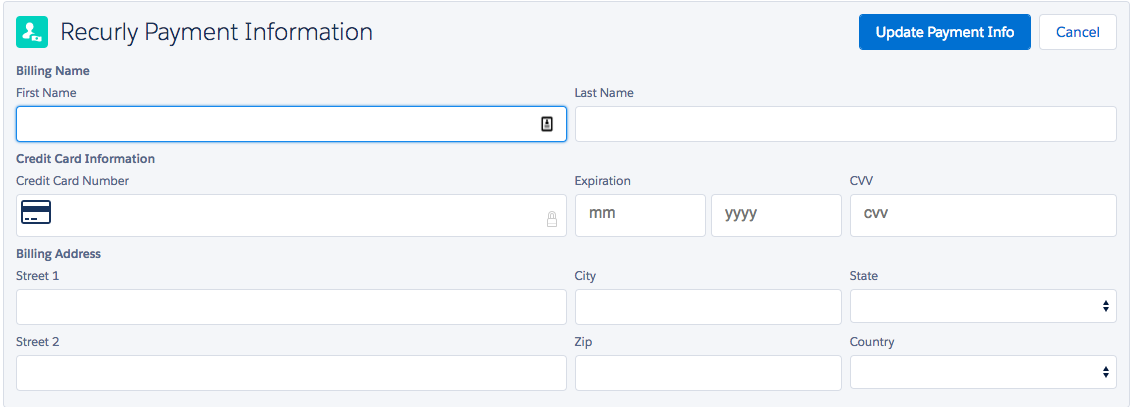
Note: For PCI compliance, use the method above. Editing payment information using the Edit button won't sync changes back to Recurly.
Deleted accounts
Deleted Recurly Accounts in Salesforce are captured in a custom object labeled Deleted Accounts. If an account is deleted in Recurly, its status in Salesforce changes to "Inactive."
Recurly plans, add ons, and items
Recurly syncs your plans, add-ons, and items with respective fields in Salesforce. This synchronization is one-way. Any creation or edits in Salesforce won't reflect in Recurly. However, manual object linking is possible. When a plan, add-on, or item is deleted or disabled in Recurly, its status in Salesforce updates to "Inactive."
Fields
| Plans | Add-Ons | Items |
|---|---|---|
| Plan Name | Add-On Name | Item Name |
| Plan ID | Add-On ID | Item Code |
| Plan Code | Code | Item ID |
| Status | Status | External SKU |
| Description | Price | Accounting Code |
| Interval Length | Tier Type | Description |
| Recurring Charge Amount | Item State / Status | |
| Setup Fee | Unit Amount / Default Price | |
| Tax Collection | Tax Collection |
Recurly subscriptions
Recurly syncs subscriptions with fields like Plan Name, Trial Length, Currency, Price, and more in the Recurly Subscriptions object in Salesforce. On the Recurly Subscription page, view related Add-Ons, Invoices, Transactions, and Line Items.
Fields
Recurly synchronizes your subscriptions with the following fields in the Recurly Subscriptions object within Salesforce:
| Recurly Subscription Fields |
|---|
| Plan Name |
| Trial Length |
| Currency (custom currency field) |
| Price |
| Quantity |
| Coupon Code |
| Collection Method |
| Customer Notes (defaults to notes from account page) |
| Estimated MRR |
| Current Term |
| Renewal Term (if applicable) |
Creating a subscription from a Recurly account
- Navigate to the desired Recurly Account object within Salesforce.
- Click on New Recurly Subscription.
- A custom Visual Force page will appear, allowing you to input plan details, amount, add-ons, and dates, similar to the Recurly UI.
- You have the flexibility to select any currency for the subscription.
- Define the number of billing cycles for both the initial and renewal terms. Even if a customer opts to cancel, the subscription will continue to bill until the end of the defined term. More on subscription terms.

Note:Currently, Salesforce doesn't support adding multiple subscriptions to Recurly in a single action.
Creating a Subscription from a Salesforce Opportunity
If activated, the integration can generate new subscriptions in Recurly directly from Salesforce's closed-won opportunities. Detailed steps can be found here.
Modifying a Subscription
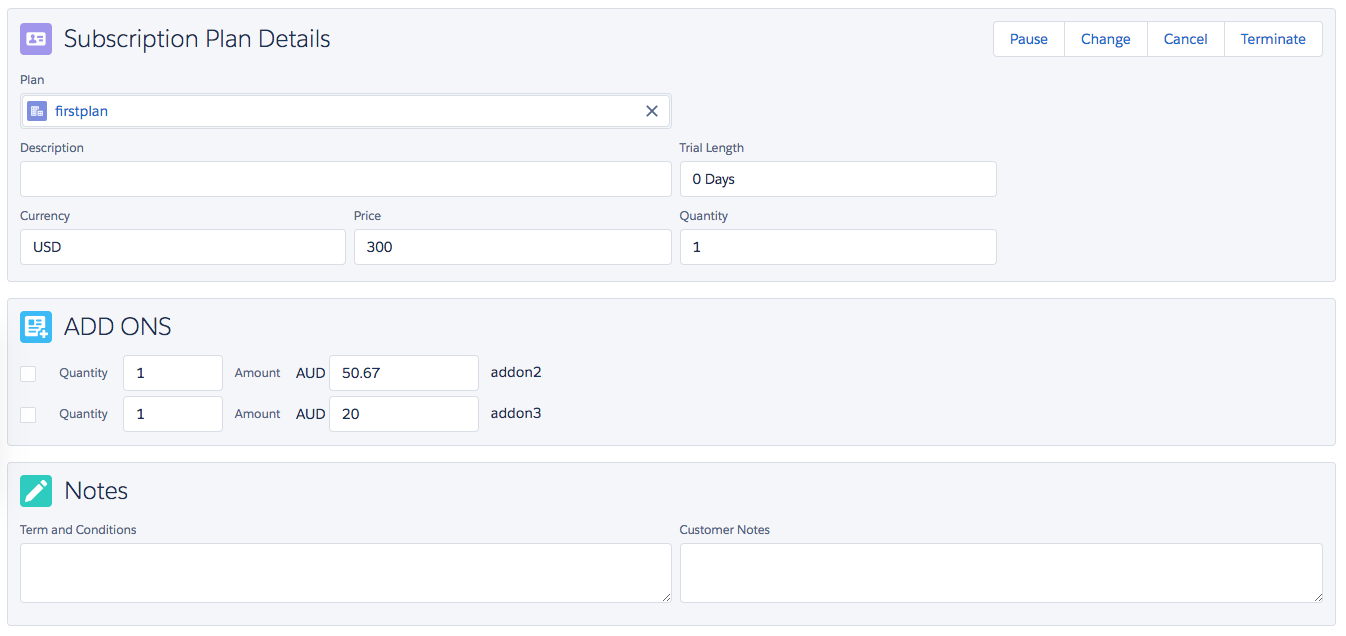
- To make changes to a subscription, select Manage Subscription Plan from the Recurly Subscription object.
- A variety of editable fields will be presented, including the option to adjust the start date of a Future dated Subscription.
Caution
Using the Edit button on the Recurly Subscription and altering subscription details won't reflect these changes in Recurly. It's advised for administrators to hide this button to avoid confusion. This is a standard Salesforce functionality.
Subscription actions
- Cancelling: To cancel a subscription, use the Manage Subscription Plan flow and select "Cancel." The subscription will then be set to cancel in Recurly at the next renewal date.
- Terminating: To terminate a subscription immediately, follow the Manage Subscription Plan flow and choose "Terminate." Options for immediate full, partial, or no refunds will be presented.
- Pausing: To temporarily halt a subscription, select the Manage Subscription Plan button on an active subscription and choose "Pause". Define the number of billing cycles you wish to skip, and the subscription will pause accordingly. More on pausing a subscription.
Subscription statuses
- Pending Subscription Changes: Subscriptions marked with "Pending Changes" have upcoming changes set for their next renewal date in Recurly. Any new modifications (changes, cancellations, terminations) will override these pending changes in Recurly.
Note: Specific pending changes aren't visible in Salesforce. To view them, access Recurly and inspect the subscription directly.
- Estimated MRR: Recurly provides an Estimated MRR (Monthly Recurring Revenue) field to help identify valuable subscribers. However, due to the complexities in calculating MRR, it's recommended to use this for estimation only. For accurate MRR reporting, refer to Recurly Analytics.
Recurly invoices
Recurly syncs invoices with fields like Invoice Number, Type, Status, Currency, and more in the Recurly Invoices object in Salesforce. On the Recurly Invoice page, associated Transactions and Line Items can be viewed.
Editing an invoice
From version 2.24 onwards, select invoice elements can be edited within Salesforce and reflected in Recurly. Fields like PO Number, Net Terms, and Customer Notes can be updated via the Edit button.
Recurly line items
Recurly can optionally sync invoice line items with fields like Line Item ID, Type, State, and more in the Recurly Line Items object in Salesforce. On the Recurly Line Item page, view associated Recurly Account, Salesforce Account, Subscription, Plan, Add-On, Item, and Invoice.
Note: This is a one-way sync; changes in Salesforce won't reflect in Recurly. Disabling line item sync will prevent any line items from syncing with Salesforce.
Recurly transactions
Recurly can optionally sync payment transactions with fields like Transaction Name, UUID, Type, and more in the Recurly Transactions object within Salesforce. On the Recurly Transaction page, view associated Recurly Account, Salesforce Account, Subscription, and Invoice.
Note: This is a one-way sync; changes in Salesforce won't reflect in Recurly. Disabling transaction sync will prevent any transactions from syncing with Salesforce.
Salesforce accounts and Recurly integration
Recurly offers a seamless integration with Salesforce's native Accounts object through the Recurly Accounts object. This optional feature facilitates advanced reporting on interconnected objects in your Salesforce organization. When activated, Recurly introduces the following fields on the Salesforce Accounts object:
- Total Payments Sum: Represents the cumulative payments against linked Recurly accounts. (Note: This remains unpopulated if payment syncing to Salesforce is disabled.)
- Total Invoices Sum: The aggregate of invoices against linked Recurly accounts.
- Total Amount Outstanding: The aggregate of outstanding invoices against linked Recurly accounts.
- Average Last 3 Invoices: The mean value of the last three invoices from Recurly.
- Plan Name: Denotes the name of the most recent plan the account subscribed to.
- Past Due Invoice: A boolean field that turns TRUE if the account has a past-due invoice.
- In Trial: A boolean field that turns TRUE if the account has a subscription in trial status.
- Active Subscriber: A boolean field that turns TRUE if a linked Recurly account has an active subscription. If the subscription is set to future or will cancel, this field turns FALSE.
- Billing Address: During integration setup, there's an option to synchronize the billing address from Recurly accounts to Salesforce accounts. If activated, the billing address from the linked Recurly account populates this field.
Recommendation: Use a text field for the State/Province field on Salesforce account instead of a picklist.
Note: These fields are updated through a job that runs overnight. Therefore, they might not be immediately available post-sync. Within the Account page, you can view the associated Recurly Accounts, Recurly Subscriptions, and Recurly Invoices.
Salesforce products and Recurly offerings
Recurly provides synchronization between Recurly Plans, Recurly Add Ons, Recurly Items, and Salesforce's native Products object. You can either link your Recurly offerings to existing Salesforce products or generate a new linked product for every Recurly offering. This optional feature allows you to access Recurly offerings within Salesforce, especially on Opportunities. When activated, Recurly populates the Salesforce Products object with:
- Product Name: Populated with Plan Name, Add On Name, or Item Name.
- Product Code: Prefixed with "recurly_" and populated with Plan Code, Add On Code, or Item Code.
- Product Description: Populated with Plan Description or Item Description.
- External ID: Populated with Plan Code, Add On Code, or Item Code.
- External Data Source: Auto-populated with Plan Name, Add On Name, or Item Name.
- Display URL: Direct link to the source object within Recurly.
- Active: Boolean field, TRUE if the linked Recurly object is active.
On the Product page, you can view the linked Recurly Plan, Recurly Add On, or Recurly Item.
Note: This is a one-way sync. Products created or edited in Salesforce won't sync with Recurly. Salesforce products linked to Recurly custom objects become read-only in Salesforce; edits should be made in Recurly and will then sync to Salesforce.
Handling deleted linked Recurly objects
If a Recurly plan or add-on linked to a Salesforce product is deleted in Recurly, the product's status updates to "inactive". Similarly, if a Recurly item is disabled, the linked Salesforce product's status updates to "inactive".
Salesforce price books and Recurly pricing
If you opt to synchronize your Recurly plans, add-ons, and items with Salesforce products, you can also sync their prices to Salesforce's Standard Price Book. This ensures consistent pricing across both platforms. When activated, Recurly populates the Price Book Entry object related to each linked Salesforce product with:
- Product: Populated with Plan Name, Add On Name, or Item Name.
- Product Code: Prefixed with "recurly_" and populated with Plan Code, Add On Code, or Item Code.
- List Price: Populated with the price of the plan, add-on, or item that matches Salesforce's default currency.
- Active: Boolean field, TRUE if the linked Recurly object is active and has a set price.
Note: If a plan, add-on, or item lacks a price in Recurly that matches Salesforce's default currency, no Price Book Entry object is created for the associated product. This is a one-way sync. Price book entries edited in Salesforce won't sync with Recurly. If a price book entry is altered in Salesforce, the changes will be overwritten with Recurly values during the next regular sync.
Handling deleted linked Recurly objects & prices
If a Recurly plan or add-on linked to a Salesforce product and price book entry is deleted in Recurly, the related price book entry's status updates to "inactive". Similarly, if a Recurly item's price linked to a Salesforce product and price book entry is cleared in Recurly, the related price book entry is deleted. This doesn't apply to Recurly plans or add-ons since their prices can't be deleted, only reduced to $0.
Salesforce opportunities and Recurly subscriptions
If you choose to sync your Recurly plans, add-ons, and items with Salesforce products, you can create subscriptions in Recurly directly from closed-won Opportunities in Salesforce containing these products. This streamlines the process from opportunity closure to subscription creation.
Adding products to Salesforce opportunities
Before creating a subscription in Recurly, ensure the appropriate Recurly-based Salesforce products are added to the opportunity. Use the standard Add Product flow, ensuring the desired Price Book is selected. For Salesforce CPQ, you can create quotes with Recurly products and sync them to the primary opportunity.
Rules for adding Recurly-based products to an opportunity:
- Products linked to Recurly add-ons require their associated plan.
- Only one product linked to a Recurly plan can be added to an opportunity.
- If multiple Recurly sites are connected to a single Salesforce org, all products added to an opportunity must originate from the same Recurly site.
Salesforce products not linked to Recurly offerings can be added to opportunities without these restrictions.
Creating subscriptions from Salesforce opportunities
For creating Recurly subscriptions from Salesforce opportunities:
- Ensure the opportunity includes at least one product linked to a Recurly offering.
- The opportunity must be in the "Closed Won" status.
- The opportunity shouldn't already have a linked Recurly Subscription.
- From an eligible opportunity in Salesforce, click Create Subscription in Recurly.
- the plan details, amount, and any add-ons attached to the opportunity. Define the billing cycles, end-of-term behavior, and renewal term behavior.
- If the Salesforce account on the opportunity is linked to a Recurly account with active billing information, no account-related information is needed.
- If linked to multiple Recurly accounts, select the desired Recurly account for the subscription.
Once submitted, a subscription is created from the specified Recurly-based plan and add-ons. This subscription is linked to the opportunity for easy reference.
Automatic subscription creation from Salesforce opportunities
Recurly offers an enhanced feature to automatically create subscriptions when Salesforce Opportunities are marked as closed-won. This feature can be activated for specific subdomains via the Recurly Admin page. Once enabled, Salesforce Opportunities will have a checkbox automatically activated. When an opportunity is set to closed-won with this checkbox enabled, a subscription is instantly created in Recurly, eliminating the need to navigate to the custom Visual Force order page. The subscription will be generated using default values assigned to the plan within Recurly.

Creating one-time charges from Salesforce opportunities
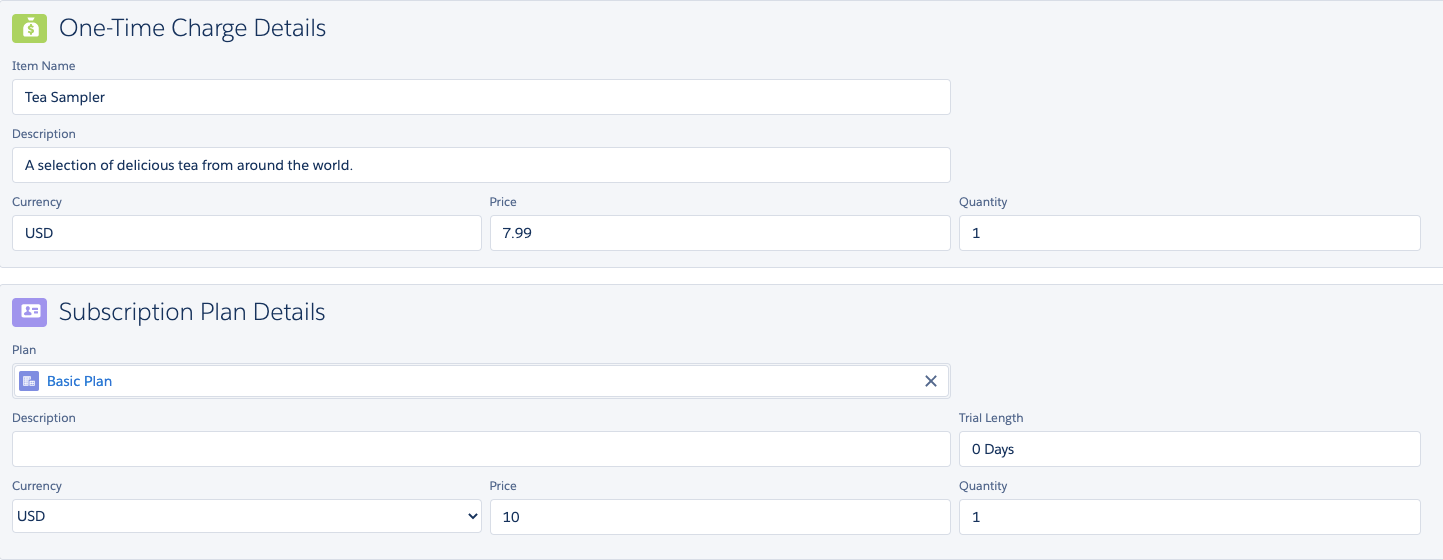
Recurly now supports the addition of one-time charges directly to Salesforce Opportunities. Users can add these charges either standalone or alongside plans. To enable this feature, ensure the sync opportunity setting is activated in your Recurly Admin and that the Recurly Charge Frequency field is integrated into the Opportunity Product Multi-Line Layout.
When adding products to an opportunity, users can set the Recurly Charge Frequency as:
- Recurring for plans and add-ons.
- One-Time for items.

For Salesforce CPQ users, specific configurations are required to create twin fields between the Quote Line and Opportunity Product. Once the opportunity is closed-won, the subscription creation process remains the same, but with an additional section for one-time charge items.
Editing subscriptions from Salesforce opportunities
Active subscriptions can now be updated directly from Salesforce Opportunities. When accessing an active subscription opportunity (in closed-won status), users will notice a "Create or Change Subscription in Recurly" button. Clicking this button will lead to the order review page, where users can select the "Change Existing Subscription" option. This allows users to edit plan details, amounts, and add-ons. A new sidebar provides a real-time preview of changes made.

Utilizing automatic payment link in Salesforce opportunities
Recurly introduces a payment link feature, allowing users to send a direct payment link to customers via email. This leverages Recurly's PCI compliant HPP page for payment capture. To utilize this feature, users must set up their email templates and, if necessary, an organization-wide email address. Once set up, users can select the "Send Payment Capture Link" as their invoicing option when submitting an order. The customer will receive an email with a direct link to Recurly's HPP page for payment details.
Creating or updating accounts from Salesforce opportunities
If essential account and billing information is missing from a Salesforce Opportunity or its related account, additional fields will be displayed on the subscription creation page. At a minimum, an account code and billing information are required. If no Salesforce account is linked to the opportunity, or if the Salesforce account isn't linked to a Recurly account, a new account will be created in Recurly when the subscription is generated.
Note: If account linking is enabled, the "Recurly Account Linking" field specified in admin settings will not be editable on the subscription creation page.
Roles & permissions
Recurly provides custom profiles and permission sets to manage user access:
- Recurly Admin: Has read, view, create, and edit access to all objects. Can access the Recurly Admin tab and Recurly Logs tab.
- Recurly Sales User: Has read, view, create, and edit access to all objects.
- Recurly Support User: Only has read and view access to all objects.
- Recurly Sales / Marketing Manager: Only has read and view access to all objects.
These roles ensure that different users have appropriate levels of access and control over the Recurly integration within Salesforce.
Salesforce integration guide
Introduction
Integrating Salesforce with Recurly streamlines your sales and billing processes, ensuring that data flows seamlessly between the two platforms. This guide provides step-by-step instructions to set up the integration, ensuring a smooth experience for your team.
Getting started
Pre-setup considerations
- Familiarize Yourself: Before diving in, read through the entire setup guide to understand the process and its implications.
- Support: If you encounter challenges or have questions, contact Recurly's support team for assistance.
Initial setup steps
-
Salesforce Account: If you don't have one, create a free developer account for testing purposes. Always test the integration in a Recurly sandbox account before moving to production.
-
Install Recurly Package: Install the Recurly for Salesforce package in your Salesforce organization. Start with a sandbox org to test the integration. Use the provided sandbox Salesforce integration link for installation.
-
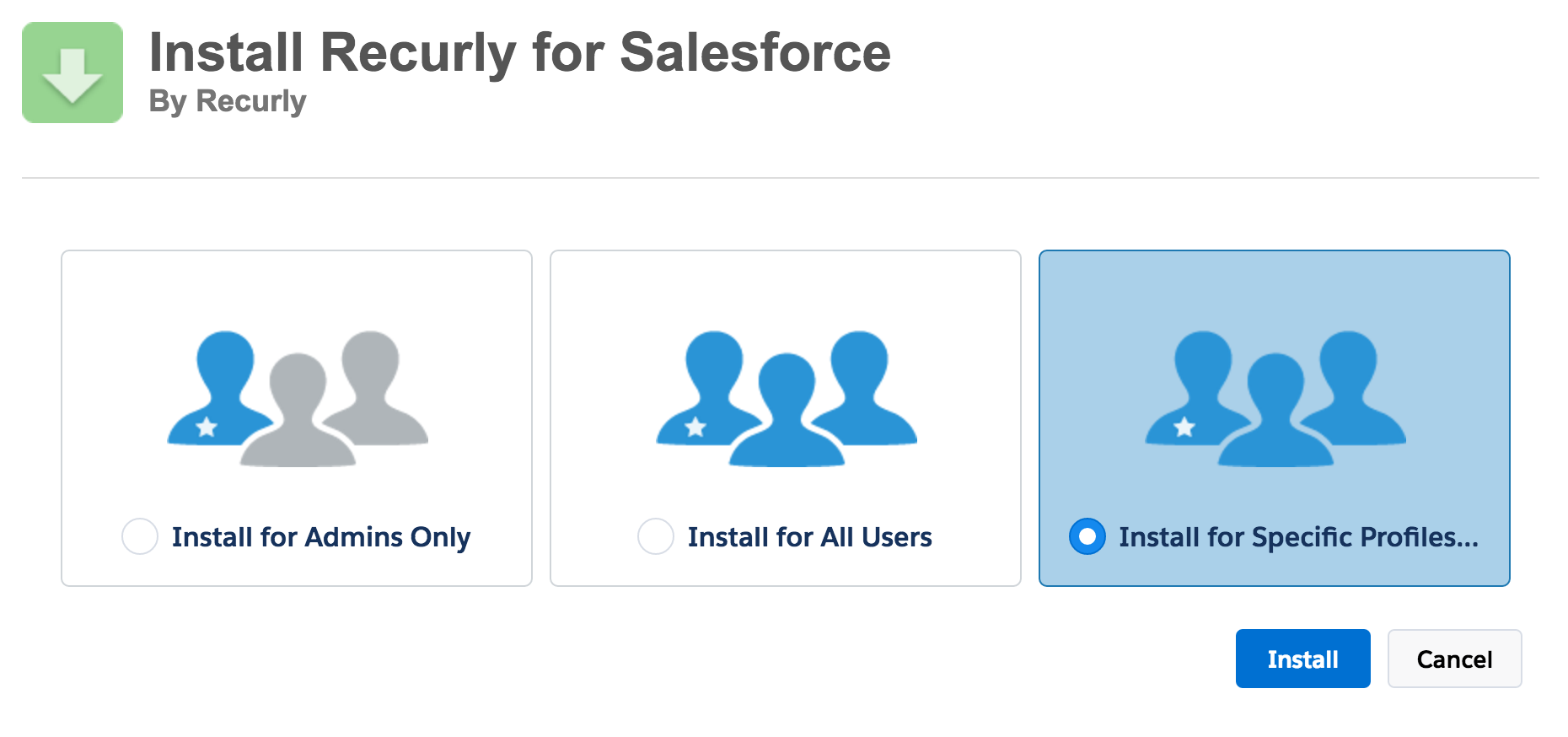
Package Installation: During installation, choose the audience for the integration. Typically, installing the package for specific profiles is recommended. This allows you to assign specific access to the package for each profile in Salesforce.
-
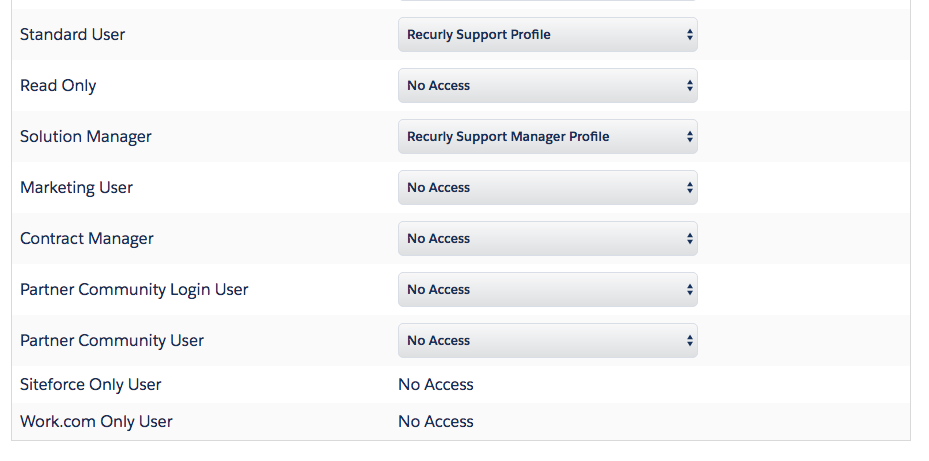
Assign Roles: Decide which roles should have Recurly permissions. Create new profiles by cloning existing Salesforce profiles and label them as "Recurly __ Profile" (e.g., "Recurly Support Profile").
-
Installation Process: Click "Install" and grant access to the Recurly API when prompted. The installation may take a few minutes.
-
Review User Profiles: After installation, review your user profiles to ensure the correct roles have access to Recurly data.
-
Field Configuration: If you use state/country fields as pick lists, consider changing them to text fields. This simplifies the integration process.
Configuring your integration
API settings configuration
- Private API Key: Navigate to the API Settings tab on the Recurly Admin page. Input your API key from the "API Credentials" section in Recurly. If you don't have a Salesforce private API key in Recurly, create a new one named "Salesforce".
- Public API Key: Input your public API key from Recurly's "API Credentials" page. This key is essential for integrating with Recurly.js for payment information.
- Multiple Subdomains: If you have multiple Recurly subdomains, set the Private and Public API keys for each. The integration supports up to ten subdomains.
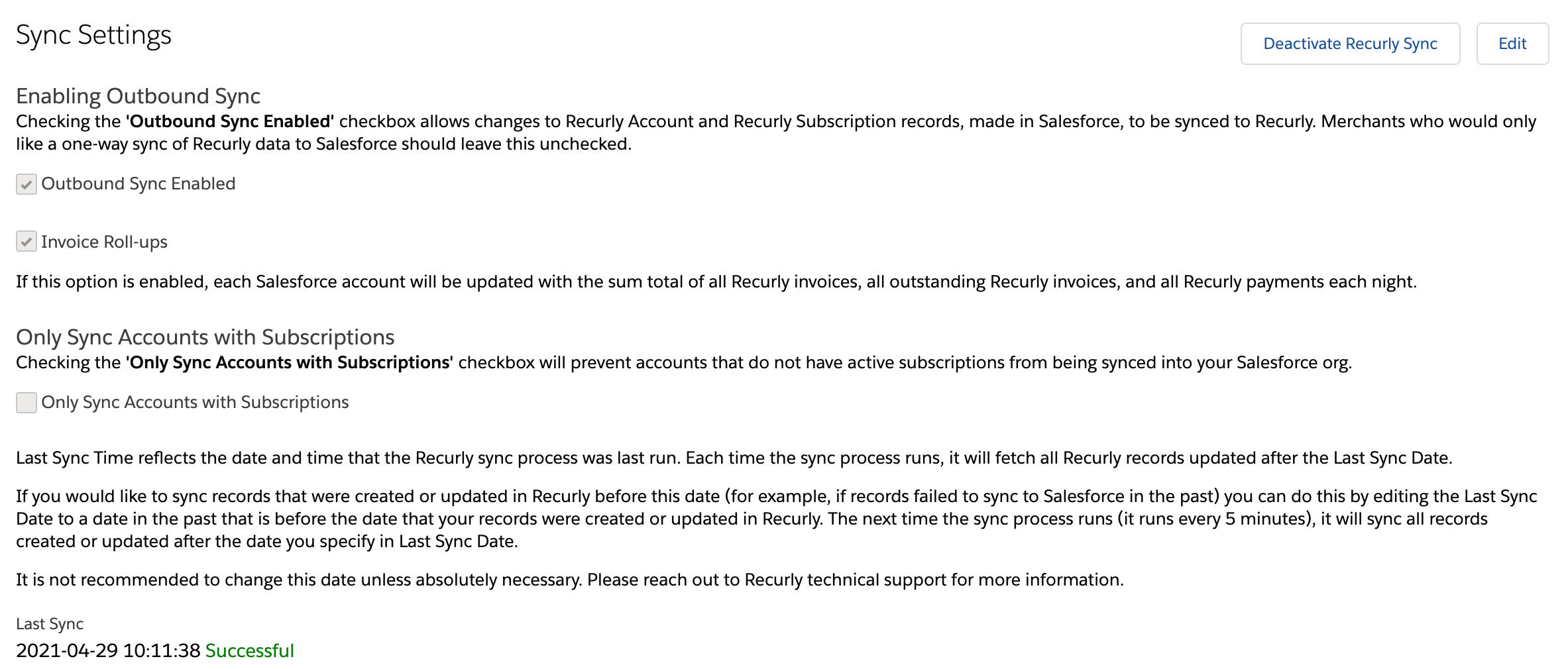
Sync settings configuration
-
Enable Outbound Sync: This allows immediate syncing of new/edited records from Salesforce to Recurly.
-
Invoice Roll-Ups: Enables summarization fields on Salesforce accounts linked to Recurly accounts.
-
Most Recent Invoice: Populates Salesforce accounts with the "Recurly Most Recent Invoice Amount".
-
Selective Sync: Sync only accounts with active, pending, or expired subscriptions to Salesforce.
Caution
Do not activate the Recurly Sync yet. This is the final step after all settings are configured.
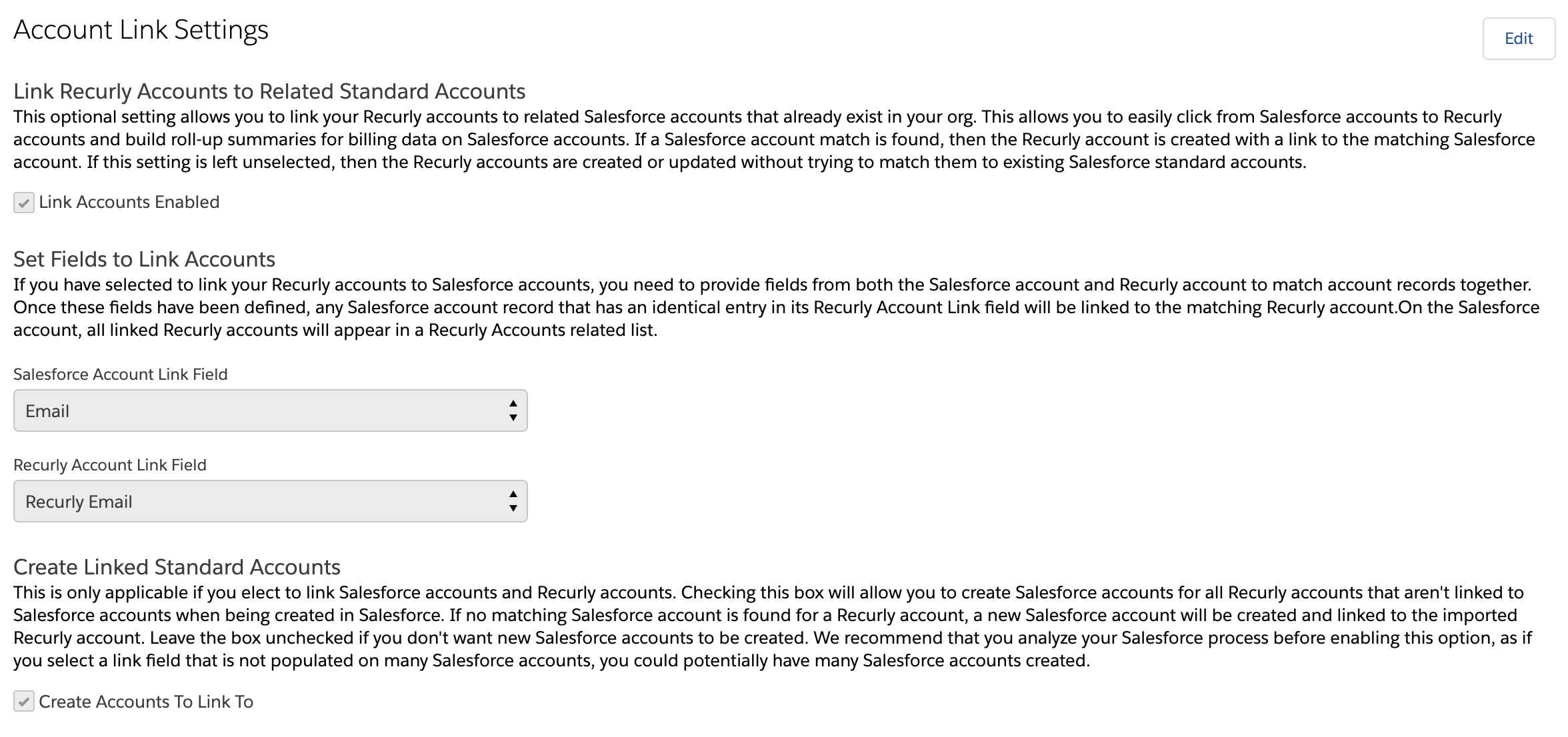
Account linking
-
Link Accounts Enabled: Allows linking of Recurly accounts to related Salesforce accounts.
-
Field Matching: Choose fields to match accounts in both Salesforce and Recurly.
-
Create Accounts: If a Recurly account doesn't find a match in Salesforce, a new Salesforce account can be created.
Salesforce account creation from Recurly
If a Recurly account doesn't match an existing Salesforce account, the integration can create a new Salesforce account. This is useful for businesses with online channels generating leads for sales teams.
Caution:
This setting can result in a significant number of accounts being created in Salesforce. Use with discretion.
Configure product sync settings
This section allows you to synchronize your Recurly offerings, which include plans, add-ons, and items, with Salesforce's native Product object.
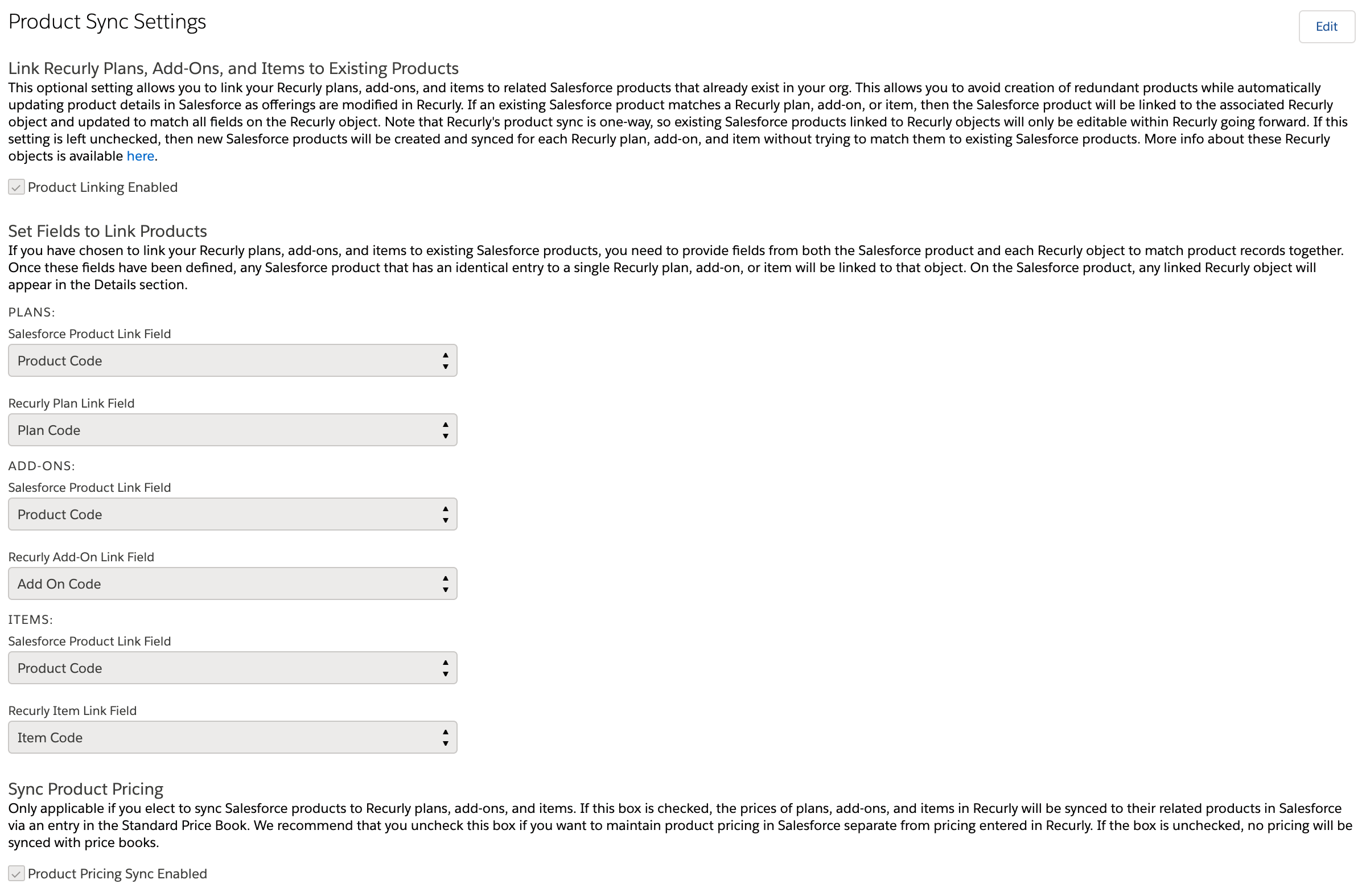
- Product Linking Enabled: Initially set to disabled. When enabled, the integration will attempt to link Recurly Plans, Add-Ons, and Items to corresponding Salesforce products. If no match is found, a new Salesforce product will be created and linked to the Recurly custom object. This feature ensures that your Recurly offerings and Salesforce products are in sync based on specific criteria, such as Plan Code and Product Code.
- Field Matching: You must specify the fields that will be used to match Recurly offerings with Salesforce products. This is crucial for product linking. If a direct 1:1 match isn't found for a Recurly offering, the existing Salesforce product remains unchanged, and new products are created for each unmatched Recurly object.
Warning on Calculated Fields
Do not use a calculated field, a field that is not writable from external systems, or a field that is not visible to your Salesforce users. If you choose a field that fits this description, Recurly will not be able to create accounts in Salesforce and this functionality will not work.
- Product Pricing Sync Enabled: Initially set to disabled. When enabled, the integration will synchronize the price of each Recurly offering with a corresponding entry in Salesforce's Standard Price Book. Only prices in the default currency of your Salesforce organization will be synchronized.
- Convert Opportunities to Recurly Subscriptions: Initially set to disabled. When enabled, you can create Recurly subscriptions, one-time charges, and accounts directly from Closed Won opportunities in Salesforce.
Configure sync custom field settings
This section allows you to synchronize custom field data from Recurly into Salesforce.
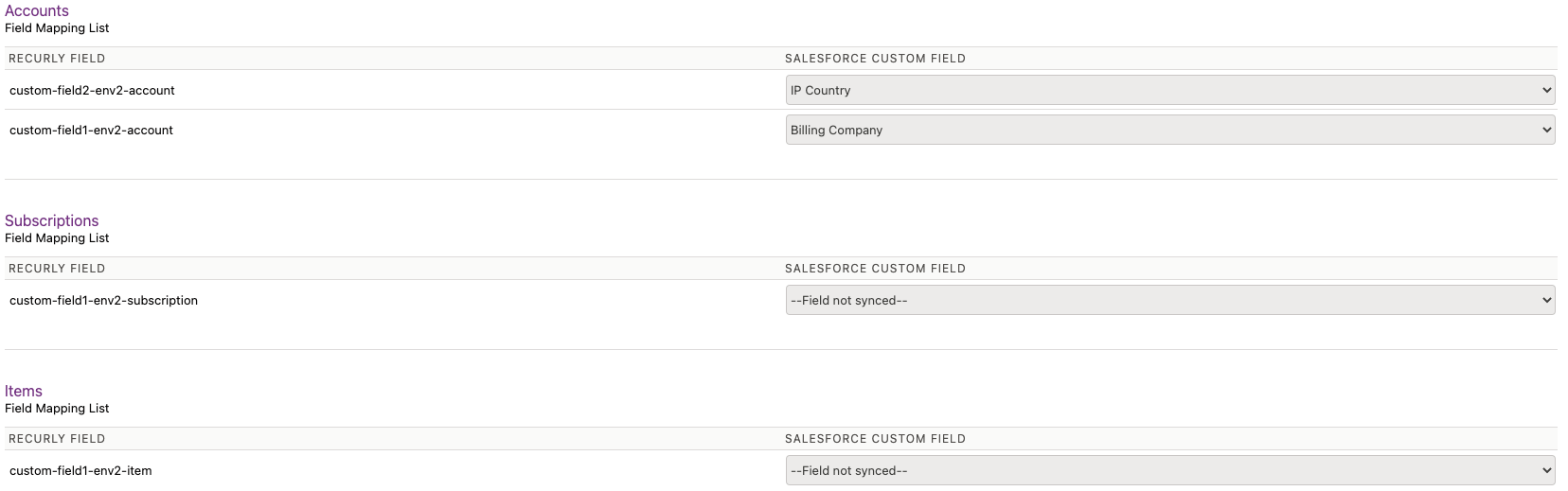
All custom fields set up on your Recurly site(s) will be displayed, categorized by Item, Account, and Subscription. From this list, you can select which Salesforce custom field you wish to map to each Recurly custom field. The dropdown will only display String type fields from the respective Recurly object. It's recommended to exclude mandatory fields to prevent sync issues if data is missing.
Configure advanced sync settings
This section is for users with more complex synchronization needs.
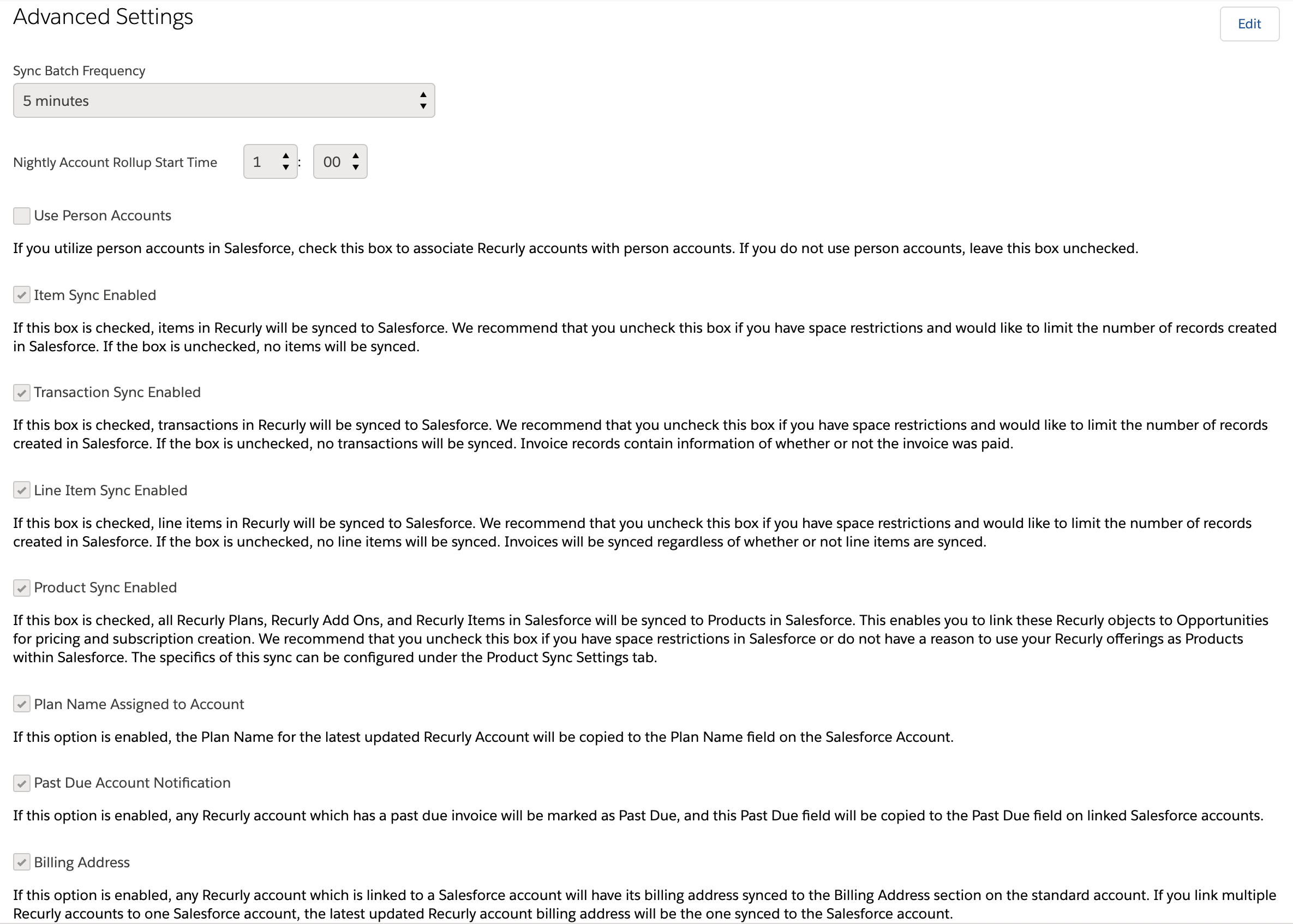
- Sync Batch Frequency: Salesforce will, by default, query Recurly every 5 minutes for new data. This frequent querying ensures near-real-time data synchronization but can strain your Salesforce system. You can adjust this frequency anywhere between 5 to 60 minutes based on your needs.
- Nightly Account Rollup Start Time: If you've enabled invoice roll-ups in your Sync Settings, specific fields on the Salesforce account will be recalculated nightly at the time you specify.
- Use Person Accounts: If your Salesforce organization uses person accounts, this option allows you to associate Recurly Accounts with Salesforce Person Accounts.
- Item Sync Enabled: By default, this is enabled. If disabled, items from your Recurly item catalog won't synchronize with Salesforce. This option is useful if you're concerned about Salesforce data limits.
- Transaction Sync Enabled: By default, this is enabled. If disabled, transaction data won't synchronize with Salesforce. This is another option to consider if you're wary of Salesforce data limits.
- Line Item Sync Enabled: By default, this is enabled. If disabled, invoice line items won't synchronize with Salesforce. This can help manage Salesforce data limits.
- Product Sync Enabled: Initially set to disabled. When enabled, your Recurly plans, add-ons, and items will synchronize with Salesforce's native Product object. This is useful if you're concerned about Salesforce data limits.
- Plan Name Assigned to Account: This feature transfers the name of any linked subscriptions from Recurly to Salesforce accounts.
- Past Due Account Notification: If enabled, Salesforce accounts linked to past-due Recurly accounts will be marked as such.
- Billing Address: If enabled, the billing address from the Recurly account will be transferred to the corresponding fields on the linked Salesforce account.
- Active Subscriber: If enabled, Salesforce accounts linked to active Recurly subscriptions will be marked as such.
- In Trial: If enabled, Salesforce accounts linked to Recurly accounts with subscriptions in the trial phase will be marked as such.
Editing your Salesforce layouts
To maximize the benefits of your integration between Salesforce and Recurly, you can add Recurly-specific fields to your native Salesforce layouts.
Modifying the Salesforce account layout
If you're linking Recurly accounts with Salesforce standard accounts, you'll need to modify the Salesforce account layout to view Recurly data alongside your sales data.
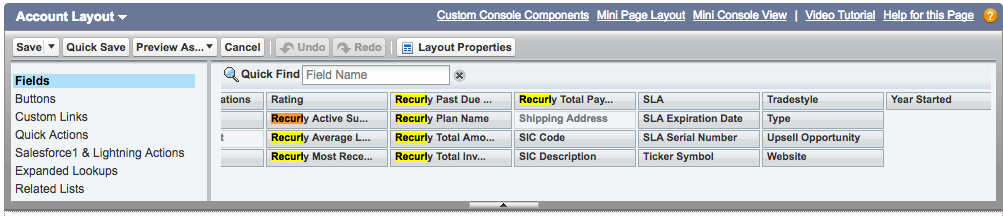
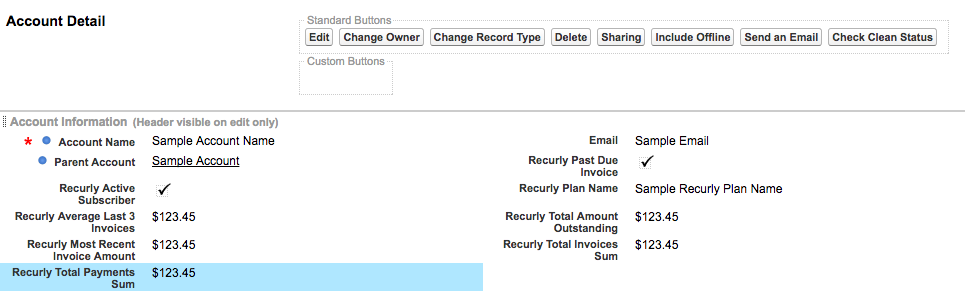
- Recurly Active Subscriber: If there are linked accounts with an active subscription, this will be True.
- Recurly Average Last 3 Invoices: Average of the last 3 invoices issued in Recurly (updated overnight).
- Recurly Most Recent Invoice Amount: The amount of the most recent invoice issued to this customer.
- Recurly Past Due Invoice: If the account has a past due invoice in Recurly, this will be True.
- Recurly Plan Name: If the account has an active subscription, the name of the plan will be populated here.
- Recurly Total Invoice Amount: The sum of the total amount of invoices issued to this customer (updated overnight).
- Recurly Total Payment Amount: The sum of the total amount of payments this customer has paid (updated overnight).
Fields like "Recurly Active Subscriber", "Recurly Average Last 3 Invoices", "Recurly Most Recent Invoice Amount", and others can be added to your Salesforce account layout. This ensures that all relevant data is easily accessible.
You can choose to drag any of these fields onto your account layout. An example layout is below:
Related Lists: You can also add Related Lists for Recurly objects to your Salesforce account. This allows your sales reps and support reps to see billing information on the account object and is available for:
- Recurly Accounts
- Recurly Subscriptions
- Recurly Invoices
- Recurly Transactions
- Recurly Line Items
Modifying the Salesforce product layout
If you're syncing Recurly offerings to Salesforce products, you can modify the Salesforce product layout to transition seamlessly between Salesforce products and their linked Recurly offerings.
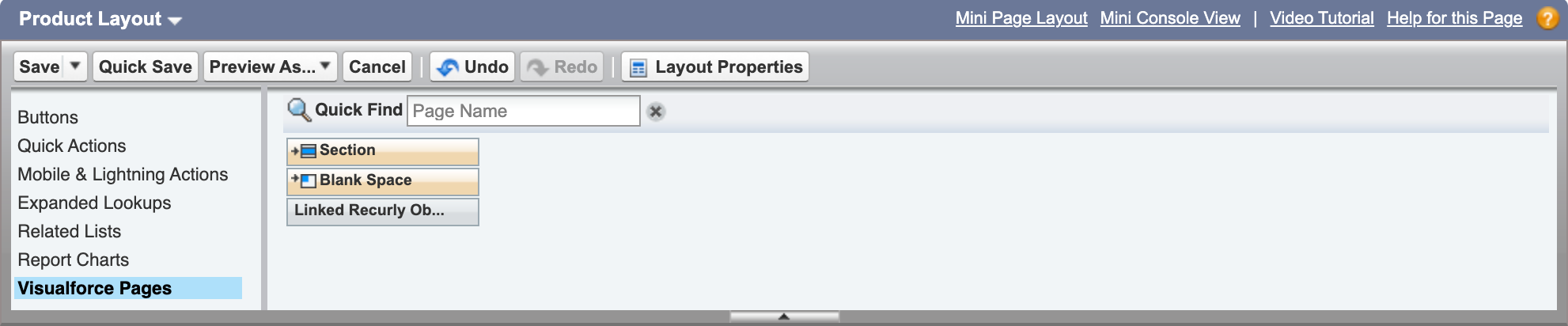
Add the "Linked Recurly Object" field to your Salesforce product layout to easily identify and access the corresponding Recurly offering.
Modifying the Salesforce opportunity layout
If you're creating Recurly subscriptions from Salesforce opportunities, you'll need to modify the Salesforce opportunity layout.
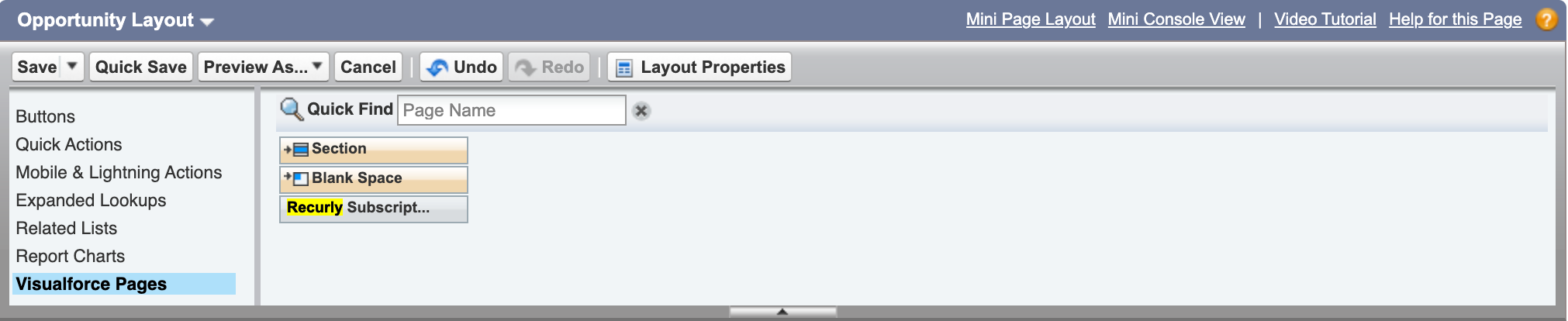
Add the "Recurly Subscription Button" to your Salesforce opportunity layout. This button allows you to create a Recurly subscription directly from a Closed Won opportunity in Salesforce.
Modifying the Salesforce opportunity product layout
If you're creating Recurly One-Time Charges from Salesforce opportunities, you'll need to modify the Salesforce opportunity product layout.

Add the "Recurly Charge Frequency" to your Salesforce opportunity product layout. This field helps in creating one-time charges from Closed Won opportunities in Salesforce.
Editing the Opportunity product multi-line layout
Once you're in the Salesforce interface, you'll need to navigate to the "Edit Multi-Line Layout" option located at the top of the page. This option allows you to customize the layout of multiple lines within the Opportunity Product section. However, it's essential to note that you must have the necessary permissions to edit and save these forms.
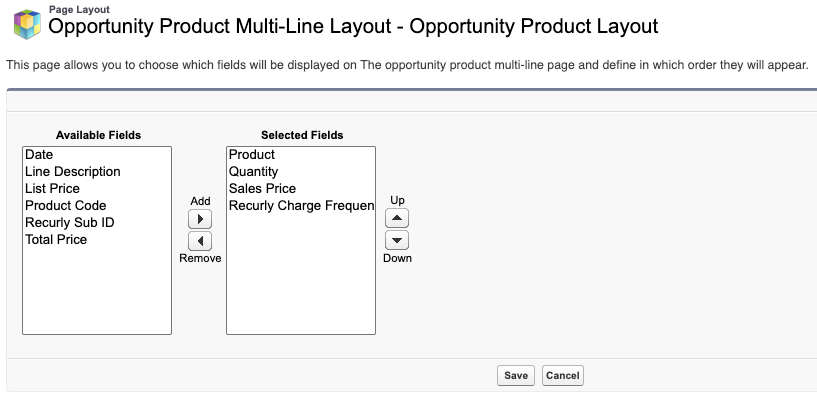
To incorporate the Recurly Charge Frequency into the Opportunity Product related list, follow these steps:
- Access the Opportunity Layout: Choose the specific Opportunity Layout you wish to modify.
- Click the Wrench Icon: This icon is situated above the Products section and below the Related Lists section.
- Select Recurly Charge Frequency: In the Available Fields section, find and select Recurly Charge Frequency.
- Add to Layout: Click the Add button to move the selected field to the current layout.
- Save Changes: Click Okay to save your modifications.
Viewing subscription term fields on the Recurly subscription layout
If you find that not all Subscription Term fields are visible on the Recurly Subscription layout, you'll need to adjust the layout to include the necessary fields. Here's a list of fields you might consider adding, along with a brief description of each:
| Fields | Description |
|---|---|
| Current Period Started At | Indicates the date and time when the billing period commenced. |
| Current Period Ends At | Specifies the date and time when the billing period concludes. |
| Trial Started At | Marks the date and time when the trial period began. |
| Trial Ends At | Denotes the date and time when the trial period ends. |
| Current Term Started At | Represents the start date of the term, coinciding with the beginning of the first billing period. |
| Current Term Ends At | Indicates the end date of the term, calculated based on the plan's interval and the total billing cycles within a term. |
| Paused At | This field remains null unless the subscription is paused or set to pause at the end of the current billing period. |
| Activated At | Specifies the date and time when the subscription was activated. |
| Canceled At | Marks the date and time when the subscription was canceled. |
| Expires At | Denotes the date and time when the subscription expired. |
| Total Billing Cycles | Represents the number of cycles or billing periods within a term. |
| Renewal Billing Cycles | If Auto Renew is enabled, this value determines the length of subsequent terms once the current term concludes. |
| Remaining Billing Cycles | Indicates the number of billing cycles left in the current term. |
| Remaining Pause Cycles | This field remains null unless the subscription is paused or set to pause at the end of the current billing period. |
| Auto Renew | Specifies whether the subscription will renew at the end of its term. |
Salesforce CPQ configuration considerations
If you're not creating Recurly subscriptions from Salesforce opportunities or generating Recurly One-Time Charges from Salesforce opportunities, you can skip this section.
For those using Salesforce CPQ, you can utilize quotes to select and configure your products as usual. These will then transition into the Opportunity and follow the standard Closed Won Subscription creation process. The built-in validations will prevent incompatible behaviors, such as having multiple plans on a single opportunity or a recurring one-time charge, by hiding the button.
For one-time charges, you can maintain your CPQ setup with some additional configuration. You'll need to add a twin field to both the Quote Line and Opportunity Product. To finalize the process, introduce a workflow (or another mechanism like Apex triggers or Lightning Flows) to copy the value from your field on the Opportunity Product to the manage package field (API name: "recurly_v2_Recurly_Charge_Frequency__c") on the Opportunity Product before insertion. This action will activate the validations when the quote is synced into the opportunity.
Begin syncing data
After setting everything up, it's crucial to verify that your configurations are correct and comprehensive. If you're uncertain about any aspect of your setup, don't hesitate to contact Recurly support. They're eager to assist you in ensuring your setup aligns with your business and organizational needs.
When you're ready to begin, click the "Activate Recurly Sync" button located on the Sync Settings tab. This action will initiate the data synchronization process from Recurly to Salesforce. Remember, the user who activates the Recurly Sync will become the owner of the Recurly custom objects and the Salesforce Account, Product, and Price Book Entry objects created in your instance.
The initial synchronization process might take longer than subsequent syncs due to the volume of historical Recurly data being transferred to Salesforce.
Uninstalling Recurly for Salesforce
If you need to uninstall an older version of the package or simply wish to remove the current package, follow these steps:
- Navigate to the Sync Settings tab.
- Click the "Deactivate Sync" button to disable the automatic synchronization from Recurly.
- Access the Setup option in the top-right corner of the screen. (Note: If you're not an administrator in your Salesforce organization, you might not have access to the subsequent steps.)
- Navigate to Build > Installed Packages.
- Click "Uninstall" next to Recurly for Salesforce.
- Decide whether you want to retain your data in your organization or delete it.
If you encounter issues with ongoing processes, review your background jobs and halt them if necessary. For any other concerns or inquiries, contact Recurly support.
FAQs
Recurly to Salesforce sync errors
Q: What happens when there are errors with the Recurly to Salesforce sync?
A: When errors occur during the sync from Recurly to Salesforce, the API will automatically attempt to re-sync the failed data. For instance, if an invoice doesn't sync successfully, the integration will try to re-sync it during the next run. You can view these error messages in the Recurly Logs tab within the Recurly for Salesforce application. To get a detailed report on these errors, navigate to the "Recurly Reports" folder in Reports and Dashboards within Salesforce. The "Recurly Error Logs" report in this folder provides insights on sync errors.
Recurly logs - sync stats record
Q: How does the Recurly Log work in version 2.39?
A: Starting from version 2.39, the progress of each sync batch is recorded in a log. This log captures the number of records of each type that were successfully created or failed. If you've installed a previous version and upgraded to 2.39, you might need to modify the layout of the Recurly Logs object to view the data in the Sync Stats Record.
Salesforce to Recurly sync errors
Q: What happens when data fails to sync from Salesforce to Recurly?
A: If data doesn't sync between Salesforce and Recurly, the user who edited the record in Salesforce will receive an email detailing the reason for the sync failure.
Workflow, triggers, and Force.com customization
Q: Can I add Force.com customizations on top of Recurly custom objects in Salesforce?
A: Yes, you can implement Force.com customizations on Recurly custom objects within Salesforce. However, these customizations won't be supported by Recurly since each merchant might need different triggers, workflows, and customizations to integrate Recurly data into their business processes.
Troubleshooting
Q: What are some common issues and their solutions?
A: Here are some common issues and steps to troubleshoot them:
- Issue: Recurly accounts aren't linking to Salesforce standard accounts.
- Troubleshooting Steps: Check the Recurly Admin tab and ensure that linking to Salesforce accounts is enabled. If issues persist, verify that the linking field on Salesforce and Recurly accounts is populating correctly.
- Issue: I can't add my Recurly API keys to the API Settings tab in Salesforce.
- Troubleshooting Steps: Ensure that your Recurly subdomain (subdomain.recurly.com) doesn't exceed Salesforce's 25-character limit for a Recurly subdomain.
- Issue: Salesforce accounts aren't being created when Recurly accounts are made.
- Troubleshooting Steps: Check the Recurly Admin tab and ensure that the option to create Salesforce accounts is enabled.
- Issue: I'm missing Recurly data in my Salesforce org.
- Troubleshooting Steps:
- Check the Recurly Logs tab for errors.
- If there are no logs, navigate to Setup > Apex Jobs and check for any Apex jobs with errors.
- Check your email for any API key failure notifications from Recurly for Salesforce.
- Ensure the user running the integration has the necessary permissions to insert records.
- Troubleshooting Steps:
- Issue: My users can't see data.
- Troubleshooting Steps: This could be due to page layouts or permissions.
- Issue: I can't uninstall the package.
- Troubleshooting Steps:
- Deactivate the sync via the admin page by clicking the "Deactivate sync" button.
- Ensure there are no custom fields, workflow rules, or apex code referencing any objects/fields in the package. If there are references, try uninstalling again and check for errors.
- Troubleshooting Steps:
Data.com duplicate management and Recurly for Salesforce
Q: How does data.com duplicate management work with Recurly for Salesforce?
A: Salesforce offers duplicate management through data.com. While this is beneficial for users, it can cause issues for API integrations. To ensure proper data synchronization and linking from Recurly, it's recommended to:
- Exclude the user running the sync, including the "Recurly for Salesforce" user, from triggering data.com rules.
- Manually exclude updates to fields related to the Recurly sync.
- For the initial sync, deactivate data.com rules to ensure all data syncs correctly.
Further support
Q: Where can I get more support if I face issues?
A: If you need further assistance, please contact Recurly Support. Make sure to mention the version of the package you're using, which is available on the Recurly Admin screen.
Advanced questions
Q: How does the sync process work in detail?
A: Recurly syncs data every 5 minutes (or based on your configured interval) by object, depending on the last successful sync. The order in which objects sync is complex due to timing intricacies. In general, the sync object order is: Plans, Addons, Recurly Accounts/Accounts, Subscriptions, Invoices, Line Items, and Transactions. Each object will sync and link to others if the related record exists in Salesforce. If not, a separate batch job for linking runs after the sync job to ensure proper linking.
Q: What code is used, and what resources are required?
A: For a detailed answer, please contact [email protected].
Q: Which data can be synced back to Recurly?
A: Several objects can be synced back to Recurly if you've enabled bidirectional sync on the Recurly Admin tab. These include Recurly Accounts (creation and edit), Billing Information, and Recurly Subscriptions.
Q: Can I set up a Subscription in a different, non-primary currency via an Opportunity?
A: Yes, you can. The currency settings of your org are available on the Opportunity, and they will be used for Subscription Creation. For instance, if your Opportunity is in EUR while your org's primary currency is USD, the created Subscription will be in EUR.
Q: Which permissions are required for users of the integration?
A: Users need access to a Recurly permission set. While you can assign necessary object and code level permissions, it's recommended to use one of the provided permission sets to avoid sync issues. If you need a custom set of permissions, contact [email protected].
Q: How can I re-sync all of my data?
A: Navigate to the Recurly Admin tab, deactivate the sync, set the Last Sync Date to a past date (e.g., 1/1/2010), save the page, and activate the sync. This will attempt to re-sync all records from Recurly to Salesforce.
Q: How can I force the sync process to run off-cycle?
A: Navigate to the Recurly Admin tab, deactivate the sync process, and then reactivate it. This will cause all jobs to be rescheduled and start immediately.
Q: Why isn't my data syncing every 5 minutes?
A: Recurly for Salesforce operates within Salesforce's limits. The integration uses batch and scheduled Apex jobs and future methods, which are limited by Salesforce. If these limits are reached, the sync jobs might not run until the usage returns under Salesforce's threshold.
Q: How do I ensure a single Recurly Account and its related records sync between Recurly and Salesforce?
A: Use the Resync Recurly Account button on the Recurly Account record. This will sync the information stored in Salesforce back to Recurly. Starting from version 2.38, you can choose which associated records will also re-sync.
Q: Can I extend the start date of a Subscription in Salesforce?
A: Yes, but only if the subscription has a status of "future" with a future start date. Once the date is current or past, you can't modify the start date.
Q: Will Salesforce on Recurly work with Salesforce CPQ?
A: Yes, in most cases. You can create a quote and sync products to the opportunity, which will then flow to Recurly when the Opportunity is Closed-Won. Some configurations are required for one-time charges with CPQ.
Updated 3 months ago