
Coupons & discounts
Streamline your promotional campaigns, boost customer engagement, reward loyal customers, and drive revenue growth. Understand, create, manage, and analyze coupon strategies with ease.
Overview
Required plan
This feature or setting is available to all customers on any Recurly subscription plan.
Definition
The Coupons and Discounts feature is a dynamic tool in the Recurly system that allows you to provide valuable promotions to your customers, boosting customer loyalty and encouraging increased sales. This guide will help you understand all aspects of this feature, so you can make the most of it.
Note to readers:
It's essential to understand the nuanced difference between a 'coupon' and a 'discount' as they serve different purposes in promoting sales.
- Discount: A discount is a reduction in price applied automatically by the merchant to certain products or services, without requiring any action from the customer. For example, a 20% off on all sneakers during a weekend sale.
- Coupon: A coupon, on the other hand, is a ticket, code or document that can be exchanged for a financial discount on a product or service. Coupons are typically distributed by the business to customers, who then have the option to use them to get a price reduction. The discount contained within the coupon needs to be applied or redeemed manually by the customer, usually by entering a code at checkout. For example, a $10 off coupon that can be used on any purchase over $50.
In this guide, when we refer to "apply the discount", we are talking about a reduction in price that can be manifested in two ways:
- As a direct discount applied automatically to the price of the product or service without any additional action required from the customer.
- Or, through a coupon that contains a discount, which the customer can apply manually to obtain a price reduction.
Therefore, whether it's a direct discount or a coupon-based discount, the phrase "apply the discount" encompasses both scenarios, aiming to provide a clearer understanding of the promotional strategies described in this guide.
Key benefits
- Revenue enhancement: Leverage coupons and discounts to attract, retain customers, and boost revenue.
- Customer loyalty and engagement: Use discounts to appreciate top customers, fostering loyalty and increased interaction.
- Strategic flexibility and insights: Tailor and analyze promotions to stay agile and informed in the marketplace.
Creating and customizing coupons
Before initiating the creation of coupons, acquaint yourself with the various fields and options that will appear in the coupon creation form. This understanding will foster the development of coupons effectively aligning with your business strategies and objectives.
Understanding the coupon fields
Here we break down the significance and usage of each field in the coupon creation form:
-
Internal Name:
- Purpose: To identify the coupon campaign internally.
- Visibility: Not exposed to customers unless intentionally shared through API or emails.
- Best Practice: Utilize distinctive names to facilitate easy referencing.
-
Code Type & Code:
-
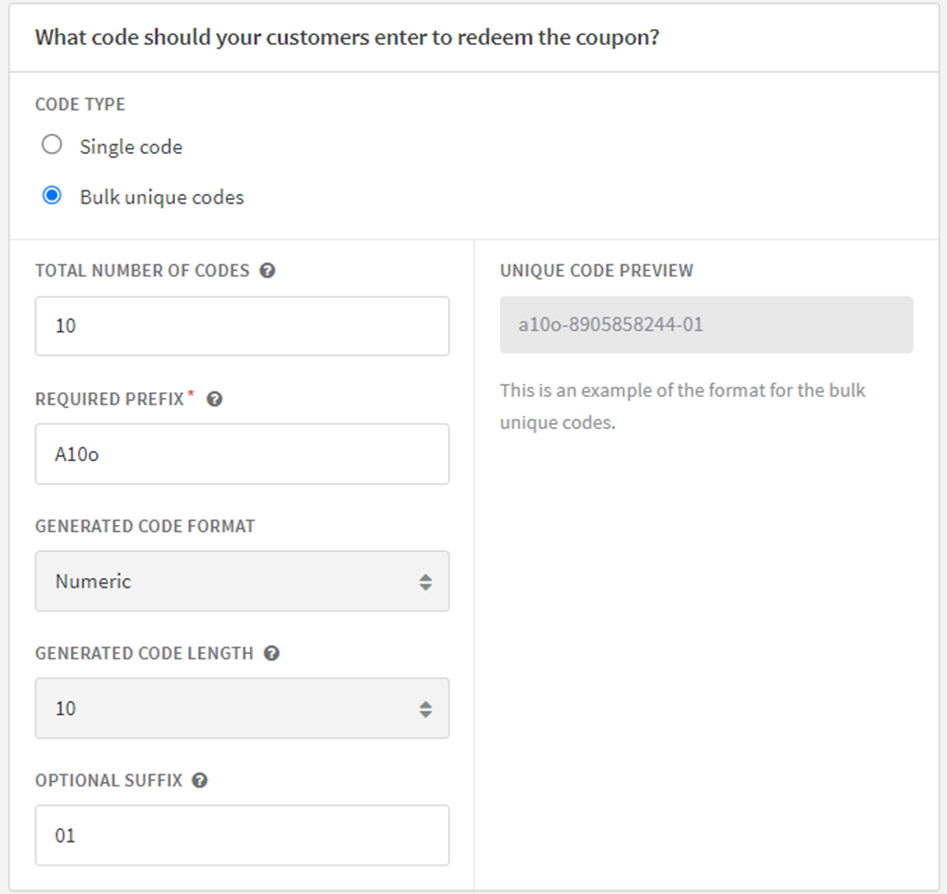
Purpose: This is how customers will redeem their coupon. You have two options for the type of code to use:
- Single Code: This is one code that can be used multiple times, depending on the settings you choose for the number of redemptions allowed. It's simple to create and distribute.
- Bulk Unique Codes: These are a set of unique codes generated in bulk, with each code being usable only once. This option is great for creating personalized offers and preventing code sharing. To learn more about creating and using bulk unique codes, please visit our dedicated bulk codes page.
-
Character Allowance: Alphanumeric, dashes (-), underscores (_), and plus signs (+).
-
Reuse: Permissible only after the prior coupon has either expired or achieved its maximum redemption limit.
-
Type of Discount:
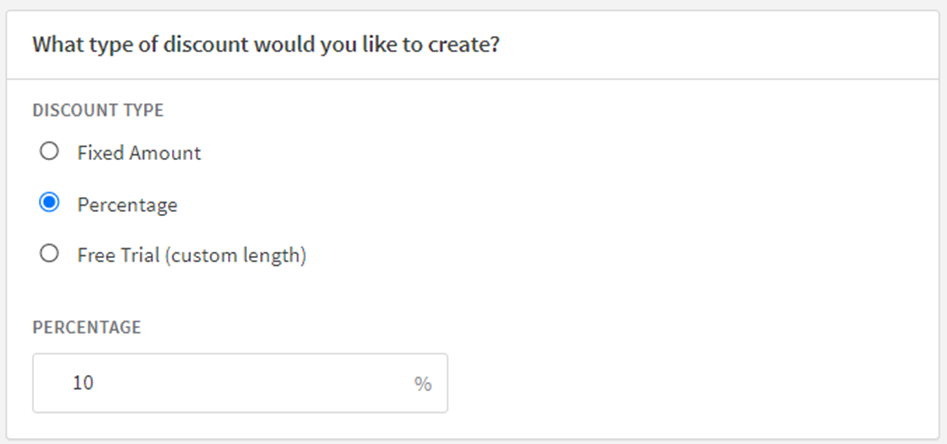
- Options: Select from fixed amount, percentage, or free trial.
- Multi-currency Support: Allows specifying different fixed amounts for various currencies.
-
Duration:
- Usage: Determines the period that the coupon will be applicable.
- Options: Forever, single use, or limited time.
-
Maximum Redemptions:
- Usage: To define the total redemption count for the coupon.
- Utility: Helpful in restricting the coupon usage to a certain number of customers.
-
Redemptions Per Account:
- Purpose: To limit the number of times a single account can redeem the coupon.
- Benefit: Prevents customers from exploiting the discount offer by redeeming it multiple times through a single account.
-
Redeem By Date:
- Definition: The expiration date for the coupon.
- Effect: Post this date, the coupon cannot be redeemed.
-
Eligible Charges:
- Function: Allows you to specify the charges that the coupon can discount.
- Options: Recurring charges (including plans, add-ons, and setup fees), one-time charges only, or both.
-
Eligible Plans:
- Usage: To designate the plans which can avail the discount.
- Default Setting: All plans are eligible but can be customized to specific plans.
-
Eligible Items:
- Usage: To designate the items which can avail the discount.
- Default Setting: All items are eligible but can be customized to specific plans.
- Discount Level:
- Function: To ascertain whether the discount applies at the account level or only to a specific subscription.
- Payment Page Description:
- Visibility: Shown to customers during the redemption process on your payment or checkout page.
- Invoice Description:
- Appearance: Featured on the invoice where coupons are applied, except for free trial coupons as they don't offer a monetary discount.
General step-by-step process
Follow these detailed steps to create a new coupon: More targeted directions are below, to help differentiate the various modifications.
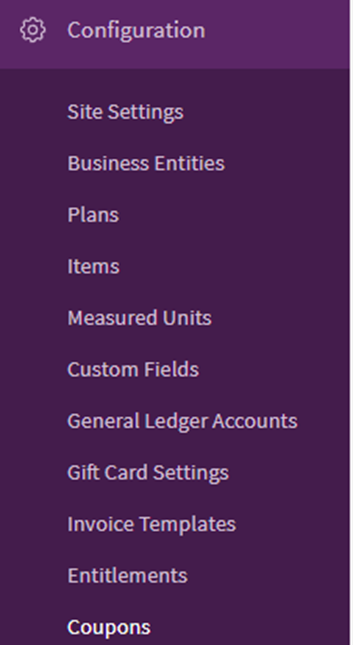
- Navigate to the "Configuration” section.
- Click on "Coupons".
-
- Select the "New Coupon" button.
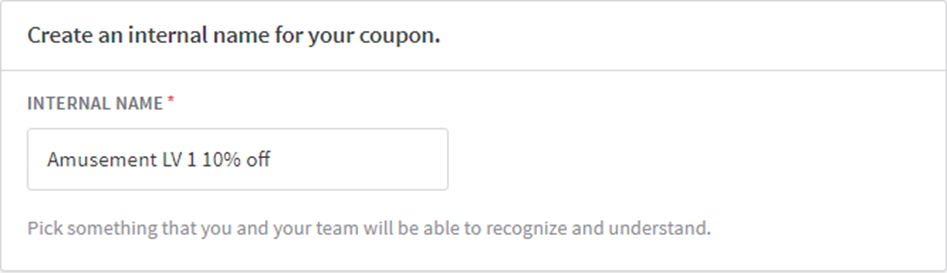
- Enter a unique Coupon ID (Internal Name).
- Choose the code type, selecting between a single code or bulk unique codes.
- Decide on the type of discount — either a percentage or a fixed amount.
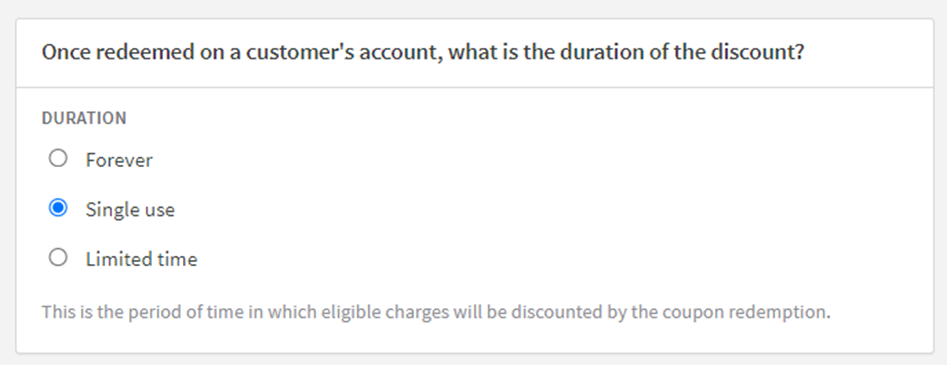
- Define the Coupon Duration — options include single-use, forever, or a limited number of months.
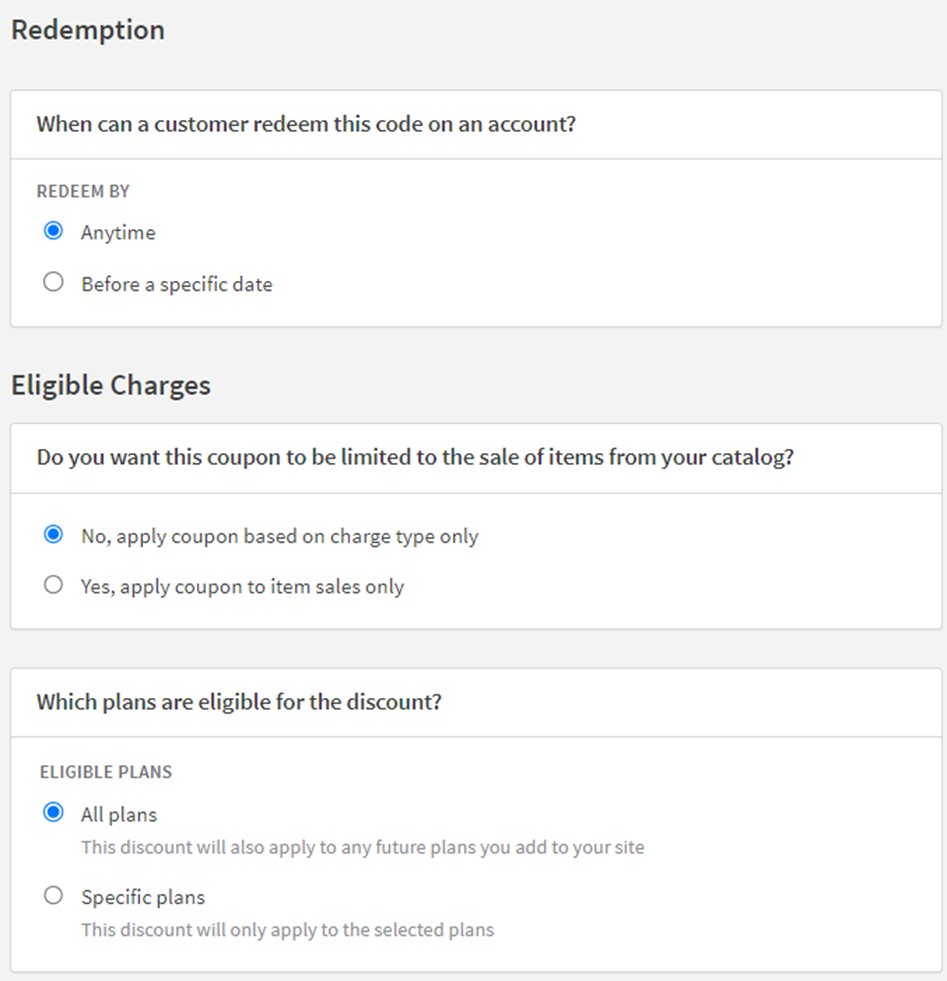
- Optional: Under the "Elegible Charges" section, set additional rules such as redemption limitations, eligibility settings, or expiration dates.
- Eligible Charges: Define which plans or items are eligible for the discount.
- Click on "Create Coupon" to finalize the setup.
Note: The discount will automatically show up on the invoice when it's created..
Modifying an existing coupon
To edit an existing coupon, follow these steps:
- Navigate to the "Configuration" section.
- Click on "Coupons".
- Identify and select the coupon you desire to amend, then press “Edit”.
 , or hover on the right side of the table to select the ‘edit’ option.
 - Implement the necessary changes.
- Click on "Save Changes" to finalize your modifications.
Note:
- Please be aware that any changes will only affect coupons redeemed after the modifications have been saved; existing redemptions will remain unaffected.
- Additionally, once created, certain coupon attributes cannot be edited. These include the coupon code, discount type, duration, plans, items, and discount level.
Understanding different types of discounts
There are multiple types of discounts that can be applied to a customer's invoice, each with its own method of calculation. Below we have provided a detailed explanation for Percentage Discounts and Fixed Amount Discounts, along with examples.
Percentage discounts
Percentage discounts will apply the same percentage to each eligible charge on the invoice. However, they will never discount a plan setup fee. This distinction allows you to create coupons that only discount plan fees and add-ons by using a percentage discount. Conversely, you can create a fixed amount discount that will only discount a setup fee.
Example of percentage discount
Assume a coupon offers a 10% discount off Plan A. Plan A has a setup fee of $50.00, a plan fee of $15.00 and an add-on of $7.00. The invoice with the discounts would look like this:
- The setup fee of $50.00 for Plan A will not be discounted.
- The plan fee of $15.00 for Plan A will be discounted by 10%, bringing a discount total of ($1.50).
- The add-on of $7.00 for Plan A will be discounted by 10%, yielding a discount total of ($0.70).
- The total discount on the invoice is ($2.20), making the final payable amount $69.80.
Fixed amount discounts
When applying a fixed amount discount, the specified discount amount is distributed across all eligible charges on the invoice, starting with the first subscription line item, which is usually the setup fee. If this fixed amount discount is larger than the eligible charges on the invoice, the remaining discount will not be returned to the coupon redemption, and will not carry over to subsequent invoices.
To create a coupon that specifically targets a plan's setup fee, formulate a Single Use coupon with a Fixed Amount that is equal to or less than the setup fee amount. This ensures that the discount is applied to the setup fee, which is always the first subscription line item on the invoice, without extending to other line items.
For a fixed amount coupon, it is important to note the order of how charges appear and are discounted on the invoice: one-time charges are listed before subscription charges, but are discounted after subscription charges. Thus, if you have a coupon that is intended to discount both subscription and one-time charges, and the fixed amount discount is less than the total subscription charges, the one-time charges on the invoice will not receive this discount.
Example of fixed amount discount
Assume a coupon offers a $20.00 discount off Plan A. Plan A has a plan fee of $15.00 and an add-on of $7.00. The invoice with the discount would look like this:
- The plan fee of $15.00 for Plan A will receive a full discount of ($15.00).
- The add-on of $7.00 for Plan A will get a discount of ($5.00), since there was only $5.00 remaining on the coupon redemption.
- The total discount on the invoice is ($20.00), making the final payable amount $2.00.
Free trial coupons (custom length)
Free trial coupons are a strategic way to entice customers into trying out your services. They allow the customer to enjoy your product or service without having to pay immediately. By using a free trial coupon, you can offer various trial lengths that may differ from your standard trial period, giving your customers more flexible options. The trial period will start from the day the subscription is created. It's important to note that free trial coupons don't offer a monetary discount and therefore are not included in the calculation of the first or subsequent invoices.
Duration of the discounts
This refers to the time frame during which the applicable charges will benefit from the discount offered through the coupon redemption.
Forever
This option allows the discount to be applied indefinitely, for as long as the subscription remains active.
Single use
This option allows the discount to be applied only once.
Limited time
Choose this option to offer the discount for a limited, predefined period. Once this period ends, the regular charges will resume.
A recurring discount that is only valid for a specified number of days, weeks, months or years. The coupon will discount any invoices generated during the lifespan of the coupon. We recommend you select a period that matches the billing cycle of the eligible plans included in the coupon.
Limited lifespan coupons will automatically expire one hour prior to the anniversary of their redemption.
Redemption
This section outlines the different parameters that dictate the redemption of coupons, helping you to manage their usage effectively.
Number of redemptions
Define the total number of times the coupon can be redeemed across all your customers.
Unlimited
Allows for an unlimited number of redemptions, giving customers the freedom to use it repeatedly.
Specific number
Restrict the coupon to a specific number of redemptions, after which it will no longer be valid.
Redemptions per account
Set the rules for how many times a single account can redeem the coupon.
Only once
The coupon can be redeemed only once per account, ensuring exclusivity.
Unlimited
Allows an account to redeem the coupon an unlimited number of times, offering more flexibility.
Specific number
Limit the redemption to a specific number of times per account, providing a balanced approach between one-time and unlimited use.
Redeem by
Determine the time frame within which the coupon can be redeemed to avail the discount.
Anytime
Allows customers to redeem the coupon at any time, without any expiration date, encouraging continual engagement.
Before a specific date
Restricts the redemption of the coupon to before a predetermined date, creating a sense of urgency and encouraging timely action.
Eligible charges
Define what type of charges are eligible for the discount.
Recurring charges
Enable this coupon only for a subscriber's recurring charges, which include the plan base fee, plan add-ons (non-item based), and plan setup fees).
Plans Available
Specify which subscription plans can avail the discount offered by the coupon.
All plans
The coupon will be applicable to all plans, including those added in the future, ensuring a wide-reaching discount.
Specific plans
Limit the coupon to be applicable only to selected plans, facilitating focused discounts.
Item sales only type
This section allows you to specify whether the coupon is applicable to certain items or all items in your catalog, defining the scope of the discount.
Choose to limit the coupon to only affect the sale of items from your catalog.
Eligible items
Identify the items that can be discounted using the coupon.
All items
The coupon will apply to all items, including those added to your catalog in the future, offering a broad application.
Specific items
Restrict the coupon to apply only to selected items, allowing for targeted discounts.
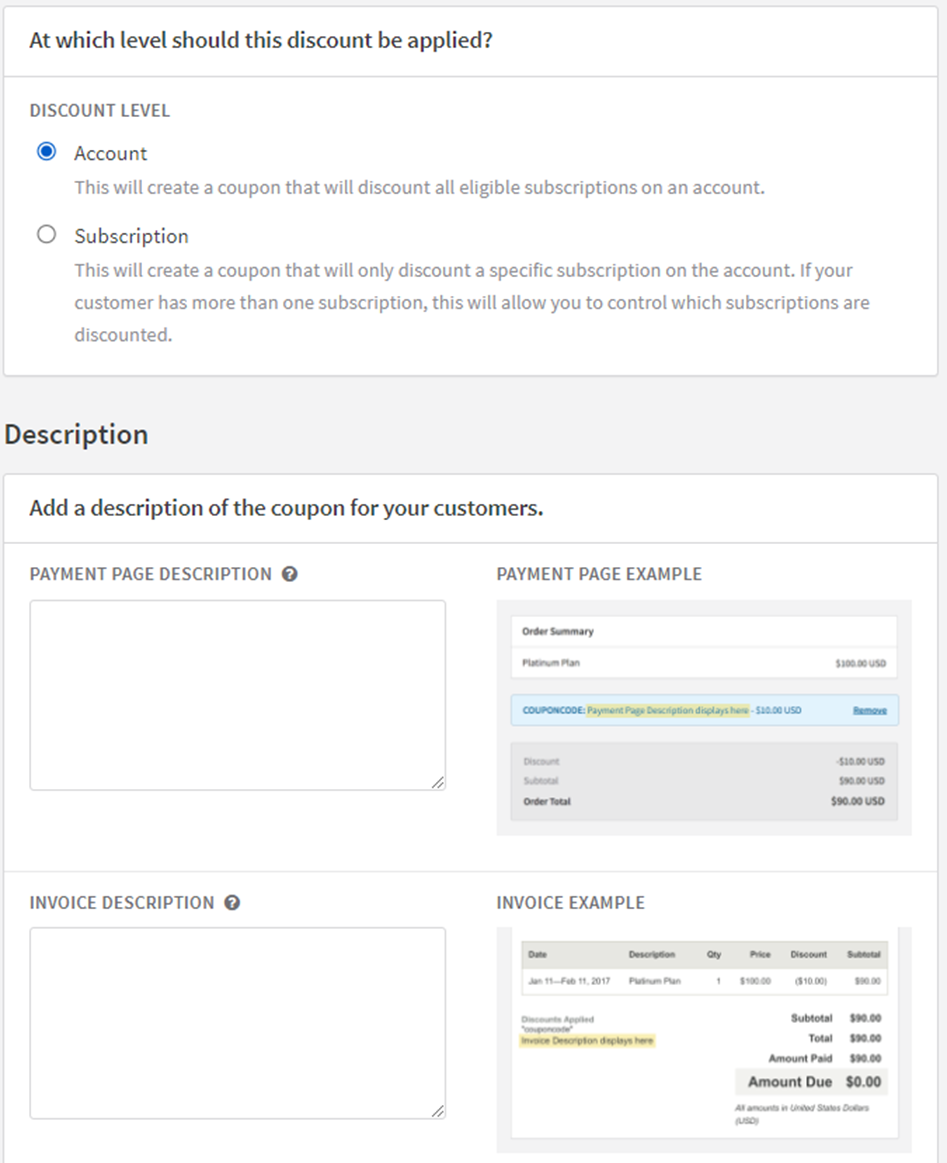
Discount level
Determine the level at which the discount will be applied, be it at the account level affecting all eligible subscriptions or at the individual subscription level.
Account
Create a coupon that discounts all eligible subscriptions linked to an account, offering a comprehensive discount strategy.
Subscription
Craft a coupon that targets a specific subscription on an account, providing a nuanced approach to discounts, especially when a customer holds multiple subscriptions.
Description
Detail the descriptions that will be visible to the customers at different stages of the transaction, enhancing clarity and transparency.
Payment page description
Include a description that will be displayed when the customer is redeeming the coupon, either on a hosted payment page or through your own checkout form accessed via the API, guiding them during the redemption process.
Invoice description
Provide a concise description of the coupon to be featured in the "Discounts Applied" section on the invoice, aiding in a detailed breakdown of the applied discounts for the customer's reference.
Coupon usage and application
Applying a coupon
Coupons, once applied to a user's account, initiate a reduction on upcoming invoices. These codes are applicable to the account of a client and are used for deducting a specified amount from future invoices. There are two ways to apply a Coupon: during a transaction or directly to an account.
Applying a coupon during a purchase
In most cases, a user can input a Coupon during checkout, which is then applied to their purchase. This can be done via the provided payment page or on your personal checkout page using Recurly.js and the API. There are some things you should keep in mind:
- For the discount to be applied, the purchase must include charges that are eligible for the discount. For instance, a Coupon applicable only to Plan B cannot be used during the sign-up for Plan A.
- If the sign-up process for the subscription fails due to a declined transaction, the Coupon will not be applied.
- If only one active Coupon is allowed on an account at a time, the application of a new Coupon will replace the existing one.
- If more than one active Coupon is allowed, the new code will be added to the list of active discounts and applied after existing discounts.
- If the coupon is subscription-level, redeeming it in a subscription creation action will automatically tie the redemption to that subscription.
- Account-level Coupons can be used during the subscription process and will apply to the new subscription and any additional subscriptions added to the account later.
API and Recurly.js
You can enable customers to apply Coupons on your own checkout page using Recurly.js and or the API. Make sure the Coupon is being applied within the subscription creation action to avoid applications on accounts where the subscription failed due to a declined transaction. If you apply the Coupon directly on the account, separate from the subscription creation action, you will see applications for failed signups.
Recurly UI
When adding a subscription to a customer's account in the Recurly UI, you can input a Coupon and apply it simultaneously.
Hosted Payment Page
To allow the application of Coupons on the provided payment page, you need to enable the Coupons option in the Hosted Pages Settings page under Configuration on your Recurly site.
The payment page description will show when a customer redeems a coupon on your hosted payment pages, or if you choose to show the description on your own checkout page. The description can be up to 255 characters.
- If you would like to allow coupons to be redeemed on your hosted payment pages, enable Coupons on the Hosted Page Settings page on your Recurly site.
Additionally, you can pre populate the field by setting it in the URL, e.g. ?subscription[coupon_code]=10off
Hosted Account Management
Currently, we do not allow Coupons to be applied on existing accounts through the hosted account management pages. If you wish to include this option on your hosted account management pages, please submit a feature request through a support ticket.
Applying a coupon during upgrade or downgrade
You can apply a coupon when upgrading or downgrading a subscription, so the discount applies to the changed invoice. This is useful for Subscription-level discounts that apply only to the new version of the subscription.
- The Coupon's eligible charges must include the new plan of the subscription.
- Coupons cannot be applied with "On next renewal" changes to avoid any conflicts with any Maximum Redemption rules for the campaign or the account.
- A subscription change that would generate an invoice (e.g. - change the plan, quantity, or price) must be made. The Coupon cannot be the only thing changed during the subscription change.
Direct application on account
If you want to discount the next invoice of an existing subscription or a one-time charge invoice, you can directly apply a Coupon on the account. Free trial Coupons cannot be applied directly on an account; they must be used during the creation of a subscription.
Recurly UI
Every account page has a Coupon Redemptions page that you can access by clicking on Manage Coupons in the Account Information module or above the Coupon Redemptions table lower on the account page.
API and Recurly.js
You can apply a Coupon on an existing account, outside of a purchase, through our API Coupon Redemption resource. We do not support this functionality through Recurly.js. If the Coupon is subscription-level, you will need to specify the uuid of the existing subscription you want to tie the redemption too in the redemption request.
Removing a coupon
To remove a coupon from a customer's account, you can use either the Recurly User Interface (UI) or the Recurly API. Here's how you can do it through the Recurly UI:
- Navigate to the Coupons Redemptions page for the specific customer account you are working with.
- In the 'Redeemed on Account' table, you will find a list of all coupons that have been redeemed by that account.
- Identify and select the coupon you wish to remove.
- Follow the prompts to complete the removal process.
When you remove a coupon from a customer's account, it means that the discount associated with that coupon will no longer apply to future invoices. However, it won't affect the invoices that have already been issued; they won't be retroactively adjusted to the higher, non-discounted amount. The customer will not be charged immediately upon the removal of the coupon, but they will be charged the regular price (without the discount) on their next billing cycle. It is recommended to inform the customer about this change to manage their expectations appropriately.
Modifying a coupon
Coupons can be adjusted to alter display text or redemption rules. However, you cannot modify any attributes that would affect active redemptions on a customer's account. The following fields can be edited after the Coupon is created:
- Internal Name
- Maximum Redemptions
- Redeem By date
- Redemptions Per Account
- Payment Page Description
- Invoice Description (not applicable to free trial coupons)
Expiration and coupons
Expiring a coupon
Coupons can expire automatically based on the rules you set, or you can manually expire them. Expiring a Coupon prevents customers from redeeming it. However, customers who have already redeemed the Coupon are not affected.
Early expiration
To manually expire a Coupon, visit the Coupon's overview page and select Expire Early. Once you confirm, the Coupon will expire immediately.
Automatic expiration
Coupons will automatically expire if you set a redeem by date or maximum redemptions and either of those limitations are reached.
Reusing a coupon
If a Coupon expires early or reaches its maximum redemptions, the code may be reused when creating a new Coupon.
Restoring a coupon
If a Coupon has expired, you can restore it to make it redeemable again. If the Coupon has reached its maximum redemptions or the redeem by date, you must edit those fields before the Coupon can be restored.
Coupon reporting and analysis
Reporting and exporting coupon and discount data
For understanding the status and effectiveness of your discount campaigns, there are a variety of export options available. You can access these exports from the Exports page under the Reports section.
Inventory of coupons
The Coupons export essentially provides an inventory of your discount campaigns. It displays all the coupons present on your site, their associated rules, and when they were created or expired.
Further details on this export can be found in our Coupons export documentation.
Coupon redemption statistics
The Coupon Redemptions export displays the effectiveness of your discount campaigns. It provides information about who redeemed your coupons, the time of redemption, and how much discount was applied to their account. Filter this report by your coupon to total the discount amount and create a time-bound redemption chart.
Refer to our Coupon Redemptions export documentation for additional information.
Invoice summary
The Invoices - Summary export provides information on which coupons were applied to an invoice, as seen in the coupon_code column.
For more information, refer to our Invoices - Summary export documentation.
Line item details
The Invoices - Line Items export shows which coupons were applied to the line item and the total discount they provided.
Check out our Invoices - Line Items export documentation for more details.
Line item discounts
The Invoices - Line Items - Coupons export provides specific discounts for each coupon applied to the line item. This export will only be visible if you have the Multiple Coupons Per Account feature enabled in your coupon Settings.
Further information can be found in our Invoices - Line Items Coupons export documentation.
FAQs
Q: What happens with discounts when a plan includes a free trial and a setup fee?
A: Discounts are not applied to a free trial invoice unless there is a setup fee and the coupon offers a fixed amount discount. If you are utilizing a fixed amount discount on a plan that includes a trial and a setup fee, it is recommended to choose a "Limited Time" duration of 1 month rather than "Single Use." This ensures that both the setup fee and the first month will receive the discount.
Q: How does coupon accounting work in Recurly?
A: In Recurly, both percentage and fixed amount coupons are applied to the charge line items before the tax is calculated. Credits, which have their own line items on an invoice, are applied after the coupons have discounted the charge line items. It is important to note that these coupons will be applied to the next invoice created after the coupon is redeemed, and they cannot retroactively discount an existing invoice. To amend an existing invoice, you have the option to issue a partial refund equal to the discount amount or perform a full refund of the invoice, redeem the coupon, and then reissue the invoice with the correct discount. Free trial coupons, on the other hand, create a custom trial period at the time of subscription creation and do not offer a monetary discount, hence they do not appear on any invoices.
Q: Can customers have multiple active coupon redemptions on their account?
A: Yes, it is possible to allow customers to have more than one active coupon redemption on their account. This can result in multiple discounts appearing on a single invoice or even on a specific line item. To understand how multiple discounts are applied to line items, you can refer to the Multiple Coupons Per Account documentation. The settings for this feature can be adjusted on the coupon configuration page.
Q: How can I create a coupon that offers discounts across several billing cycles?
A: To create a coupon that offers discounts over multiple billing cycles, set the duration to "Limited time" and adjust the period to match your plan's term length. However, be aware that if the discount is a fixed amount and the eligible charges on the invoice are less than the discount amount, the remaining discount will not be transferred to future invoices.
Q: Where can I find information about coupon redemptions?
A: All coupons have a "Redemptions" table that lists all the accounts that have redeemed the coupon, along with the total discount amount provided by that coupon across all redemptions. For bulk coupons, there is a "Not Redeemed" table that displays all the unique codes that haven’t been redeemed yet. You have the option to expire any unredeemed unique codes early, and any expired codes will be found at the end of the table list.
Updated 15 days ago